C:\d830100111\d830100111ILCE9UC2\01GB-ILCE9UC2\030BAS.indd
2019/02/19 10:01
ILCE-9
d-830-100-11 (1)
GB
79
Shooting
Shooting with drive modes (continuous
shooting/self-timer)
Select the appropriate mode for the subject, such as single shooting,
continuous shooting or bracketing shooting.
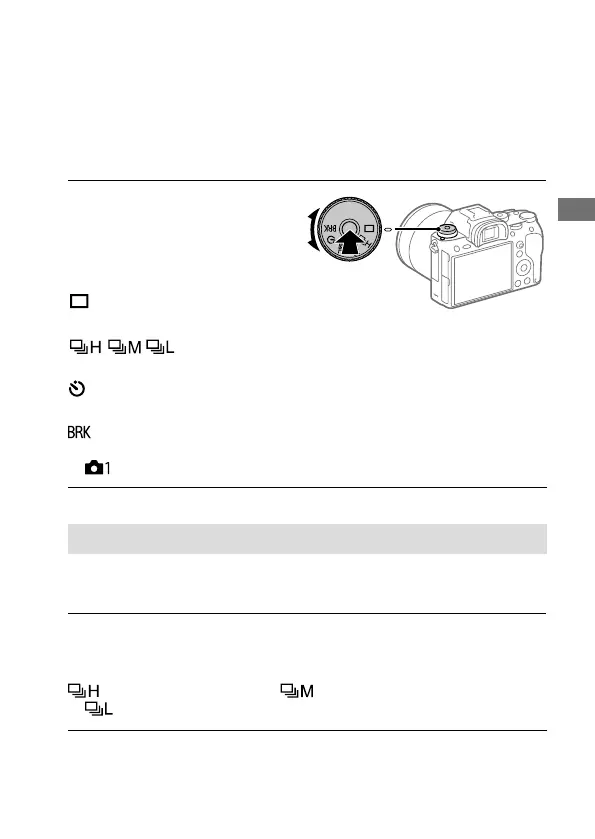
Select the desired drive mode
by turning the drive mode dial.
• Turn the drive mode dial while
holding down the drive mode dial
lock release button.
Single Shooting: Normal
shooting mode.
Cont. Shooting: Shoots images continuously while you
press and hold down the shutter button.
Self-timer: Shoots an image using the self-timer after a designated
number of seconds have elapsed since the shutter button was pressed.
Bracket: Shoots images using the bracketing function. The
type of bracketing function can be set by selecting MENU
(Camera Settings 1) [Bracket Settings] [Bracket Type].
Continuous shooting
Shoots images continuously while you press and hold down the shutter
button.
Turn the drive mode dial and select the desired mode.
• Turn the drive mode dial while pressing the drive mode dial lock release
button.
Continuous Shooting: Hi/ Continuous Shooting: Mid/
Continuous Shooting: Lo



 To Next Page