ILCE-9
d-830-100-11 (1)
C:\d830100111\d830100111ILCE9UC2\01GB-ILCE9UC2\020PRE.indd
2019/02/19 10:01
GB
24
Basic operations
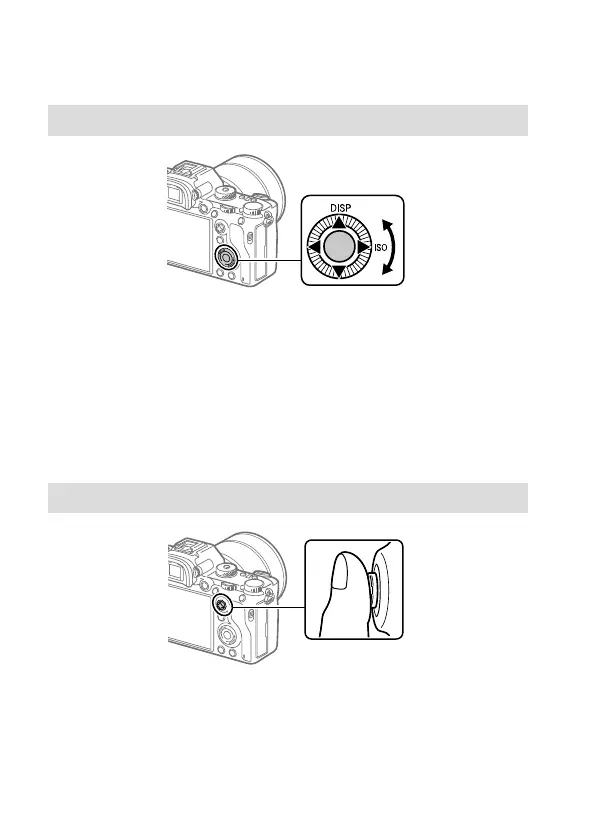
Using the control wheel
• You can select setting items by turning or pressing the top/bottom/left/
right side of the control wheel. Your selection is determined when you
press the center of the control wheel.
• The DISP (Display Setting) and ISO (ISO) functions are assigned to the
top/right side of the control wheel. In addition, you can assign selected
functions to the left/right/bottom side and the center of the control
wheel, and to the rotation of the control wheel.
• During playback, you can display the next/previous image by pressing
the right/left side of the control wheel or by turning the control wheel.
Using the multi-selector
• Put your finger right on top of the multi-selector to manipulate it more
precisely.
• When [Focus Area] is set to [Zone], [Flexible Spot], or
[Expand Flexible Spot], you can move the focus area by pressing the
multi-selector up/down/left/right.
• The [Focus Standard] function is assigned to the center of the multi-
selector in the default settings.



 To Next Page