Help Guide
Color Video Camera
BRC-AM7
Entering a Character String
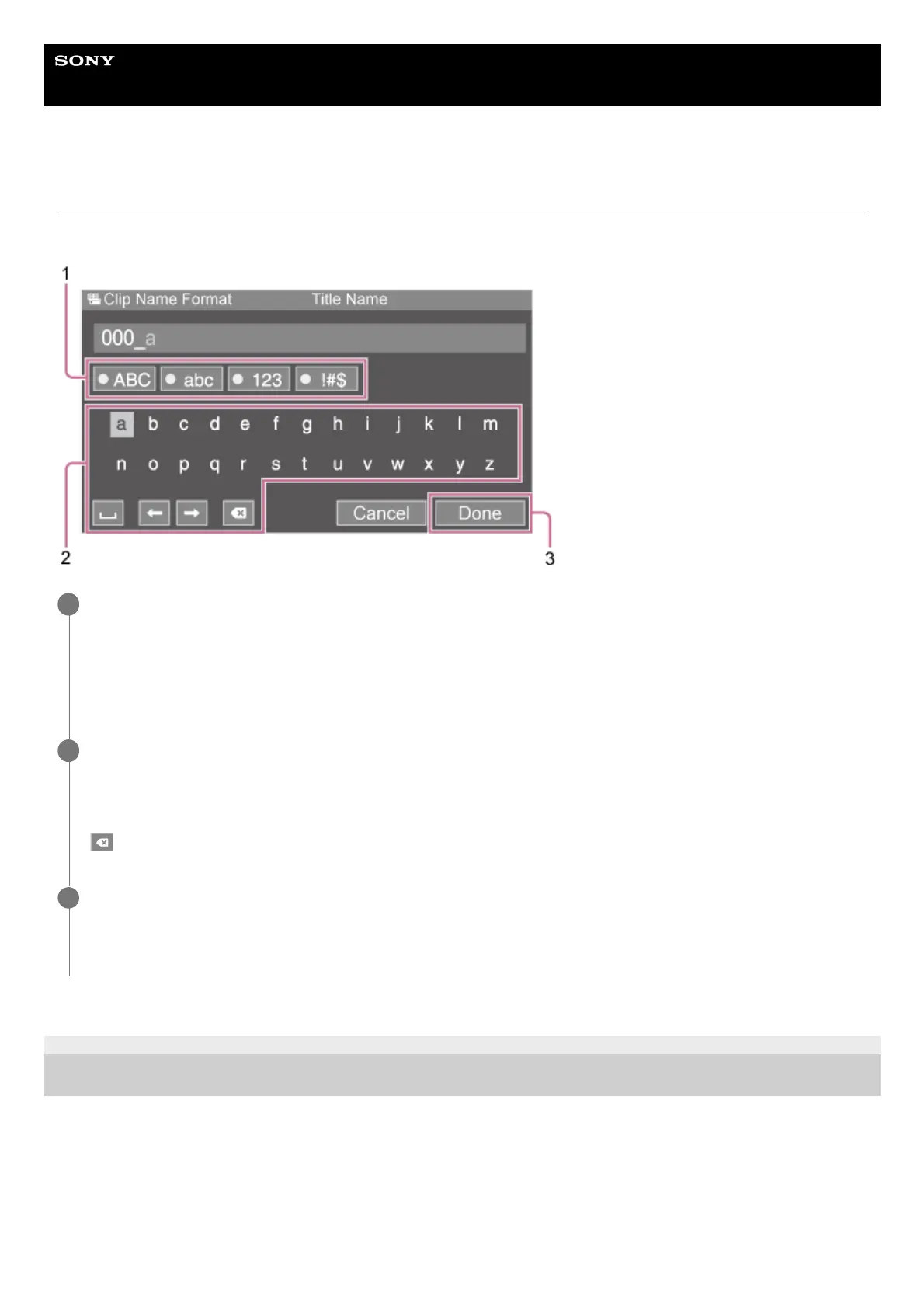
When you select an item, such as a file name, which requires character entry, the character entry screen appears.
TP1001804585
5-065-326-11(1) Copyright 2024 Sony Corporation
Press the arrow buttons in the GUI control panel to select the character type and apply the setting.
[ABC]: Uppercase alphabetic characters
[abc]: Lowercase alphabetic characters
[123]: Numeric characters
[!#$]: Special characters
1
Select a character and press the [Set] button to apply the setting.
The cursor moves to the next field.
[Space]: Enters a space character at the cursor position.
[←] [→]: Moves the position of the cursor.
(Backspace): Deletes the character on the left of the cursor.
2
When finished, press the [Done] button to apply the setting.
The character string is confirmed and the character entry screen disappears.
To cancel input, press the [Cancel] button.
3



 To Next Page