Help Guide
Color Video Camera
BRC-AM7
Output Formats and Limitations
This topic describes the output formats and limitations.
Note
The resolution of the output format is limited by the [Project] – [Rec Format] – [Frequency], [Codec], and [Video Format] settings in the
web menu or camera menu.
The resolution of the output format is also limited by the combination with the S&Q frame rate. In addition to the table of SDI
OUT/HDMI OUT connector output formats below, the HDMI output changes to Full HD or lower when all the following conditions are
met.
[Shooting] – [S&Q Motion] – [Setting] is set to [On]
[Shooting] – [S&Q Motion] – [Frame Rate] is higher than 60fps
When the conditions above are met, 3840×2160P selection options are grayed out and cannot be selected.
The image is not output if a higher resolution than the playback image resolution is configured.
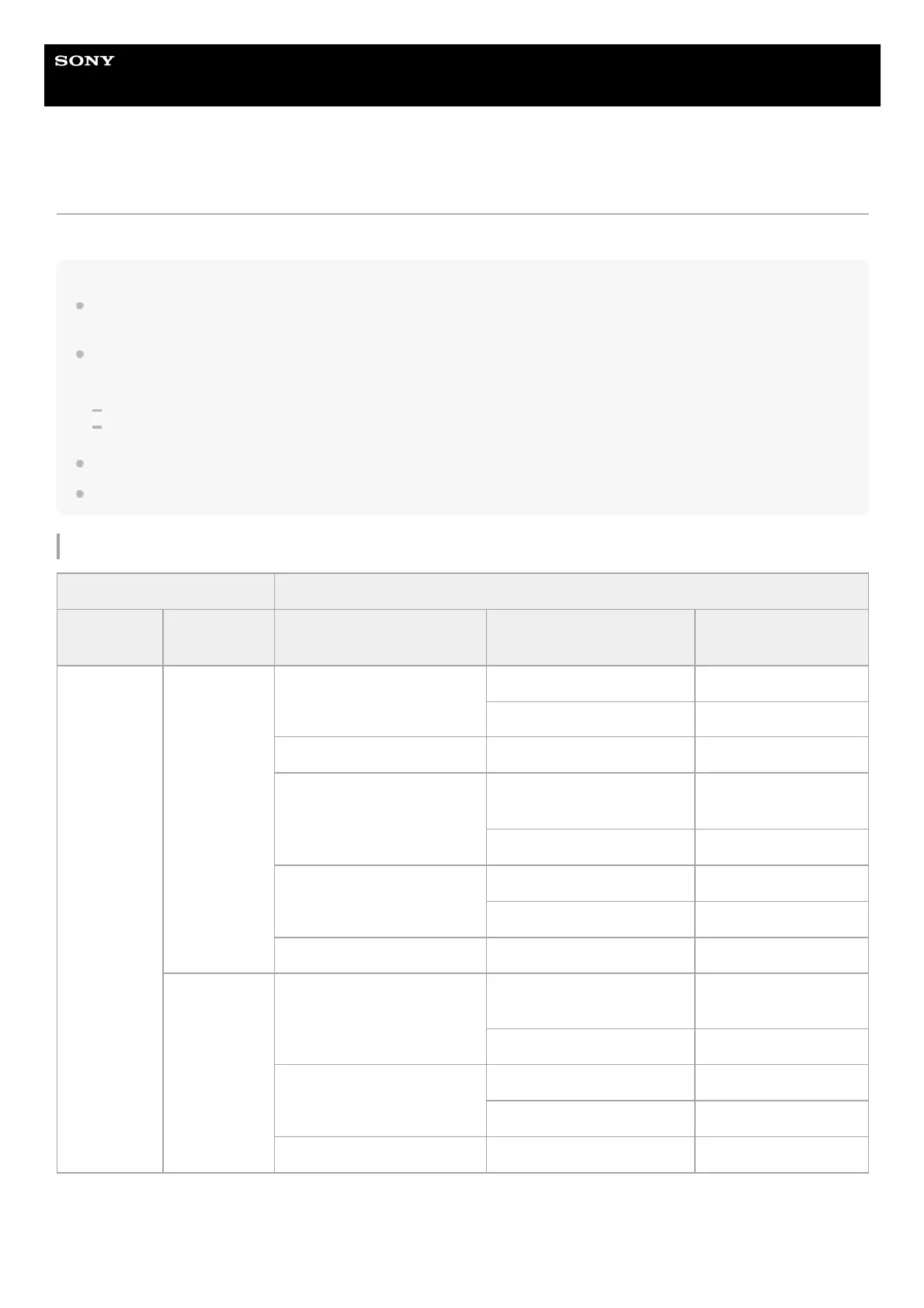
SDI1/SDI2/HDMI OUT connector output formats
[Project] – [Rec Format] [Monitoring] – [Output Format]
[Frequency]
[Video
Format]
[SDI1] [SDI2] [HDMI]
100/119.88Hz
3840×2160
3840×2160P
1920×1080P (Lvl A) 1920×1080P
(Output stopped) 1920×1080i
(Output stopped) 1920×1080P (Lvl A) 3840×2160P
1920×1080P (Lvl A) (default
value)
1920×1080P (Lvl A) (default
value)
1920×1080P (default
value)
(Output stopped) 1920×1080i
1920×1080P (Lvl B)
1920×1080P (Lvl A) 1920×1080P
(Output stopped) 1920×1080i
1920×1080i (Output stopped) 1920×1080i
1920×1080
1920×1080P (Lvl A) (default
value)
1920×1080P (Lvl A) (default
value)
1920×1080P (default
value)
(Output stopped) 1920×1080i
1920×1080P (Lvl B)
1920×1080P (Lvl A) 1920×1080P
(Output stopped) 1920×1080i
1920×1080i (Output stopped) 1920×1080i



 To Next Page