Help Guide
Color Video Camera
BRC-AM7
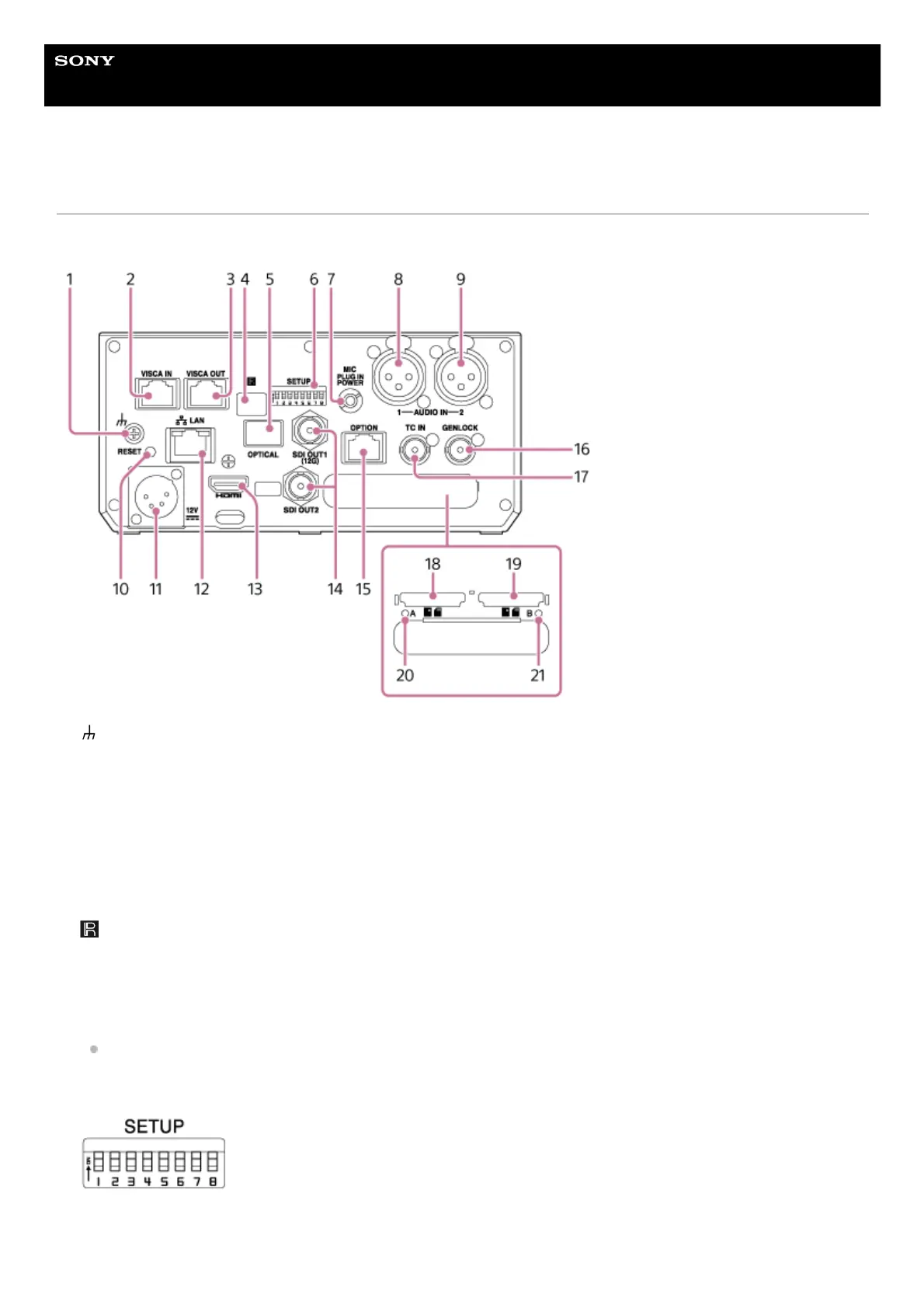
Connector Block
This topic describes the location and function of parts on the connector block of the unit.
(ground) connection
Connect to ground by connecting to the ground terminal of a power outlet or to a grounding bar.
1.
VISCA IN connector
Connect to a remote controller (option).
When connecting multiple cameras, connect to the VISCA RS-422 OUT connector of the previous camera.
2.
VISCA OUT connector
When connecting multiple cameras, connect to the VISCA RS-422 IN connector of the next camera.
3.
Infrared remote control sensor (rear)
Infrared sensor for the supplied infrared remote control.
4.
OPTICAL output connector
Outputs an SDI OUT1 (12G) connector signal converted to optical format when an SFP+ module (option) is connected.
For details, see “Outputting an Optical Fiber Signal.”
5.
SETUP switches
Configures the following settings.
Switch 1, 2: Selects the infrared remote control (supplied) that will perform operations.
6.



 To Next Page