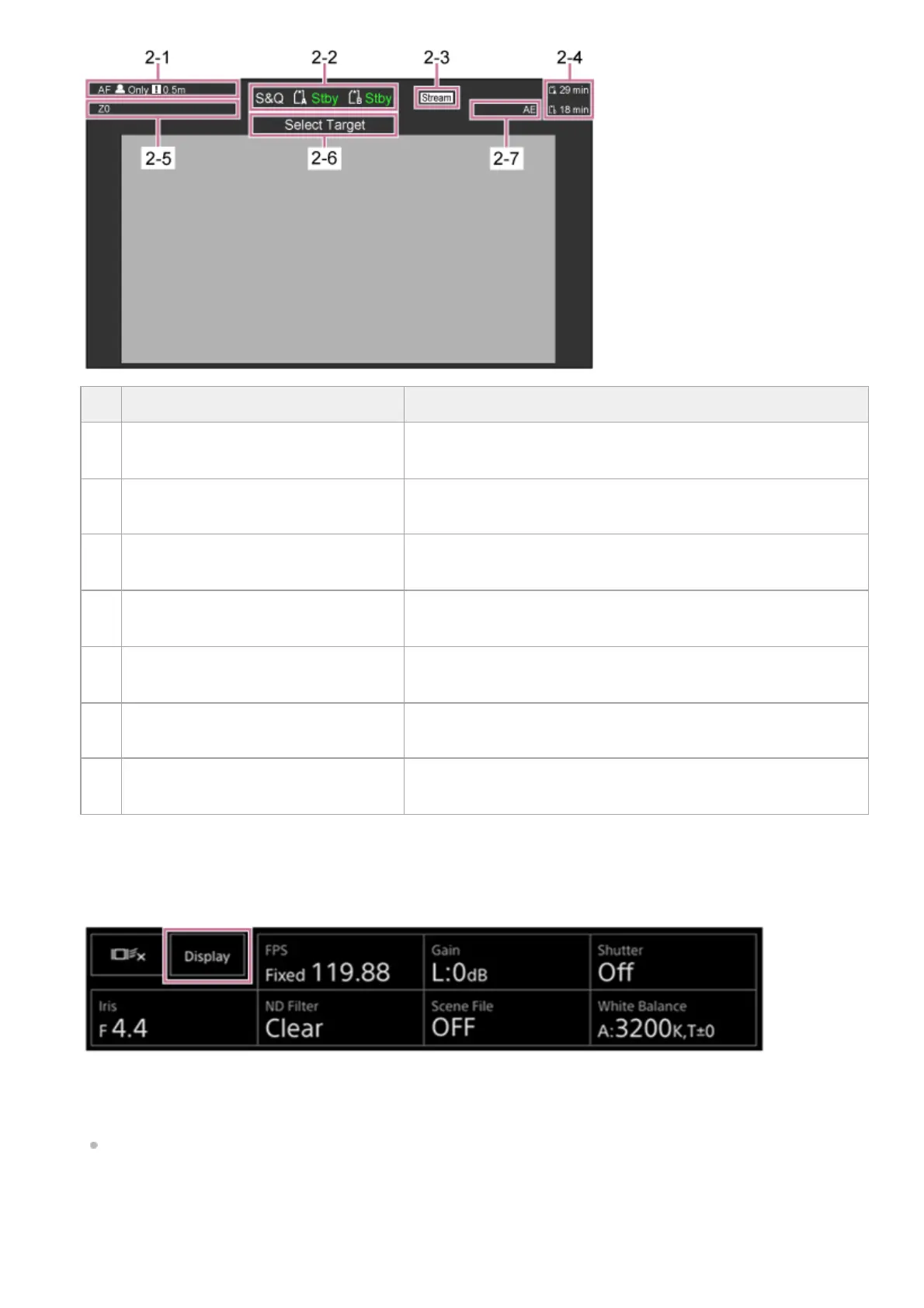
[Display] button
Press this button to display camera information on the image.
Press again while the camera information is displayed to hide the camera information.
In addition to markers, some auto focus-related indicators and messages are displayed according to the status, and these
cannot be hidden by pressing the [Display] button.
For details about the displayed camera information, see “Camera Screen Display.”
Realtime tracking AF stop button
Press the button to stop tracking a subject.
No. Display Description
2–
1
Focus mode indicator See “Focus mode indicator” in “Camera Screen Display.”
2–
2
Recording mode, slot A/B, operating
status indicator
See “Recording mode, slot A/B, operating status indicator” in
“Camera Screen Display.”
2–
3
Streaming status indicator
Displayed during streaming (when [Stream Setting] is set to [RTMP]
or [SRT-Caller] only).
2–
4
Remaining media capacity indicator
See “Remaining media capacity indicator” in “Camera Screen
Display.”
2–
5
Zoom position indicator See “Zoom position indicator” in “Camera Screen Display.”
2–
6
PTZ auto framing status indicator Displayed when PTZ auto framing is enabled.
2–
7
AE mode/AE level indicator See “AE mode/AE level indicator” in “Camera Screen Display.”



 To Next Page