Help Guide
Color Video Camera
BRC-AM7
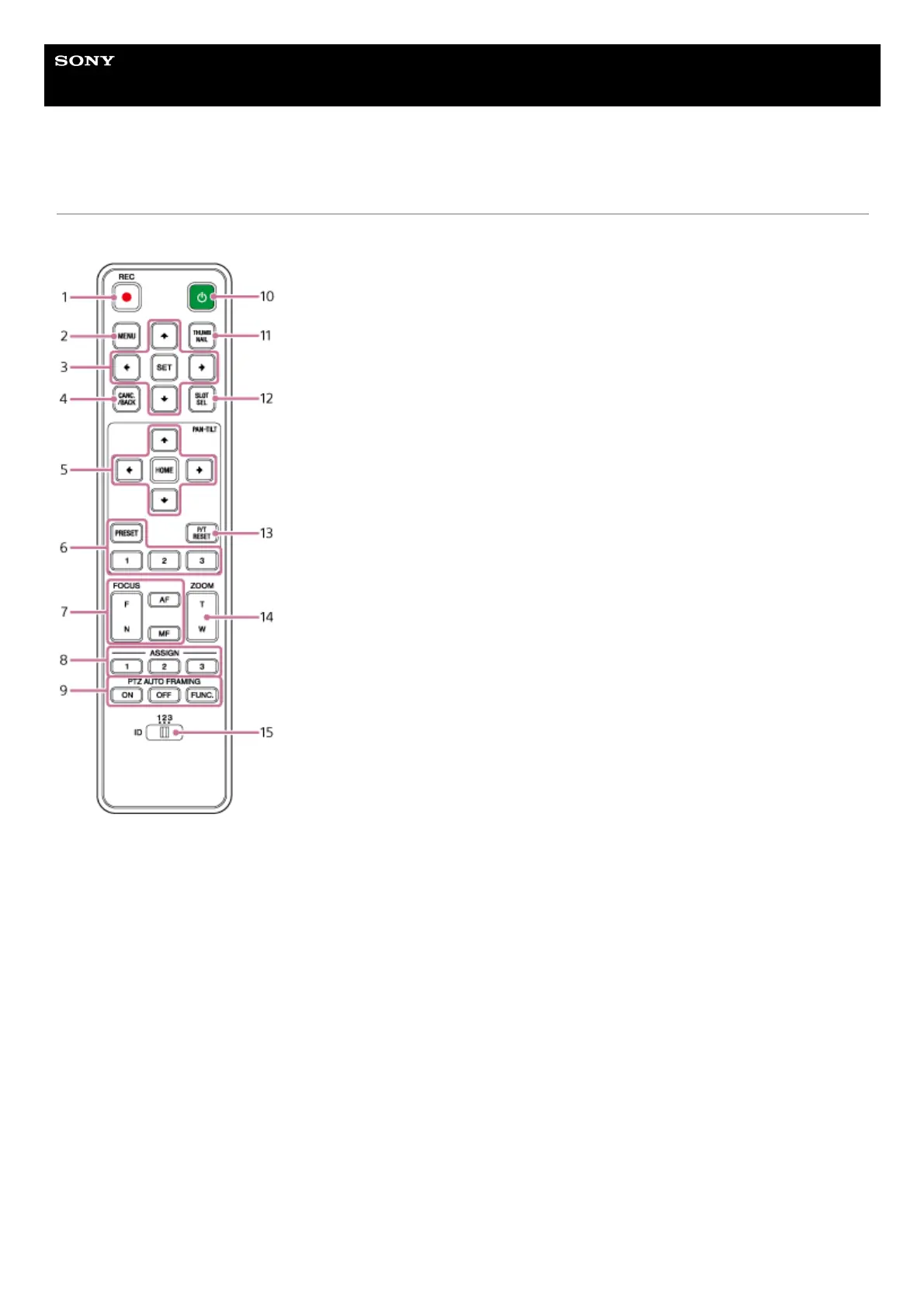
Location and Function of Parts of the Infrared Remote Control (supplied)
This topic describes the location and function of parts of the infrared remote control (supplied).
REC● (record START/STOP) button
Press to start or stop recording.
1.
MENU button
Press to show or hide the camera menu.
2.
GUI control buttons
Press to perform operations in the camera menu, in message dialogs that include buttons, and other screen display
functions.
3.
CANC./BACK button
Press to cancel a setting or to return to the previous screen of the camera menu of the unit.
4.
Pan and tilt control buttons
Press the arrow buttons to control the pan/tilt of the camera. Press the HOME button to return the orientation of the
camera to face the front.
5.
Preset position control buttons
Press and hold the PRESET button and press one of the 1 to 3 buttons to store camera direction, zoom, and focus
adjustment status in the pressed number button.
Press a number button with stored settings to recall the saved state.
6.



 To Next Page