26
HCD-FL7D
SECTION 5
TEST MODE
[COLD RESET]
• The cold reset clears all data including preset data stored in the
RAM to initial conditions. Execute this mode when returning
the set to the customer.
Procedure:
1. Press three buttons [ ], [DISPLAY], and [DVD TOP MENU]
simultaneously.
2. The fluorescent indicator tube becomes blank instantaneously,
and the set is reset.
[TUNER STEP CHANGE]
•A step of AM channels can be changed over between 9 kHz and
10 kHz.
Procedure:
1. Press the [I/ ] button to turn the power on.
2. Select the function “TUNER”, and press [TUNER/BAND] but-
ton to select the BAND “AM”.
3. Press the [I/ ] button to turn the set OFF.
4. Press M + and [I/ ] buttons simultaneously, and the display
of fluorescent indicator tube changes to “AM 9 K Step” or “AM
10 K Step”, and thus the channel step is changed over.
[FUNCTION CHANGE MODE]
• Select either VIDEO or MD of the external function input.
Procedure:
1. Press the [I/ ] button to turn the power on.
2. Hold down [MD $VIDEO%] button then press [I/ ] button, and
release [I/ ] button first in order not in switch off the set imme-
diately.
The another function of the previous function is selected, the
input level is also changed and displayed “MD” or “VIDEO”.
[GC TEST MODE]
•This mode is used to check the software version, FL tube, LED,
keyboard and VACS.
Procedure:
1. Press three buttons [ ], [DISPLAY], and [DVD MENU] simul-
taneously.
2. LEDs and fluorescent indicator tube are all turned on.
3. When you want to enter the software version display mode,
press [DVD TOP MENU] . The model number and destination
are displayed.
4. Each time [DVD TOP MENU] is pressed, the display changes
stating from MC version, GC version, DP version, DVD ver-
sion, CDDM, CDMA, CDMB, BDA, BDB, ST version, TA
version, TM version, TC version, in this order, and returns to
the model number and destination display.
5. When [CD SYNC HI-DUB] is pressed while the version num-
bers are being displayed except model number and desti-
nation, year, month and day of the software creation ap-
pear. When [CD SYNC HI-DUB] is pressed again, the display
returns to the software version display. When [DVD TOP
MENU] is pressed while year, month and day of the software
creation are being displayed, the year, month and day of cre-
ation of the software versions are displayed in the same order
of version display.
6. Press [DVD MENU] button, and the key check mode is acti-
vated.
7. In the key check mode, the fluorescent indicator tube displays
“KXX V0 C T”. Each time a button is pressed, “K” value
decreases.
However, once a button is pressed, it is no longer taken into
account.
“V” value increases like 1, 2, 3...if rotating [VOLUME] knob
in the clockwise, or it decreases like 0, 9, 8...if rotating in the
counterclockwise.
Each time the “CD DOOR LOCK DETECT” or “CD DOOR
x
1
1
1
1
1
1
OPEN/CLOSE DETECT” switch is turned on, “C” value in-
creases.
Each time the “CASSETTE LID OPEN/CLOSE DETECT”
switch is pressed, “T” value increases.
8. Also when [CD SYNC HI-DUB] is pressed after lighting of all
LEDs and fluorecsent indicator tube, value of VACS appears.
9. To exit from this mode, press three buttons in the same man-
ner as step 1, or disconnect the power cord.
[MC TEST MODE]
•This mode is used to check operations of the respective sections
of Amplifier, Tuner, and Tape.
1. Entering the MC Test Mode
Procedure:
1. Press the [I/ ] button to turn the power on.
2. Press the three buttons of [ ], [DISPLAY] and [CD SYNC HI-
DUB] simultaneously.
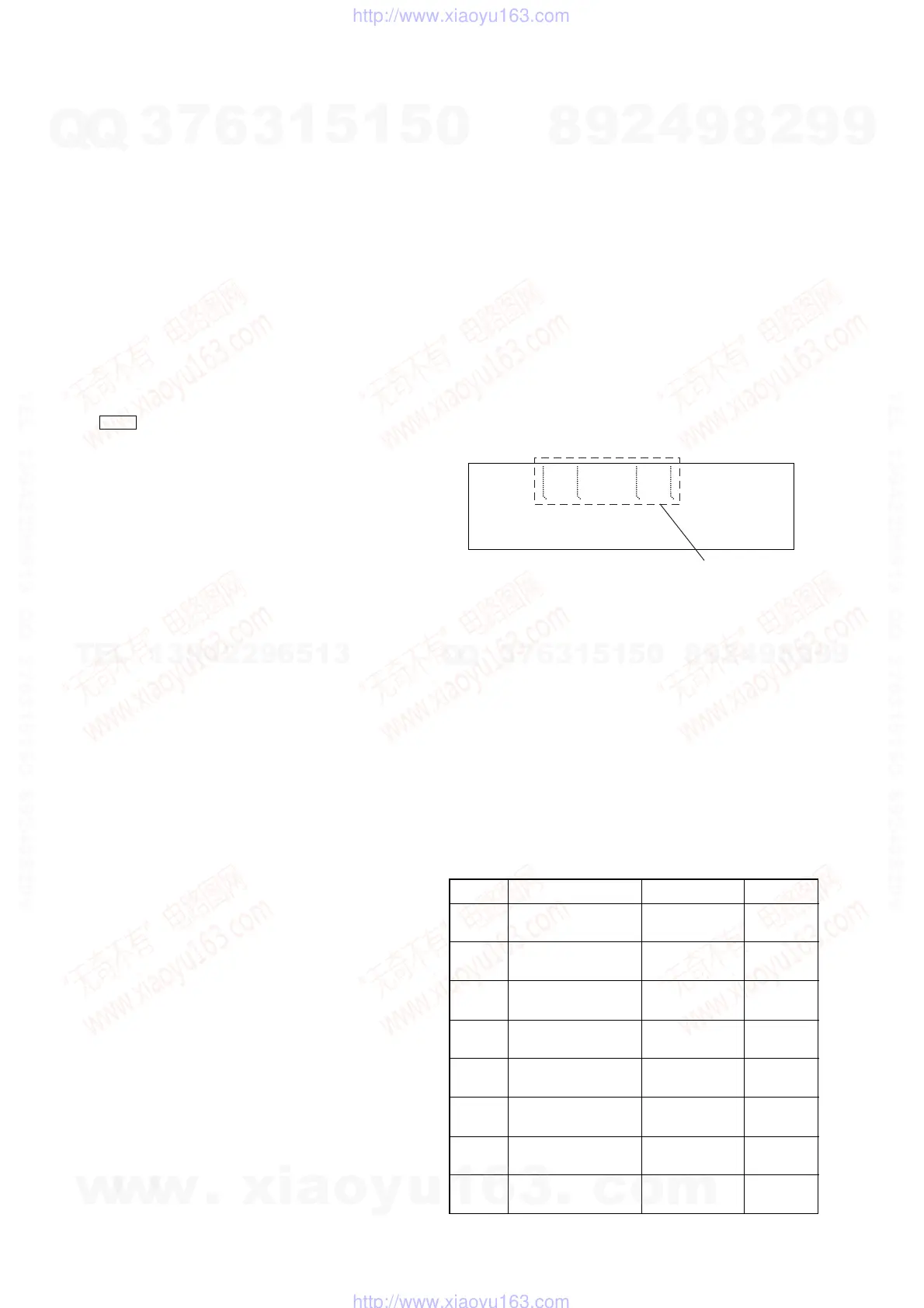
3. The segments blinks on the fluorescent indicator tube as bel-
low. The input function is changed to GAME.
2. Releasing the MC Test Mode
Procedure:
1. To release this mode, press the [I/ ] button.
2. The cold reset is enforced at the same time.
3. Check of Amplifier (US, CND, AEP, UK models only)
Initial settings:
Input , DIGITAL
EQ , FLAT
Mode , MUSIC
VAC S , OFF
Output channel setting:
Each time the
[EFFECT] button is pressed, output channels switch
as following order.
x
x
1
DIGITAL
EFFECT
Blink
1
Order Channels Bass Manage VACS*
1
1
L t L
Through ON
R t R
2
L t L
Through OFF
R t R
3
L t L, SL, C
on ON
R t R, SR, SW
4
L t L, SL, C
on OFF
R t R, SR, SW
5
L t SL
Through ON
R t SR
6
L t SL
Through OFF
R t SR
7
L t C
Through ON
R t SW
8
L t C
Through OFF
R t SW
*
1
) “EFFECT” indication
w
w
w
.
x
i
a
o
y
u
1
6
3
.
c
o
m
Q
Q
3
7
6
3
1
5
1
5
0
9
9
2
8
9
4
2
9
8
T
E
L
1
3
9
4
2
2
9
6
5
1
3
9
9
2
8
9
4
2
9
8
0
5
1
5
1
3
6
7
3
Q
Q
TEL 13942296513 QQ 376315150 892498299
TEL 13942296513 QQ 376315150 892498299
http://www.xiaoyu163.com
http://www.xiaoyu163.com



 To Next Page