MHC-V6D
13
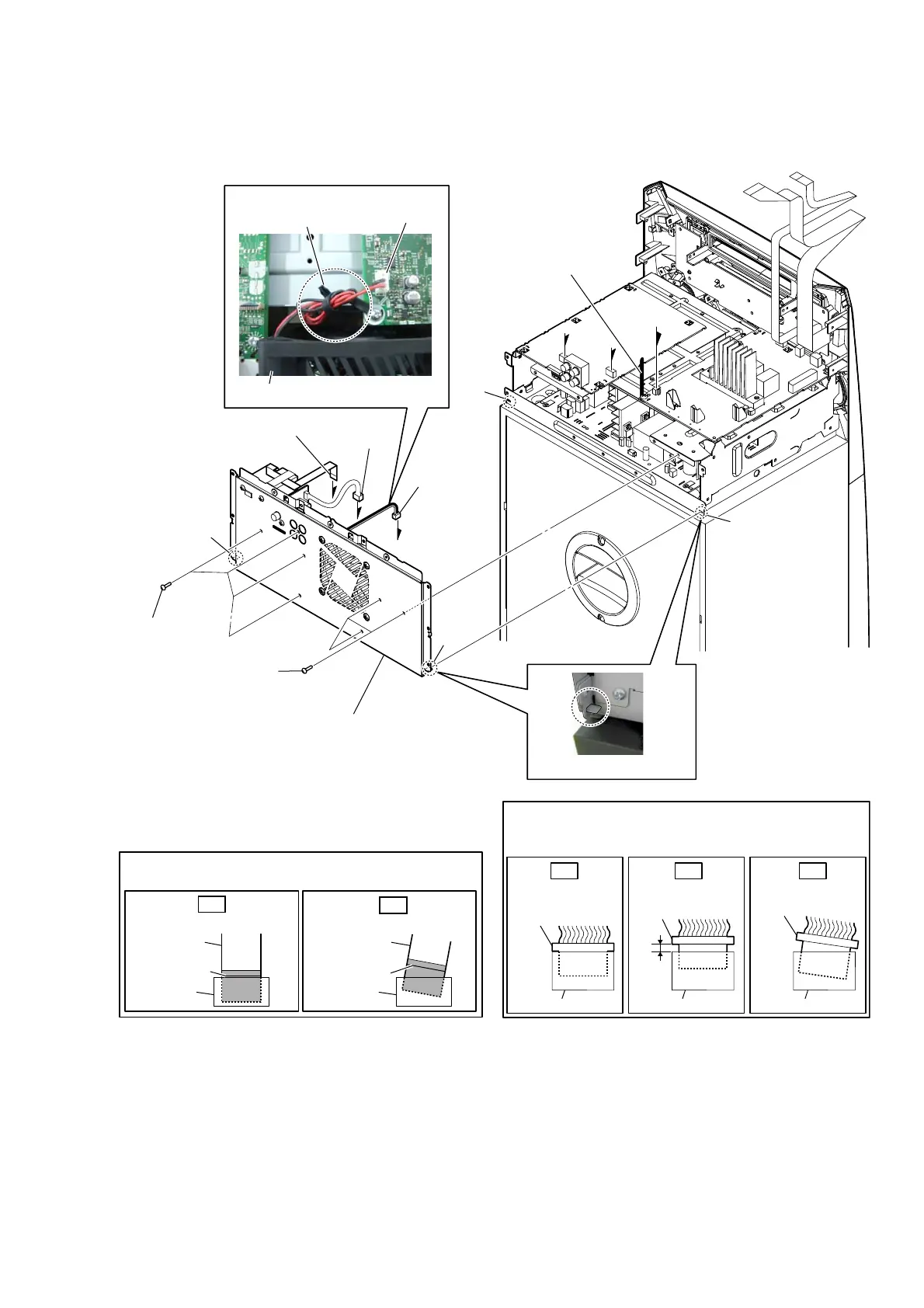
2-7. BACK PANEL BLOCK
B
B
5 three screws
(BV/RING)
5 four screws
(BV/RING)
1 Remove the DC fan wire
from the coating clip.
– Top rear view –
– Left view –
coating clip
DC fan
'& faQ wire VettiQJ
2 DC fan
connector
(CN1003)
A
C
A
C
3 flexible flat cable (9P)
(CN851)
4 connector
(CN901)
hook
hole
hole
hook
CN1003
6 back panel block
Note 1:
When installing the back panel block,
align two hooks and two holes.
colored line
Insert straight into the interior.
flexible flat
cable
connector
OK
colored line
Insert at a slant.
flexible flat
cable
connector
NG
Note 2:
When installing the flexible flat cable, ensure that
the colored line is parallel to the connector after insertion.
Note 3:
Insert the connector straight into the interior.
There is a possibility that using this device without
the connector correctly installed will damage it.
Insert only part way.
Insert straight into
the interior.
connector
Insert at a slant.
connector
connector
connector
connector connector
OK NG NG



 To Next Page
 Loading...











