MHC-V6D
23
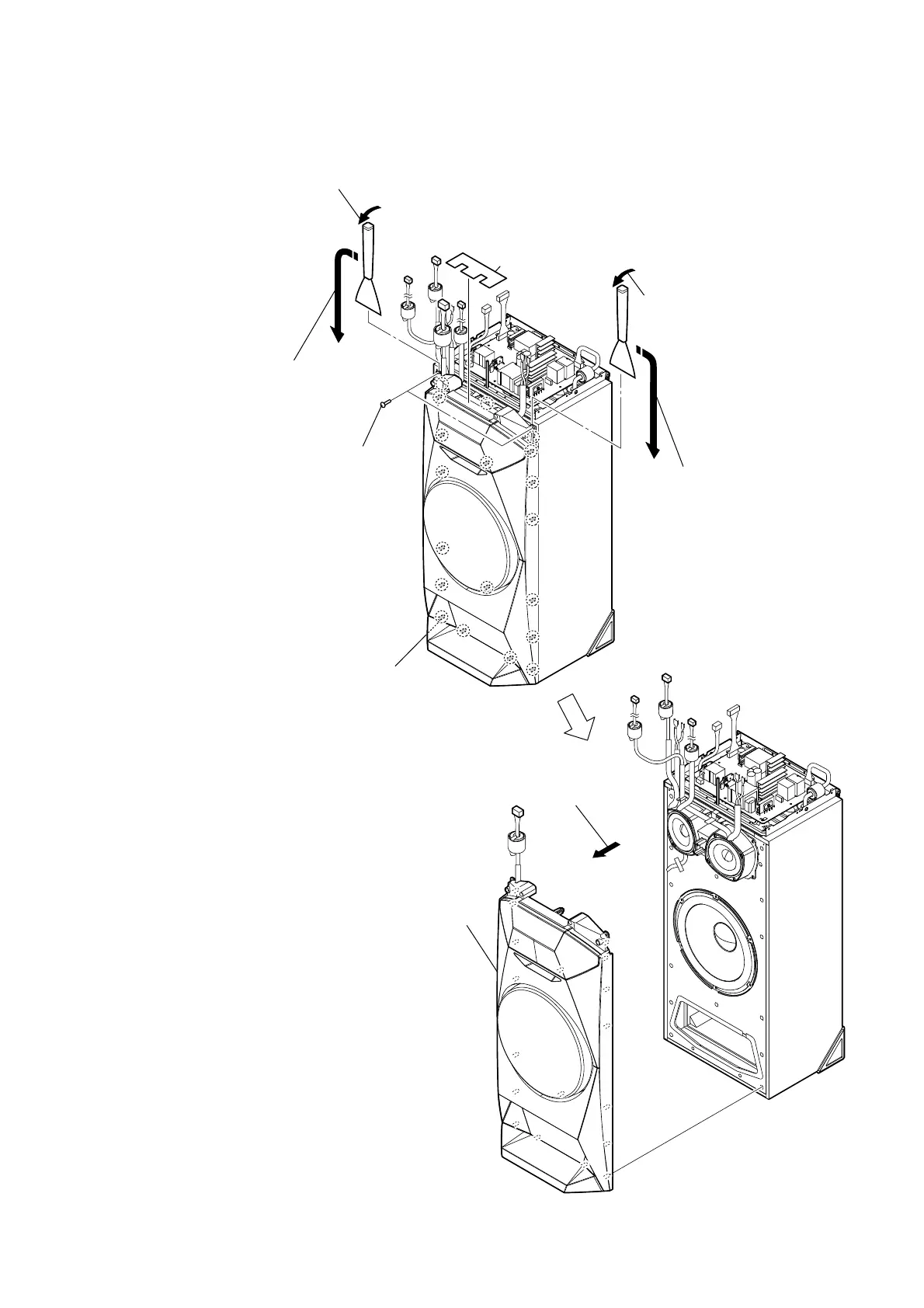
2-17. FRONT PANEL (SP) BLOCK
5 Remove the front panel (SP) block
in the direction of the arrow.
6 front panel (SP) block
total nineteen bosses
1 screw cushion
4 All bosses are removed while moving
jig in the direction of the arrow, and
front panel (SP) block is removed.
4 All bosses are removed while moving
jig in the direction of the arrow, and
front panel (SP) block is removed.
3 Insert the jig into the space and slowly
remove the front panel (SP) block.
Note: When using a jig, please work
so as not to injure front panel (SP)
block and speaker cabinet.
2 two tapping screws
(3.5 u 14)
3 Insert the jig into the space and slowly
remove the front panel (SP) block.
Note: When using a jig, please work
so as not to injure front panel (SP)
block and speaker cabinet.



 To Next Page
 Loading...











