MHC-V6D
29
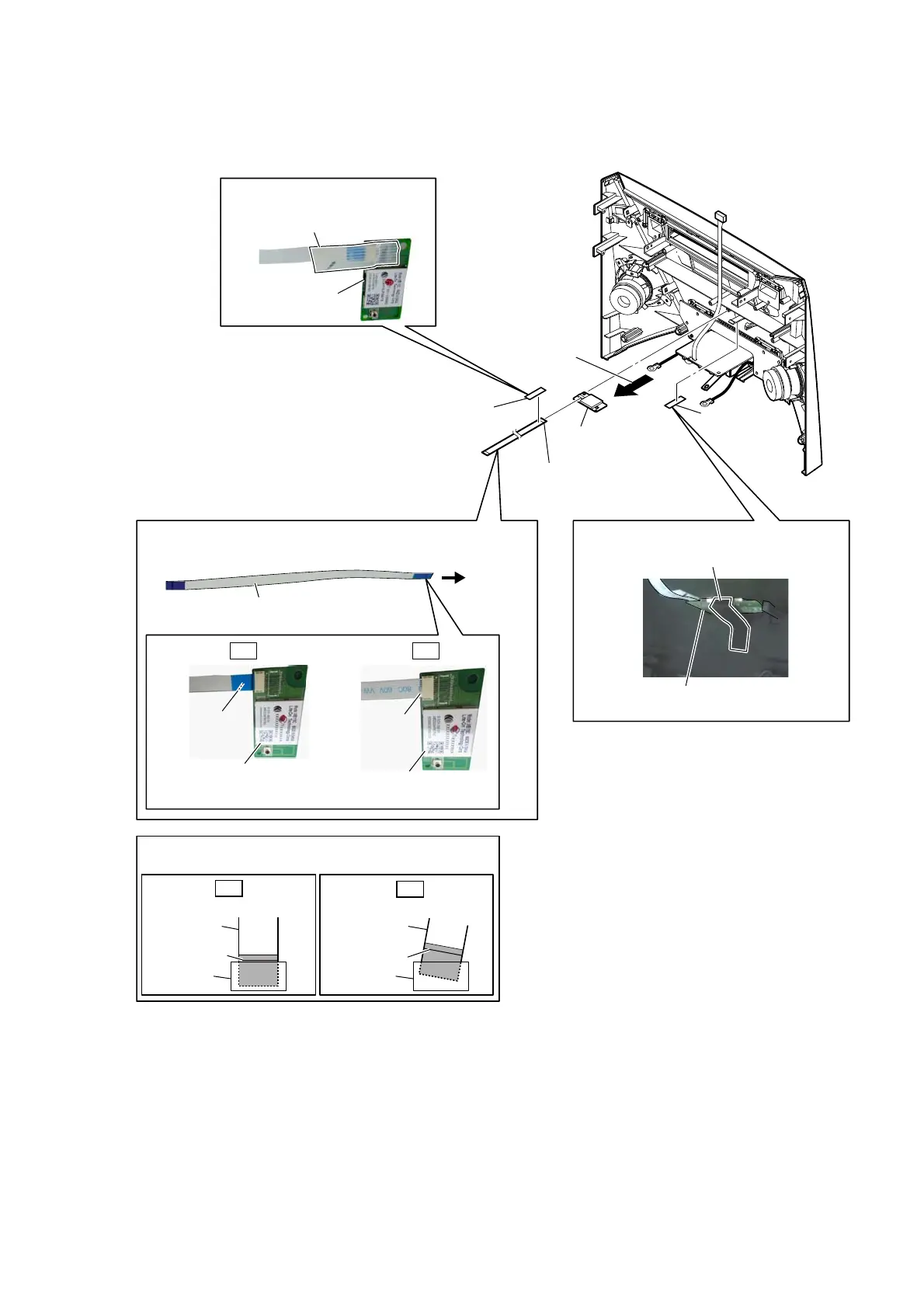
2-23. BLUETOOTH MODULE (BT1)
filament tape
(sub material)
3 filament tape
(sub material)
5 bluetooth module
(BT1)
bluetooth module
(BT1)
1 cishion (H)
bluetooth module
(BT1)
cushion (H)
WireVeWWiQJ
WireVeWWiQJ
+RZWRiQVWDOOWKeEOXeWRRWKPRGXOe%7
to
bluetooth
module
(BT1)
OK NG
Terminal face is
below side.
terminal face
bluetooth module
(BT1)
bluetooth module
(BT1)
2 Remove the bluetooth
module (BT1) in the
direction of the arrow.
–)rRQWSDQeOreDrYieZ–
colored line
Insert straight into the interior.
flexible flat
cable
connector
OK
colored line
Insert at a slant.
flexible flat
cable
connector
NG
Note:
When installing the flexible flat cable, ensure that
the colored line is parallel to the connector after insertion.
4 flexible flat cable (10P)
(FFC7)
flexible flat cable (10P)
(FFC7)



 To Next Page
 Loading...











