MHC-V6D
30
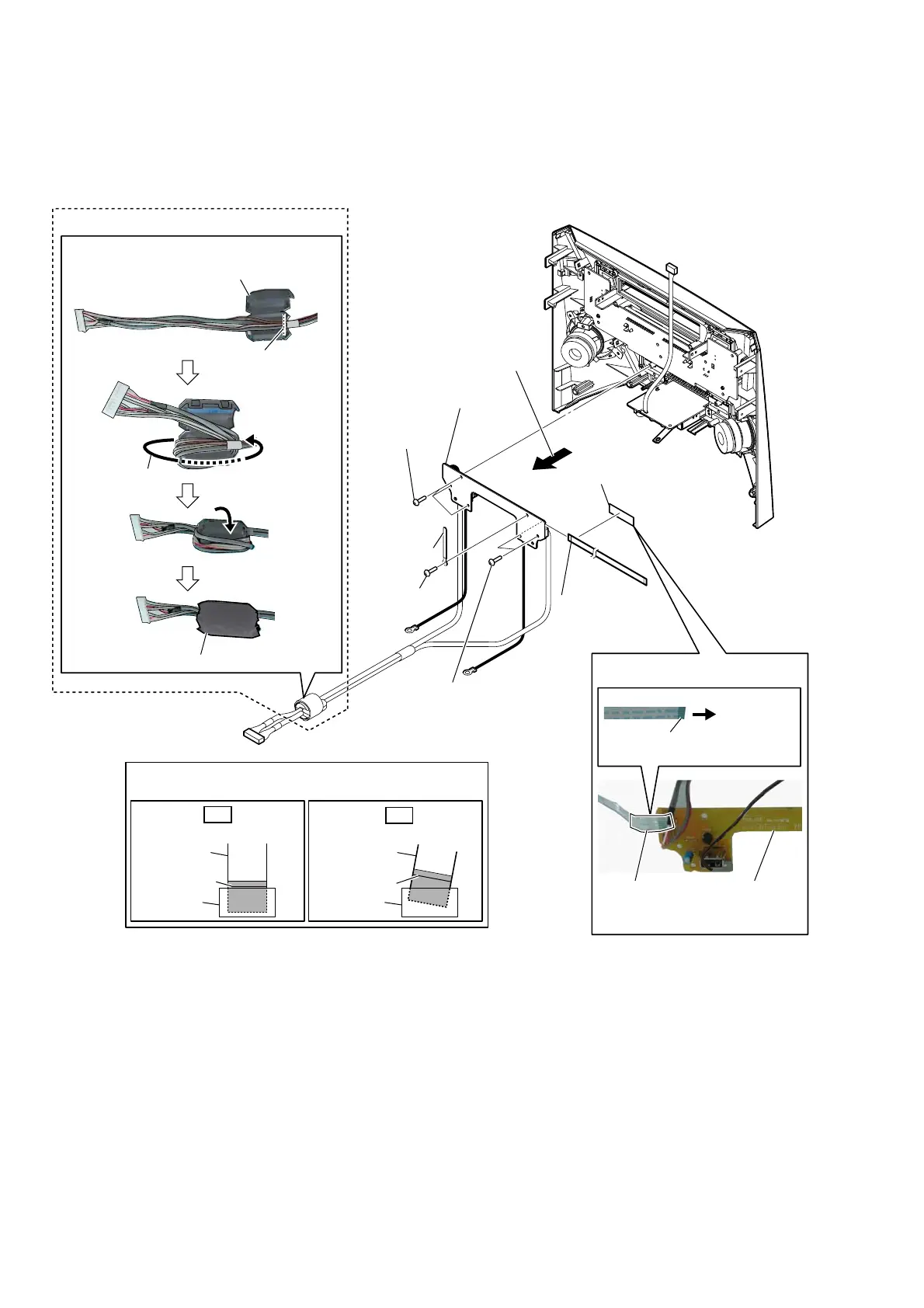
2-24. USB BOARD BLOCK
• Abbreviation
E93: United Arab Emirates, Kuwait, Iraq, Kenya, Tanzania and Nigeria models
3 Remove the USB board block
in the direction of the arrow.
to USB board
terminal
face
– Front panel rear view –
colored line
Insert straight into the interior.
flexible flat
cable
connector
OK
colored line
Insert at a slant.
flexible flat
cable
connector
NG
Note:
When installing the flexible flat cable, ensure that
the colored line is parallel to the connector after insertion.
5 flexible flat cable
(4P)
(CN2202)
2 coating clip
1 screw
(BVTP3 u 8)
1 two screws
(BVTP3 u 8)
(E93)
6 USB board block
1 three screws
(BVTP3 u 8)
Ferrite Fore (F&3) VettinJ
filament tape
(sub material)
USB board
Wire VettinJ
cushion (E 0.5)
Wrap once.
ferrite core (FC3)
guide line
4 filament tape
(sub material)



 To Next Page
 Loading...











