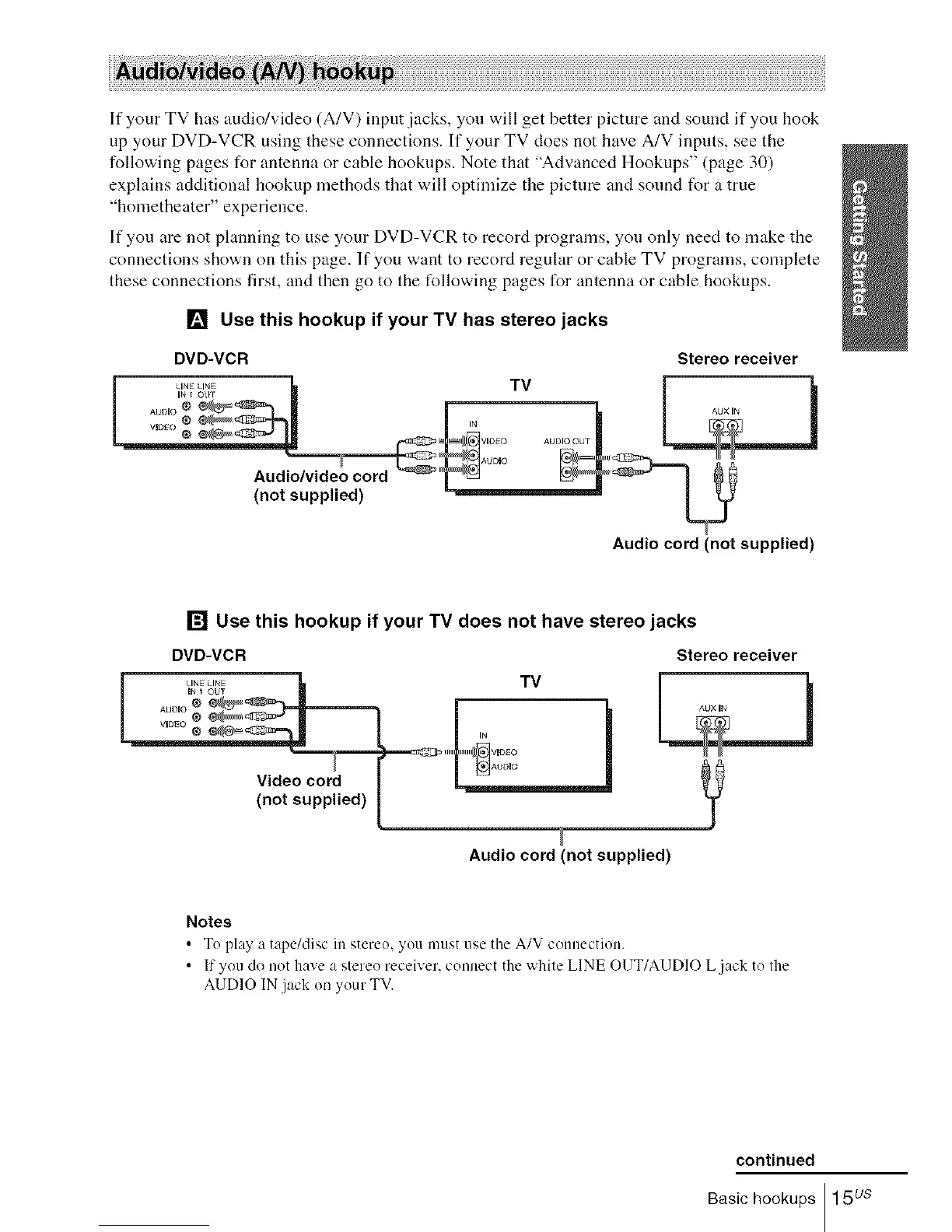
If your TV has audio/video (A/V) input jacks, you will get better picture and sound if you hook
up your DVD-VCR using these connections. If your TV does not have A/V inputs, see the
following pages for antenna or cable hookups. Note that "Advanced Hookups" (page 30)
explains additional hookup methods that will optimize the picture and sound for a true
"hometheater" experience.
If you are not planning to use your DVD-VCR to record programs, you only need to make the
connections shown on this page. If you want to record regular or cable TV programs, complete
these connections first, and then go to the tbllowing pages for antenna or cable hookups.
[] Use this hookup if your TV has stereo jacks
DVD-VCR Stereo receiver
Audio cord (not supplied)
[] Use this hookup if your TV does not have stereo jacks
Video cord
(not supplied)
DVD-VCR
TV
Stereo receiver
Audio cord (not supplied)
Notes
• To play a tape/disc in stereo, you nmst use tile A/V connection.
• If you do not have a stereo receiver, connect the white LINE O1JT/AUDIO L jack to the
AUDIO IN jack oi/your TV.
continued
Basic hookups 15 us














 To Next Page