Notes
• Tile clock calmot be set automatically if you do not receive a channel that carries a time
signal in your area. If so, set the clock manually (page 24).
• If there are only a few channels in your area that carry time signals, setting the clock
automalically may take up to about 20 minutes. If nothing happens cxeu after you wait about
20 minutes, set the clock manually (page 24).
• If you made Hookup 2, make sure you leave the cable box on.
• The clock display appears when VIDEO mode is selected with no tape inserted or when the
DVD-VCR is turned off.
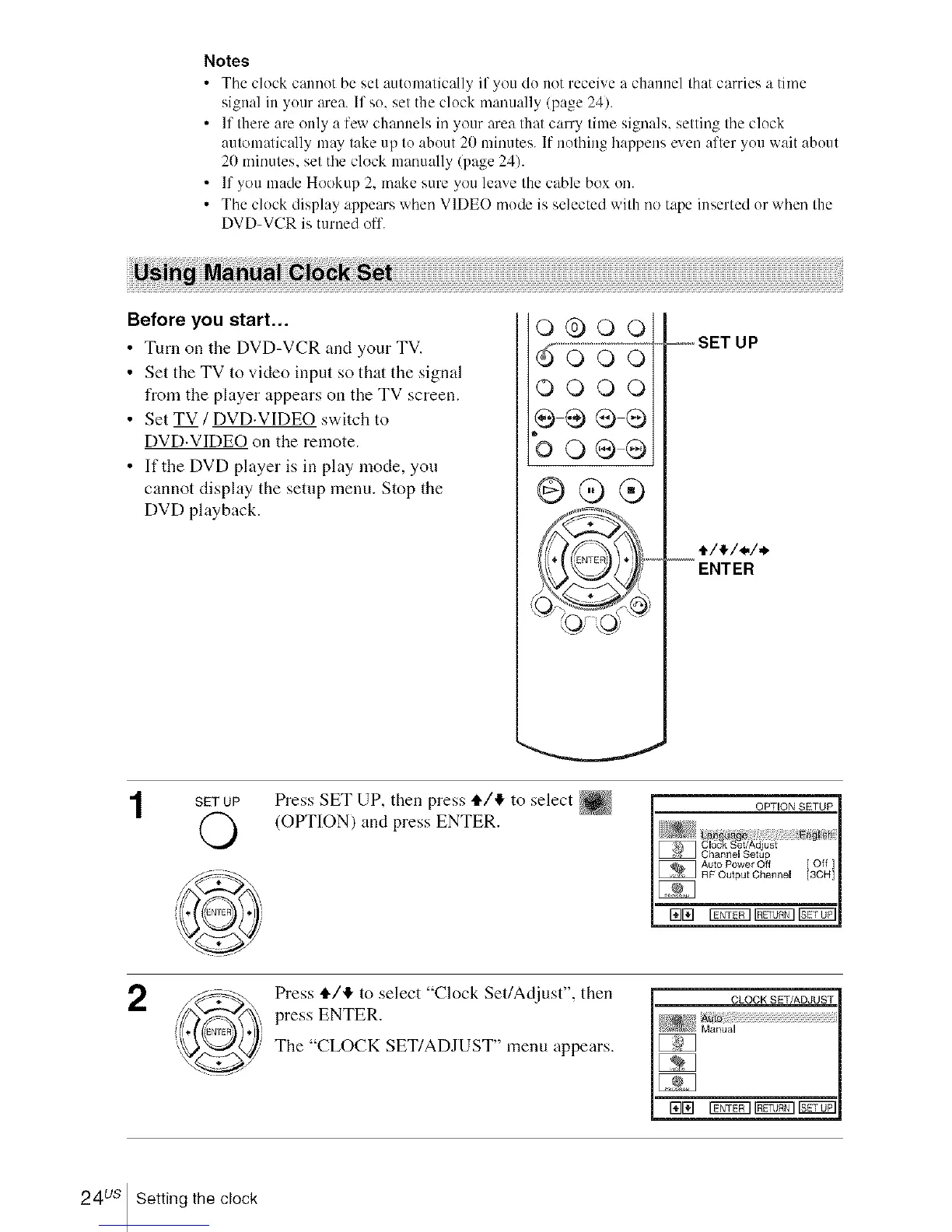
Before you start...
• Turn on the DVD-VCR and your TV.
• Set the TV to video input so that the signal
from the player appears on the TV screen.
• Set TV / DVD.VIDEO switch to
DVD.VIDEO on the remote.
• If the DVD player is in play mode, you
cannot display the setup menu. Stop the
DVD playback.
o®ooi
O000i
bo®®
@®®
=o=_SET UP
--ENTER
SET UP
©
Press SET UP, then press tl./I_ to select
(OPTION) and press ENTER.
2
Press tl./!_ to select "Clock Set/Adjust", then
press ENTER.
The "CLOCK SET/ADJUST" menu appears.
CLOCK SET/ADJUST
raE] i_t_q i_t_q r_t_l
24us Setting the clock














 To Next Page