EasyManua.ls Logo

Sony SLV-SE620 - Setting the clock; Selecting a language

Sony SLV-SE620
96 pages
Print Icon
To Next Page IconTo Next Page
To Previous Page IconTo Previous Page
Loading...
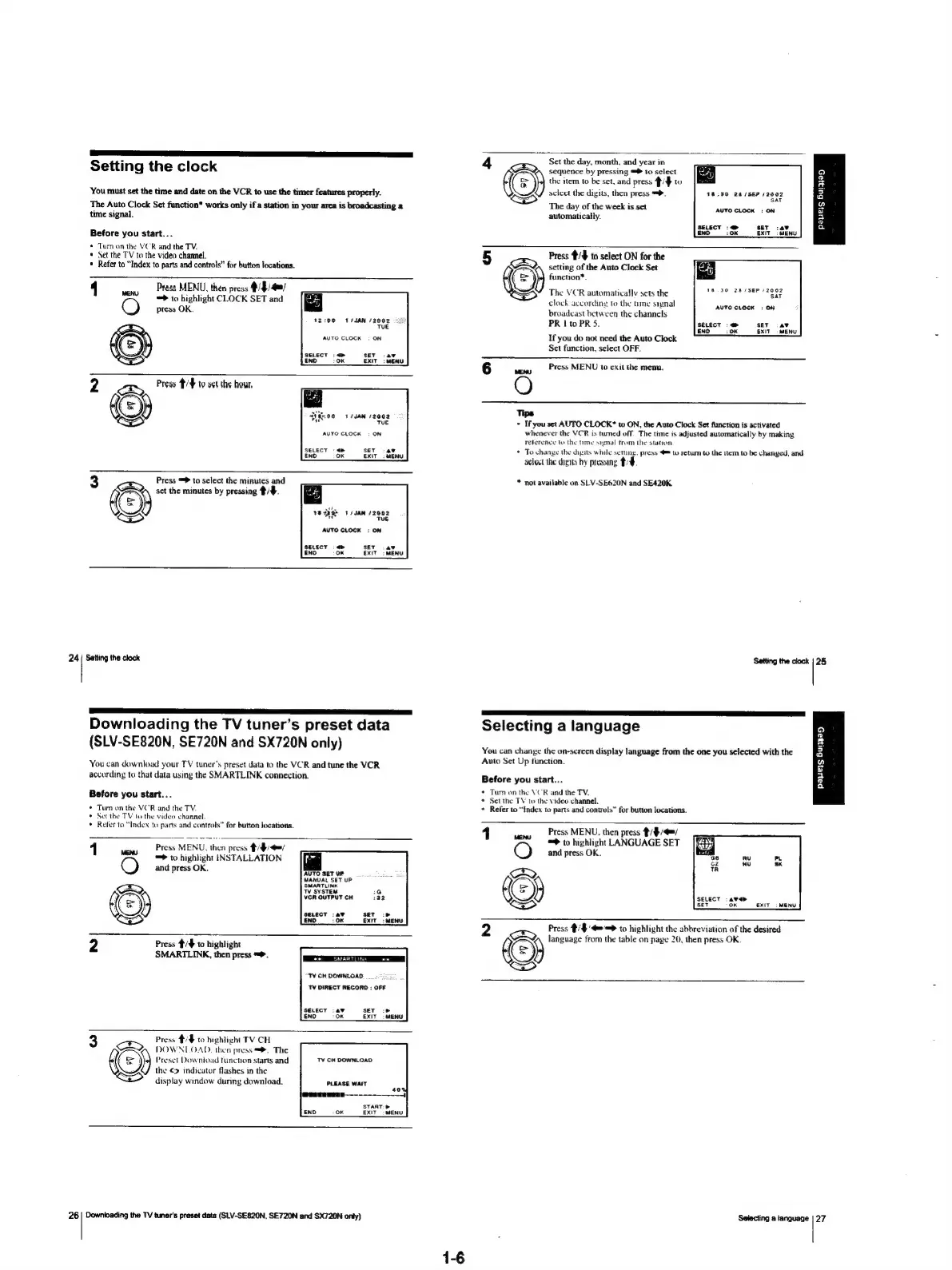
Setting
the
clock
‘You
must
set
the
time
and
date
on
the
VCR
to
use
the
timer
features
properly.
The
Auto
Clock
Set
function*
works
only
if
a
station
in
your
area
is
broadcasting
a
time
signal.
Before
you
start...
*
Tum
on
the
VCR
and
the
TV.
*
Set the
TV
to
the
video
channel.
«
Refer
to
“Index
to
parts
and
controls”
for
button
locations.
4
cis
Prass
MENU,
then
press
O
=>
to
highlight
CLOCK
SET
and
press
OK.
12:00
S/SAN
(2002
TUE
AUTO
CLOCK
:
ON
SELECT
:
<>
SET
:ayv
ENO
OK
EXIT:
MENU
Press
#/¥
to
o¢t
the
hour.
T4JAN
12002
TUE
AUTO
CLOCK
:
ON
SELECT
-
<>
SET
-
40
ENO
oK
EXIT:
MENU
Press
to
select
the
minutes
and
3
ESQr
set
the
minutes
by
pressing
#/#.
‘o}
18dg0F
Fs
JAN
/2002
a
Tue
AUTO
CLOCK
:
ON
SELECT
«>
SET
.av
END
oK
EXIT
7
MENU
24
|
Setting
the
clock
SSS
ae
IE
a
a
ES
PS
SRT
Downloading
the
TV
tuner’s
preset
data
(SLV-SE820N,
SE720N
and
SX720N
only)
You
can
download
your
TV
tuner’s
preset
data
to
the
VCR
and
tune
the
VCR
according
to
that
data
using
the
SMARTLINK
connection.
4
Set
the
day,
month,
and
year
in
sequence
by
pressing
=
to
select
a
;
ro
the
item
to
be
set,
and
press
/F
to
#
sclect
the
digits,
then
press
=>.
18:90
28
(SEP
/2902
2
The
day
of
the
week
is
set
AUTO
CLOCK
:
ON
2
automatically.
2
SELECT
:<—@>
SET
:4¥
a
END
10K
EXIT
|
MENU
5
Press
#/$
to
select
ON
for
the
setting
of
the
Auto
Clock
Set
(=)
function*.
The
VCR
automatically
sets
the
1S
3.0
2M
/SER
12002
clock
according
to
the
tume
signal
broadcast
between
the
channels
PR
|
to
PR
5.
If
you
do
not
need
the
Auto
Clock
Set
function,
select
OFF.
AVTO
CLOCK
:
ON
SELECT
>
SET
:4¥
END
10K
EXIT
MENU
Press
MENU
to
exit
the
menu.
o
i
Tips
»*
If
you
set
AUTO
CLOCK*
to
ON,
the
Auto
Clock
Set
function
is
activated
whenever
the
VCR
is
tumed
off.
The
time
is
adjusted
automatically
by
making
Teference
to
the
time
signal
from
the
stavon.
*
To
change
the
dusts
while
setiny.
press
@™
to
retum
to
the
tem
to
be
changed,
and
select
the
digits
by
pressing
*
not
available
on
SLV-SE620N
and
SE420K.
Setting
the
clock
|
25
ee
I
TT
Selecting
a
language
You
can
change
the
on-screen
display
language
from
the
one
you
selected
with
the
Auto
Set
Up
function.
Before
you
start...
payers
Bungay
Before
you
start...
*
Tum
on
the
VCR
and
the
TV.
*
Set
the
TV
to
the
video
channel.
*
Refer
to
“Index
to
parts
and
controls”
for
button
locations.
1
Press
MENU,
then
press
#/
WOW
=>
to
highlight
INSTALLATION
O
and
press
OK.
AUTO
SET
UP
MANUAL
SET
UP
‘SMARTLINK
TV
SYSTEM
1G
He)
VCR
OUTPUT
CH
332
CS
ino
10K.
exe
:
tenw
2
Press
/4
to
highlight
SMARTLINK,
then
press
=.
Dee
MARTON
we]
“TY
CH
DOWNLOAD
TV
DIRECT
RECORD
:
OFF
SELECT
-4¥
SET
:>
ENI
1D
OK
EXIT
=
MENU
Press
#/#
to
highlight
TV
CH
3
xB
DOWNLOAD.
then
press
=.
The
Preset
Download
tunction
starts
and
the
©
indicator
flashes
in
the
display
window
during
download.
TV
CH
DOWNLOAD
PLEASE
WAIT
START:
B
EXIT
>
MENU
26
|
Downloading
the
TV
tuner’s
preset
data
(SLV-SE820N,
SE720N
and
SX720N
onty)
14
*
Tum
on
the
VCR
and
the
TV,
*
Set
the
TV
to
the
video
channel.
*
Refer
to
“Index
to
parts
and
controls”
for
button
locations.
1
ew
Press
MENU.
then
press
tition
=>
to
highlight
LANGUAGE
SET
and
press
OK.
(ER)
(ey
me
OK
EXIT
=
Press
#/$
'4='=>
to
highlight
the
abbreviation
of
the
desired
°
©
MENU
language
from
the
table
on
page
20,
then
press
OK.
Selecting
a
language
|
27

Table of Contents

Related product manuals