EasyManua.ls Logo

Sony SLV-SE620 - How to Eject the Cassette Tape Oo

Sony SLV-SE620
96 pages
Print Icon
To Next Page IconTo Next Page
To Previous Page IconTo Previous Page
Loading...
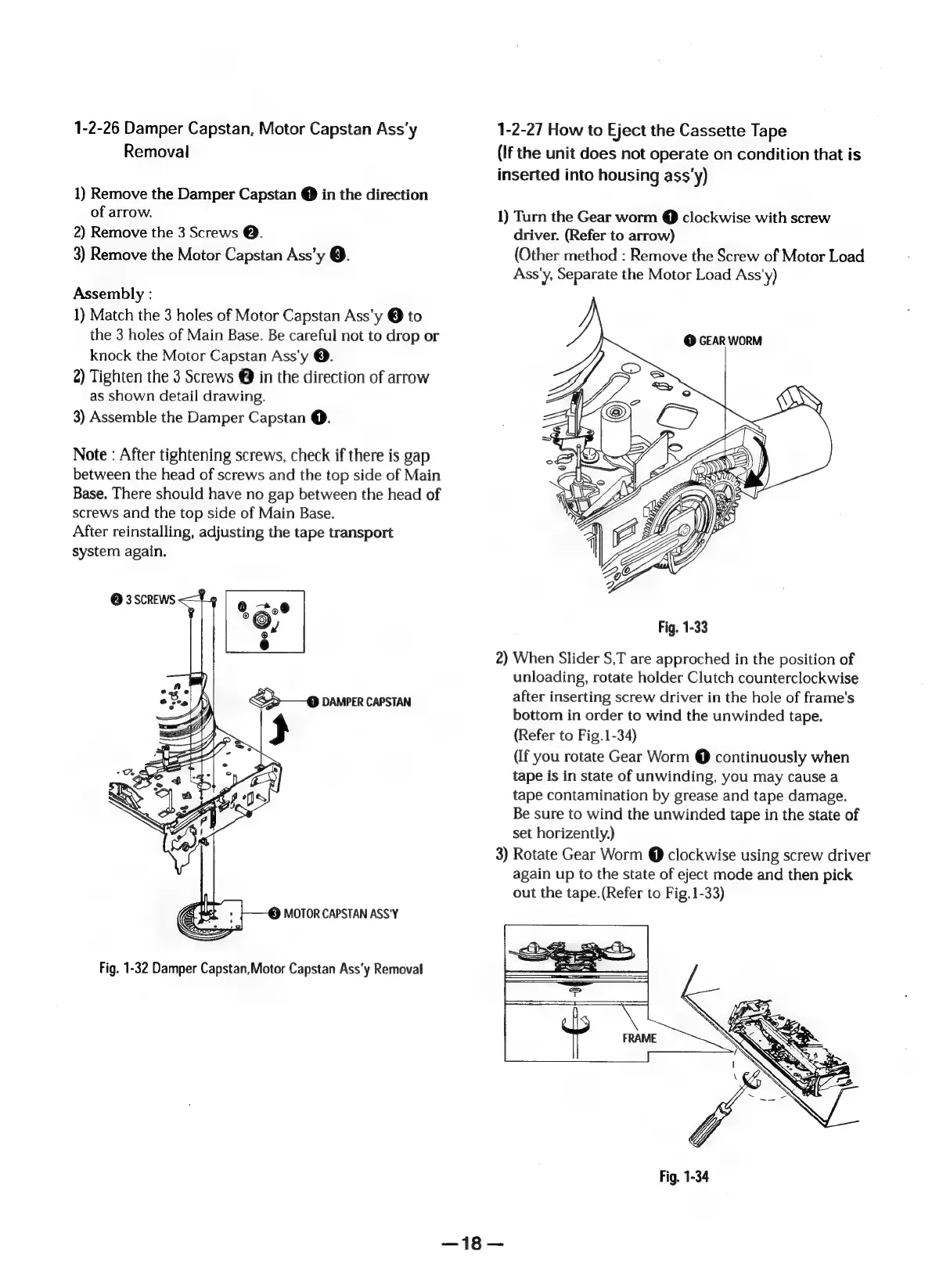
1-2-26
Damper
Capstan,
Motor
Capstan
Ass'y
Removal
1)
Remove
the
Damper
Capstan
@
in
the
direction
of
arrow.
2)
Remove
the
3
Screws
@.
3)
Remove
the
Motor
Capstan
Ass’y
@.
Assembly
:
1)
Match
the
3
holes
of
Motor
Capstan
Ass’y
®
to
the
3
holes
of
Main
Base.
Be
careful
not
to
drop
or
knock
the
Motor
Capstan
Ass'y
@.
2)
Tighten
the
3
Screws
@
in
the
direction
of
arrow
as
shown
detail
drawing.
3)
Assemble
the
Damper
Capstan
@.
Note
:
After
tightening
screws,
check
if
there
is
gap
between
the
head
of
screws
and
the
top
side
of
Main
Base.
There
should
have
no
gap
between
the
head
of
screws
and
the
top
side
of
Main
Base.
After
reinstalling,
adjusting
the
tape
transport
system
again.
@
3
SCREWS
<
y
>
—@
Damper
CAPSTAN
&})
MOTOR
CAPSTAN
ASS'Y
Fig.
1-32
Damper
Capstan,Motor
Capstan
Assy
Removal
1-2-27
How
to
Eject
the
Cassette
Tape
(If
the
unit
does
not
operate
on
condition
that
is
inserted
into
housing
ass'y)
1)
Turn
the
Gear
worm
@
clockwise
with
screw
driver.
(Refer
to
arrow)
(Other
method
:
Remove
the
Screw
of
Motor
Load
Ass'y,
Separate
the
Motor
Load
Ass'y)
@
GEAR
WORM
Fig.
1-33
2)
When
Slider
S,T
are
approched
in
the
position
of
unloading,
rotate
holder
Clutch
counterclockwise
after
inserting
screw
driver
in
the
hole
of
frame's
bottom
in
order
to
wind
the
unwinded
tape.
(Refer
to
Fig.1-34)
(If
you
rotate
Gear
Worm
@
continuously
when
tape
is
in
state
of
unwinding,
you
may
cause
a
tape
contamination
by
grease
and
tape
damage.
Be
sure
to
wind
the
unwinded
tape
in
the
state
of
set
horizently.)
3)
Rotate
Gear
Worm
@
clockwise
using
screw
driver
again
up
to
the
state
of
eject
mode
and
then
pick
out
the
tape.(Refer
to
Fig.
1-33)
|

Table of Contents

Related product manuals