EasyManua.ls Logo

Sony SLV-SE620 - Presetting channels; Programme Position Management

Sony SLV-SE620
96 pages
Print Icon
To Next Page IconTo Next Page
To Previous Page IconTo Previous Page
Loading...
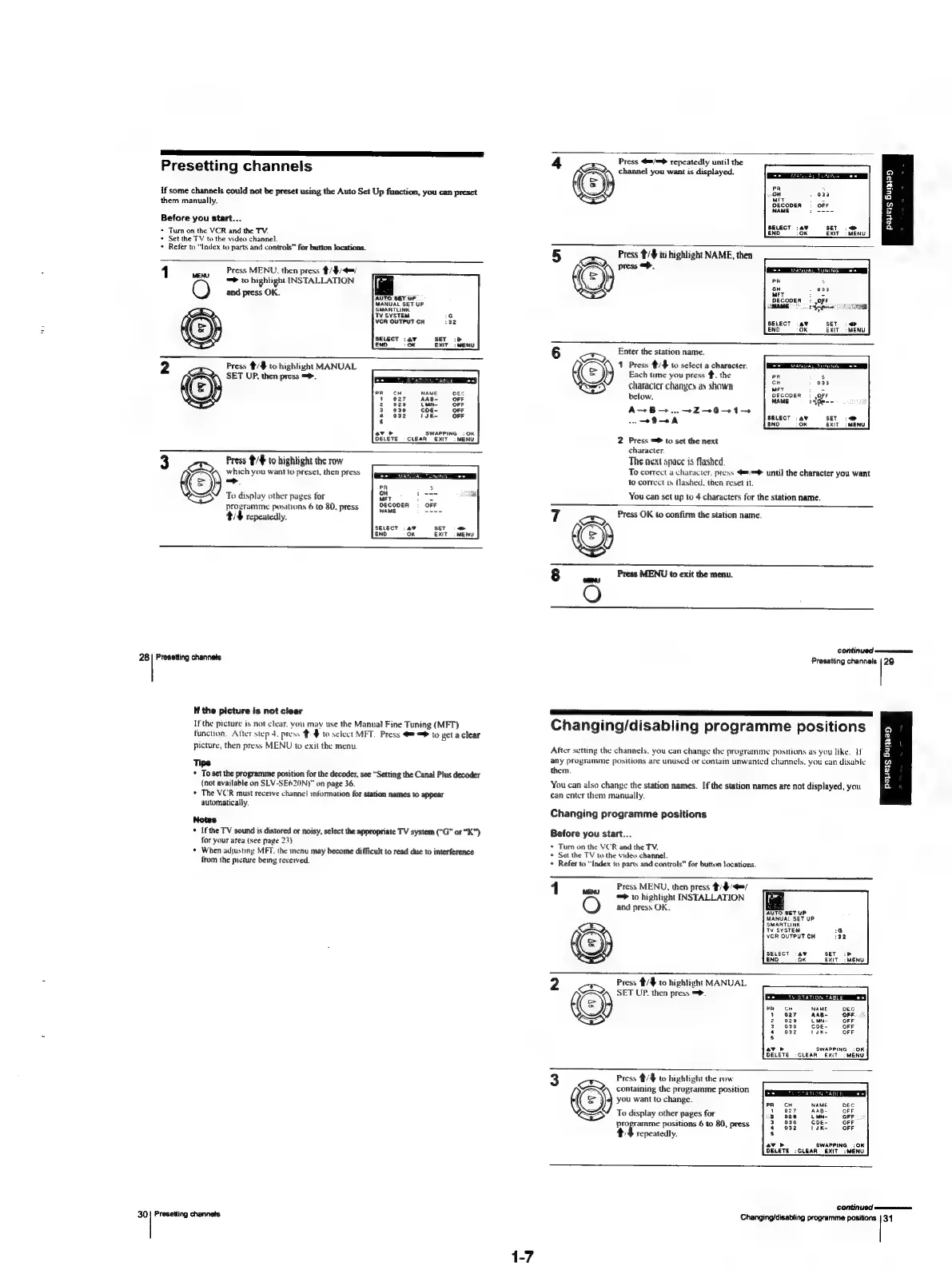
Presetting
channels
if
some
channels
could
not
be
preset
using
the
Auto
Set
Up
function,
you
can
preset
them
manually.
Before
you
start...
+
Turn
on
the
VCR
and
the
TV.
+
Set
the
TV
to
the
video
channel.
+
Refer
to
“Index
to
parts
and
controls”
for
button
locations.
1
Press
MENU,
then
press
#/$/=/
=
to
highlight
INSTALLATION
and
press
OK.
AUTO
SET
UF
MANUAL
SET
UP
SELECT
:a¥
END
oK
Press
#/#
to
highlight
MANUAL
SET
UP,
then
press
=>.
R
1
2
a
4
8
ave
SWAPPING
:OK
DELETE
-CLEAR
EXIT
>
MENU
Press
¥/#
to
highlight
the
row
which
you
want
to
preset,
then
press
(=
To
display
other
pages
for
aes
programme
positions
6
to
80,
press
‘OFF.
tt
repeatedly.
te
SET
<>
EXIT
|
MENU
28
Presetting
channels
If
the
picture
is
not
clear
If
the
picture
is
not
clear.
you
may
use
the
Manual
Fine
Tuning
(MFT)
function,
Atter
step
4.
press
$
to
select
MFT.
Press
==>
to
getaclear
picture,
then
press
MENU
to
exit
the
menu.
Tips
*
To
set
the
programme
position
for the
decoder,
see
“Setting
the
Canal
Plus
decoder
(not
available
on
SLV-SE620N)"
on
page
36.
*
The
VCR
must
receive
channel
information
for
station
names
to
appear
automatically.
Notes
+
Ifthe
TV
sound
is
distored
or
noisy,
select
the
appropriate
TV
system
(“G”
or
“K”)
for
your
area
(see
page
23)
¢
When
adjusting
MFT.
the
menu
may
become
difficult
to
read
due
to
interference
from
the
picture
being
recerved.
30|
Presetting
channels
Press
4"/=
repeatedly
until
the
channel
you
want
is
displayed.
9
:
a
.
038
a
:
OFF
n
saat
if
a
2
SET
i:
>
a
EXIT
:
MENU
5
Press
#/#
to
highlight
NAME,
then
press
=.
DANA
TUNING
an)
iG;
a
Oss
a
»
039
Qe
DECODER:
OFF
SE
SELECT
SET
:
<>
END
ok
EXIT
-
MENU
6
+
Enter
the
station
name.
1
Press
#/#
to
select
a
character,
(=)
Each
time
you
press
#.
the
character
changes
as
shown
below.
A+B...
+
Z—+-0-+1-+
OA
END
OK
_exiT_imeNy
2
Press
=
to
set
the
next
character.
The
next
space
is
flashed.
To
correct
a
character,
press
€8/=®
until
the
character
you
want
to
correct
is
flashed.
then
reset
it,
You
can
set
up
to
4
characters
for
the
station
name.
7
:
Press
OK
to
confirm
the
station
name.
8
Press
MENU
to
exit
the
menu.
O
CONTINU
eremrmrrrennain
Prasatting
channels
|
29
Changing/disabling
programme
positions
After
setting
the
channels,
you
can
change
the
programme
positions
as
you
like.
If
any
programme
positions
are
unused
or
contain
unwanted
channels,
you
can
disable
them
You
can
also
change
the
station
names.
If
the
station
names
are
not
displayed,
you
can
enter
them
manually.
Payers
Bupa
Changing
programme
positions
Before
you
start...
*
Tum
on
the
VCR
and
the
TV.
*
Set
the
TV
to
the
video
channel.
+
Refer
to
“Index
to
parts
and
controls”
for
button
locations.
1
wen
‘Press
MENU,
then
press
th
=>
to
highlight
INSTALLATION
O
and
press
OK.
i
AUTO
SET
UP
MANUAL
SET
UP.
VCR
OUTPUT
CH
SELECT
av
NI
END
OK
2
Press
#/#
to
highlight
MANUAL
So
SET
UP.
then
press
=>.
ea
Ty
STATION
TABLE
+=
SWAPPING
:
OK
CLEAR
EXIT
|
MENU
Foam
Press
#/$
to
highlight
the
row
containing
the
programme
position
a
7
t=)
you
want
to
change.
ned
OFF
SS"
To
display
other
pages
for
OFF
programme
positions
6
to
80,
press
Ore
th
repeatedly.
av
SWAPPING
:OK
DELETE
:CLEAR
EXIT:
MENU
continued
Changing/disabling
programme
positions
|
34

Table of Contents

Related product manuals