EasyManua.ls Logo

Sony SLV-SE620 - Recording TV Programmes Using the Dial Timer

Sony SLV-SE620
96 pages
Print Icon
To Next Page IconTo Next Page
To Previous Page IconTo Previous Page
Loading...
To
save
a
recording
To
prevent
accidental
erasure,
break
off
the
safety
tab
as
illustrated.
To
record
on
the
same
tayié
again,
cover
the
tab
hole
with
adhesive
tape.
Tips
*
To
select
a
programme
position,
you
can
use
the
programme
number
buttons
on
the
Temote
commander,
For
two-digit
numbers,
for
example,
press
2
and
3
to
select
“PR
23."
If
you
connect
additional
equipment
to
a
LINE
connector
or
jack,
you
can
select
the
input
szna]
using
the
INPUT
SELECT
or
PROG
+:-
buttons.
The
@
DISPLAY
information
appears
on
the
TV
screen
indicating
information
about
the
tape.
but
the
information
will
not
be
recorded
on
the
tape.
If
you
do
not
want
to
watch
TV
while
recording,
you
can
tum
off
the
TV.
When
using
a
decoder,
make
sure
to
leave
it
on.
Notes
The
DISPLAY
information
does
not
appear
during
stil}
(pause)
mode
or
slow-
mation
playback
Ifa
tape
has
pomions
recorded
in
both
PAL
(MESECAM)
and
NTSC
systems,
the
time
counter
reading
will
not
be
correct.
This
discrepancy
is
due
to
the
difference
between
the
counting
cycles
of
the
two
video
systems.
You
cannot
watch
a
Canal
Plus
programme
while
recording
another
Canal
Plus
Pprogramme.*
When
you
insert
a
non-standard
commercially
available
tape,
the
remaining
time
may
not
be
correct
The
remaining
time
is
intended
for
rough
measurement
only.
About
30
seconds
after
the
tape
begins
playback,
the
tape
remaining
time
will
be
displayed.
not
available
on
SLV-SE620N
44]
Recording
TV
programmes
Recording
TV
programmes
using
the
Dial
Timer
(SLV-SE820N
only)
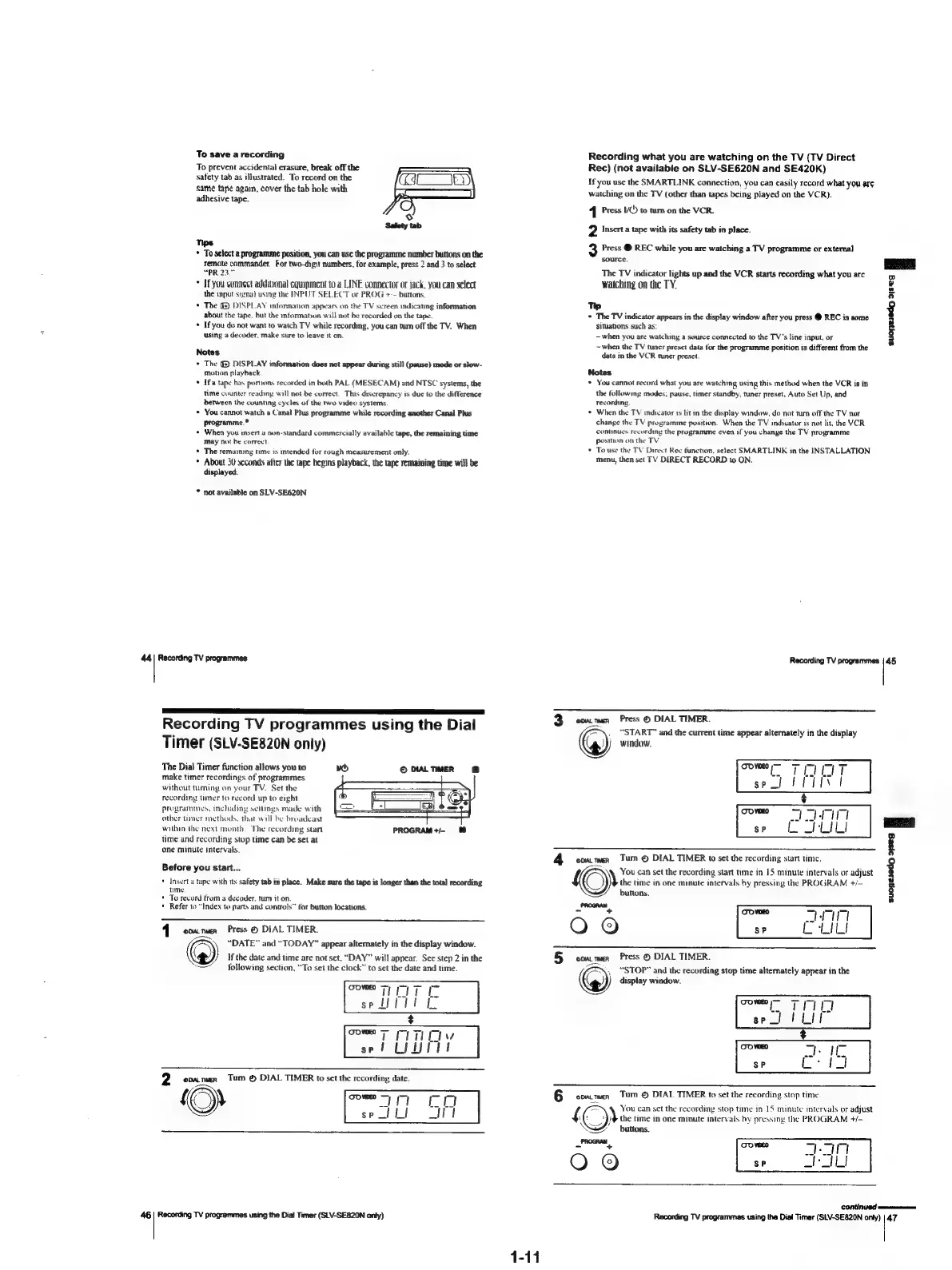
The
Dial
Timer
function
allows
you
to
make
timer
recordings
of
programmes
without
tuming
on
your
TV.
Set
the
recording
timer
to
record
up
to
eight
programmes,
including
settings
made
with
other
timer
methods.
that
will
be
broadcast
within
the
next
month,
The
recording
start
time
and
recording
stop
time
can
be
set
at
one
minute
intervals.
i
PROGRAM+/-
Before
you
start...
+
Insert
a
tape
with
its
safety
tab
in
place.
Make
sure
the
tape
is
longer
than
the
total
recording
time.
*
To
record
from
a
decoder.
tum
it
on.
*
Refer
to
“Index
to
parts
and
controls”
for
button
locations.
41>
commen
Press
©
DIAL
TIMER.
“DATE”
and
“TODAY”
appear
alternately
in
the
display
window.
2)
If
the
date
and
time
are
not
set.
“DAY”
will
appear.
See
step
2
in
the
following
section,
“To
set
the
clock”
to
set
the
date
and
time.
46
|
Recording
TV
programmes
using
the
Dial
Timer
(SLV-SE820N
only)
Recording
what
you
are
watching
on
the
TV
(TV
Direct
Rec)
(not
available
on
SLV-SE620N
and
SE420K)
If
you
use
the
SMARTLINK
connection,
you
can
easily
record
what
you
are
watching
on
the
TV
(other
than
tapes
being
played
on
the
VCR).
4
Press
VO
to
tum
on
the
VCR.
2
Insert
a
tape
with
its
safety
tab
in
place.
Press
@
REC
while
you
are
watching
a
TV
programme
or
external
source.
aes
The
TV
indicator
lights
up
and
the
VCR
starts
recording
what
you
are
o
watching
on
the
TY.
4
a
Tp
4
+
The
TV
indicator
appears
in
the
display
window
after
you
press
@
REC
in
some
situations
such
as:
-when
you
are
watching
a
source
connected
to
the
TV's
line
input,
or
~when
the
TV
tuner
preset
data
for
the
programme
position
is
different
from
the
data
in
the
VCR
tuner
preset.
Notes
*
You
cannot
record
what
you
are
watching
using
this
method
when
the
VCR
is
in
the
followmg
modes;
pause,
timer
standby,
tuner
preset,
Auto
Set
Up,
and
recording,
+
When
the
TV
indicator
1s
lit
in
the
display
window,
do
not
tum
off
the
TV
nor
change
the
TV
programme
position.
When
the
TV
indicator
is
not
lit,
the
VCR
contnues
recording
the
programme
even
if
you
change
the
TV
programme
position
on
the
TV,
To
use
the
TV
Direct
Rec
function,
select
SMARTLINK
in
the
INSTALLATION
menu,
then
set
TV
DIRECT
RECORD
wo
ON.
Recording
TV
programmes
|
45
3
commen
Press
©
DIAL
TIMER.
.
“START”
and
the
current
time
appear
alternately
in
the
display
window.
eomtmer
Turn
©
DIAL
TIMER
to
set
the
recording
start
timc.
You
can
set
the
recording
start
time
in
15
minute
intervals
or
adjust
the
time
in
one
minute
intervals
by
pressing
the
PROGRAM
t+/-
buttons.
ZX
epua.twen
Press
©
DIAL
TIMER.
“STOP”
and
the
recording
stop
time
altemately
appear
in
the
°o©
))
display
window.
sucpesedy
21seg
E
DAL
TIMER
Tum
©
DIAL
TIMER
to
set
the
recording
stop
time
You
can
set
the
recording
stop
time
in
15
minute
intervals
or
adjust
the
time
in
one
minute
intervals
by
pressing
the
PROGRAM
+/—
buttons.
elo
Recording
TV
programmes
using
the
Dial
Timer
(SLV-SE820N
only)
|
47
1-11

Table of Contents

Related product manuals