EasyManua.ls Logo

Sony SLV-SE620 - Recording TV programmes

Sony SLV-SE620
96 pages
Print Icon
To Next Page IconTo Next Page
To Previous Page IconTo Previous Page
Loading...
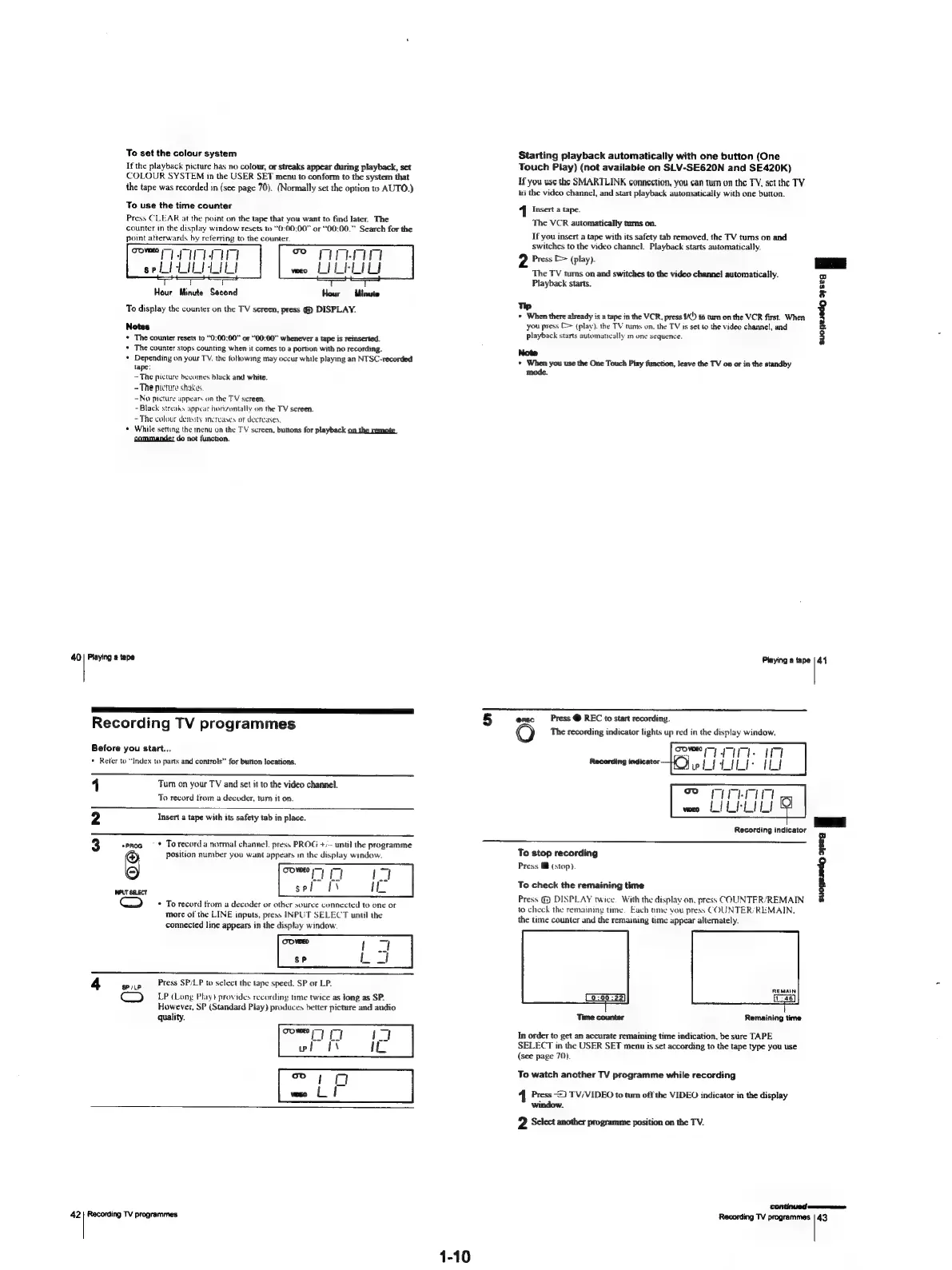
To
set
the
colour
system
If
the
playback
picture
has
no
colour,
or
streaks
appear
during
playback,
set
COLOUR
SYSTEM
in
the
USER
SET
menu
to
conform
to
the
system
that
the
tape
was
recorded
in
(see
page
70).
(Normally
set
the
option
to
AUTO.)
To
use
the
time
counter
Press
CLEAR
at
the
point
on
the
tape
that
you
want
to
find
later.
The
counter
in
the
display
window
resets
to
“0:00:00”
or
“00:00.”
Search
for
the
point
atterwards
by
referring
to
the
counter.
come
IA
seit
LILI
LIL!
Hour
Minute
Second
Hour
Minute
To
display
the
counter
on
the
TV
screen,
press
(@)
DISPLAY.
Notes
*
The
counter
resets
to
“0:00:00”
or
“00:00”
whenever
a
tape
is
reinserted.
+
The
counter
stops
counting
when
it
comes
to
a
portion
with
no
recording.
*
Depending
on
your
TV.
the
following
may
occur
while
playing
an
NTSC-recorded
tape:
—The
picture
becones
black
and
white.
-The
picture
shakes
-No
picture
appears
on
the
TV
screen.
-
Black
streaks
appear
honzuntally
on
the
TV
screen.
~The
colour
density
mereayes
or
decreases,
*
While
setting
the
menu
on
the
TV
screen,
butions
for
playback
on
the
remote
commander
do
not
function.
40
Playing
a
tape
Recording
TV
programmes
Before
you
start...
*
Reter
to
“Index
to
parts
and
controls”
for
button
locations,
1
Turn
on
your
TV
and
set
it
to
the
video
channel.
To
record
trom
a
decoder,
turn
it
on.
ND
Insert
a
tape
with
its
safety
tab
in
place.
oo
eproa
=
*:
Torecord
a
normal
channel,
press
PROG
+/--
until
the
programme
6
position
number
you
want
appears
in
the
display
window.
WUT
SELECT
Cc)
*
To
record
from
a
decoder
or
other
source
connected
to
one
or
more
of
the
LINE
inputs,
press
INPUT
SELECT
until
the
connected
line
appears
in
the
display
window.
4
mie
Press
SP/LP
to
select
the
tape
speed.
SP
or
LP.
LP
(Long
Play)
provides
recording
time
twice
as
jong
as
SP.
However,
SP
(Standard
Play)
produces
better
picture
and
audio
quality.
42|
Recording
TV
programmes
1-10
Starting
playback
automatically
with
one
button
(One
Touch
Piay)
(not
available
on
SLV-SE620N
and
SE420K)
Ifyou
use
the
SMARTLINK
connection,
you
can
tum
on
the
TY,
set
the
TV
to
the
video
channel,
and
start
playback
automatically
with
one
button.
1
Insert
a
tape.
The
VCR
automatically
turns
on.
If
you
insert
a
tape
with
its
safety
tab
removed,
the
TV
tums
on
and
switches
to
the
video
channel.
Playback
starts
automatically.
2
Press
[=>
(play).
The
TV
tums
on
and
switches
to
the
video
channel
automatically.
Playback
starts.
Tp
©
When
there
already
is
a
tape
in
the
VCR,
press
1/()
to
rum
on
the
VCR
first.
When
you
press
(>
(play).
the
TV
tums
on.
the
TV
is
set
to
the
video
channel,
and
playback
starts
automatically
in
one
sequence.
Note
»
When
you
use the One
Touch
Play
function,
leave
the
TV
on
or
in
the
standby
mode.
suonesedg
9¢5eq
|
Playing
a
tape
|
44
5
e@nec
Press
@
REC
to
start
recording.
The
recording
indicator
lights
up
red
in
the
display
window.
Recording
indicator
To
stop
recording
F
Press
@
(stop).
i
3
Cy
To
check
the
remaining
time
Press
@@
DISPLAY
twice.
With
the
display
on.
press
COUNTER/REMAIN
to
check
the
remaimng
time.
Each
ume
vou
press
COUNTER/REMAIN.
the
time
counter
and
the
remaining
time
appear
alternately.
(0:00:22)
Time
counter
Remaining
time
In
order
to
get
an
accurate
remaining
time
indication,
be
sure
TAPE
SELECT
in
the
USER
SET
menu
is
set
according
to
the
tape
type
you
use
(see
page
70).
To
watch
another
TV
programme
while
recording
Press
2}
TV/VIDEO
to
tum
off
the
VIDEO
indicator
in
the
display
window.
2
Select
another
programme
position
on
the
TV.
Recording
TV
programmes
|
43

Table of Contents

Related product manuals