EasyManua.ls Logo

Sony SLV-SE620 - Setting the Canal Plus decoder; Basic Operations; Playing a tape

Sony SLV-SE620
96 pages
Print Icon
To Next Page IconTo Next Page
To Previous Page IconTo Previous Page
Loading...
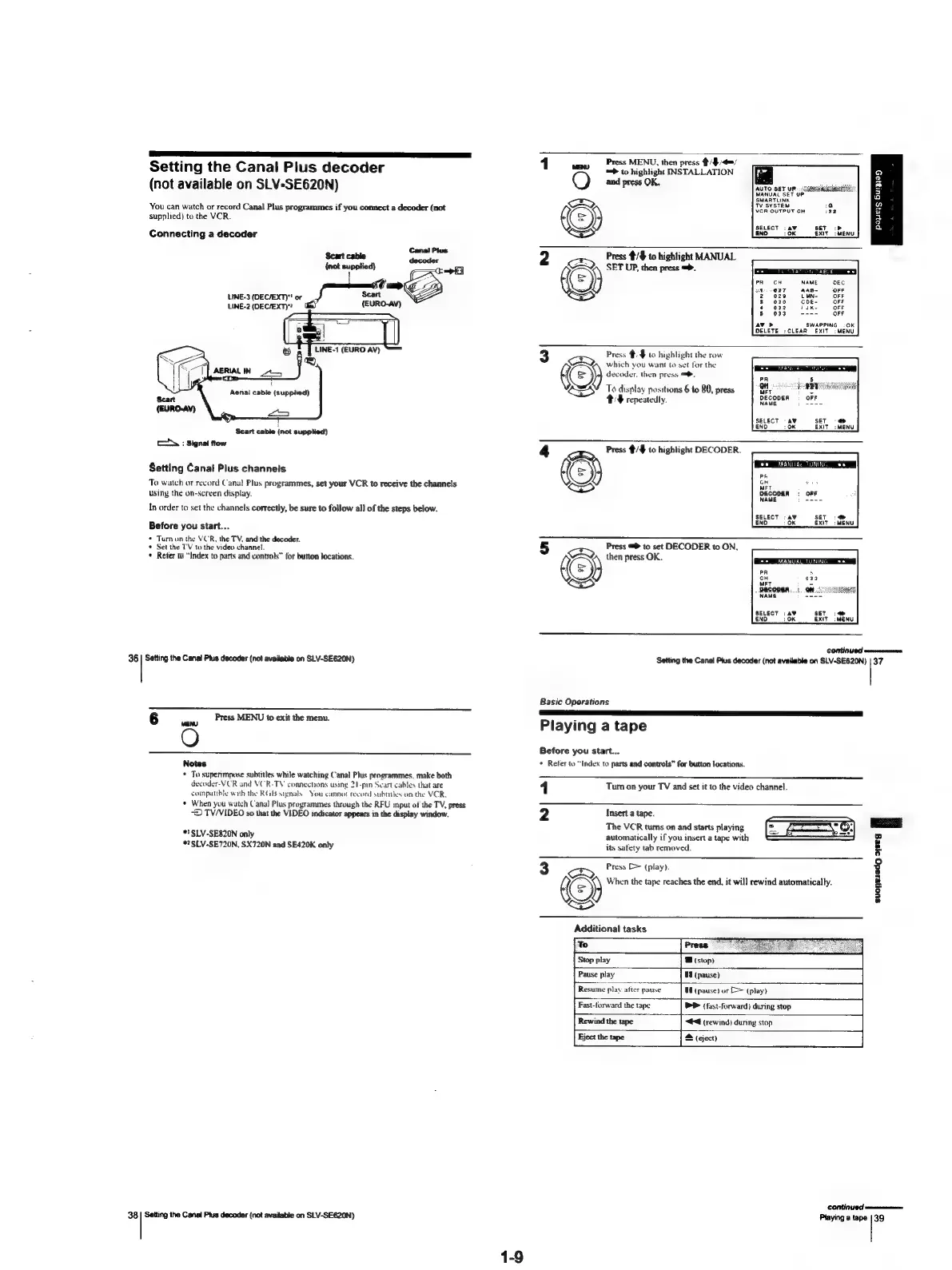
Setting
the
Canal
Plus
decoder
(not
available
on
SLV-SE620N)
You
can
watch
or
record
Canal
Plus
programmes
if
you
connect
a
decoder
(not
supplied)
to
the
VCR.
Connecting
a
decoder
Cana!
Plus
Scart
cable
{not
supplied)
decoder
=a
f
Ss
=
LINE-3
(DEC/EXT)"
or
cart
LINE-2
(DEC/EXT)?
({EURO-AV)
ee
f=
TI)
LINE-1
(EURO
AV)
Scart
cable
(not
supplied)
c=
:
Signal
flow
Setting
Canal
Plus
channels
To
watch
or
record
Canal
Plus
programmes,
set
your
VCR
to
receive
the
channels
using
the
on-screen
display.
In
order
to
set
the
channels
correctly,
be
sure
to
follow
all
of
the
steps
below.
Before
you
start...
*
Turn
on
the
VCR,
the
TV,
and
the
decoder.
*
Set
the
T'V
to
the
video
channel.
*
Reter
to
“Index
to
parts
and
controls”
for
button
locations.
36
|
Setting
the
Canal
Pius
decoder
(not
available
on
SLV-SE620N)
6
Press
MENU
to
exit
the
menu.
(MENU
O
Notes
*
To
superimpose
subtitles
while
watching
Canal
Plus
programmes,
make
both
decoder-VCR
and
VCR-TY
connections
using
21-pin
Scart
cables
that
are
companble
with
the
RGB
signals
You
cannot
record
subtitles
on
the
VCR.
¢
When
you
watch
Canal
Plus
programmes
through
the
RFU
input
of
the
TV,
press
—D
TV/VIDEO
so
that
the
VIDEO
indicator
appears
in
the
display
window.
*'
SLV-SE820N
only
*?SLV-SE720N,
SX720N
and
SE420K
only
38
Setting
the
Canal
Plus
decoder
(not
available
on
SLV-SE620N)
Press
MENU,
then
press
tite
=>
to
highlight
INSTALLATION
‘an
9
@)
and
press
OK.
auto
ser
ve.ccenmwinttiatiitie|
MANUAL
SET
UP.
3
AR
¢
2
9
BET
<>
a
ExIT
2
Press
#/%
to
highlight
MANUAL
ARQ)
SET
UP.
then
press
=.
OFF
OFF
OFF
033
OFF
SWAPPING
:
OK
LCLEAR
EXIT:
MENU
Press
4.
to
highlight
the
row
Ew)
which
you
want
to
set
for
the
(=)
decoder.
then
press
=.
CS
To
display
positions
6
to
80,
press
ST
TF
repeatedly.
OFF
SELECT
-a¥
Set
-
END
OK
EXIT:
MENU
4
Press
#/$
to
highlight
DECODER.
SS
To:
OK
EXIT
;
MENU
5
Press
=
to
set
DECODER
to
ON,
©)
then
press
OK.
SELECT
:
av
SET
END
0K
EXIT
MENU
CONTINUED
wwmnnnuasanen
Setting
the
Canal
Pius
decoder
(not
available
on
SLV-SE620N)
|
37
Basic
Operations
Playing
a
tape
Before
you
start...
*
Refer
to
“index
to
parts
and
controls”
for
button
locations.
-_
Turn
on
your
TV
and
set
it
to
the
video
channel.
Insert
a
tape.
The
VCR
tums
on
and
starts
playing
automatically
if
you
insert
a
tape
with
its
safety
tab
removed.
N
3
Press
D>
(play).
Ke)
When
the
tape
reaches
the
end,
it
will
rewind
automatically.
SS
suoneledgo
sseg
E
Additional
tasks
Stop
play
B
(stop)
Pause
play
HE
(pause)
Resume
play
after
pause
W
(pause)
or
[>
(play)
Fast-forward
the
tape
®P
(fast-forward)
during
stop
Rewind
the
tape
“44
(rewind)
dunng
stop
S
(eject)
continued
Playing
a
tape
|
39

Table of Contents

Related product manuals