EasyManua.ls Logo

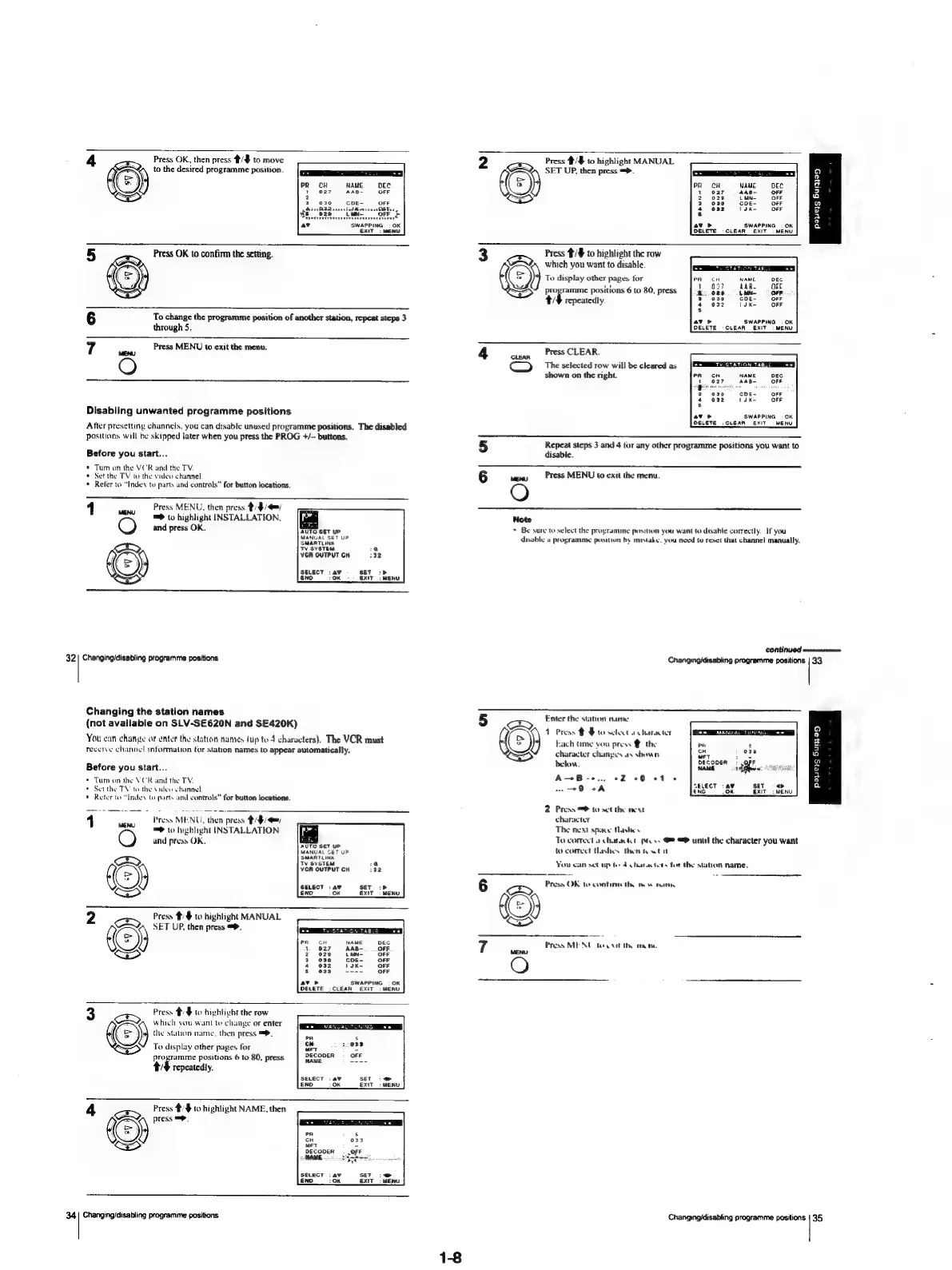
Sony SLV-SE620 - Changing the station names

Sony SLV-SE620
96 pages
Print Icon
To Next Page IconTo Next Page
To Previous Page IconTo Previous Page
Loading...
Press
OK,
then
press
4/$
to
move
2
Press
#/#
to
highlight
MANUAL
to
the
desired
programme
position.
CSET
SET
UP,
then
press
=>.
9
PR cH
NAME
DEC
()
a
g
1
027
AAB-~
OFF
F-}
Pyrers
Serer?
eaeeert
<1
oe
4
v
oT
ands
.
3
ae
Se
Bart
MENU
Shere
cuean
ex
meno
|
iim
Press
OK
to
confirm
the
setting.
3
xB
to
highlight
the
row
which
you
want
to
disable.
(=)
To
display
other
pages
tor
programme
pasitions
6
to
80,
press
4/4
repeatedly.
\uK-
OFF
To
change
the
programme
position
of
another
station,
repeat
steps
3
SWAPPING
:
OK
through
5.
DELETE
-CLEAR
EXIT
:
MENU.
Press
MENU
to
exit
the
menu.
4
Press
CLEAR.
O
(amp)
The
selected
row
will
be
cleared
as
ESTAR
eS
shown
on
the
right.
cH
NAME
DEG.
027
-AAB-
OOF
030
COE~
OFF
O32
sK-
OFF
Disabling
unwanted
programme
positions
-
SWAPPING:
6K:
After
presetting
channels,
you
can
disable
unused
programme
positions.
The
disabled
DeLeTe
Seen
en
were
ositions
will
be
skipped
later
when
you
press
the
PROG
+/—
buttons.
y
PPS
yonr
5
Repeat
steps
3
and
4
tor
any
other
programme
positions
you
want
to
Before
you
start...
disable.
*
Tur
on
the
VCR
and
the
TV.
*
Set
the
TV
to
the
video
channel
6
swe
Press
MENU
to
exit
the
menu.
*
Reter
to
“Indes
to
parts
and
controls”
for
button
locations.
O
1
Press
MENU,
then
press
@/$/4=/
=>
to
highlight
INSTALLATION,
Note
O
and
press
OK.
AUTO
SET
UP
*
Be
sure
to
select
the
programme
posiiien
you
want
to
disable
correctly.
If
you
MANUAL
SET
UP
disable
a
programme
position
hy
mistake.
you
need
to
reset
that
channel
manually.
SMARTLINK
‘TV
SYSTEM
:@
S
YGR
OUTPUT
CH
132
(=)
SELECT
:av
0
SET
>
END
OK
EXIT:
MENU
CONE
MUG
serena
32
|
Changing/disabling
programme
positions
Changing/disabling
programme
positions
|
33
Changing
the
station
names
(not
available
on
SLV-SE620N
and
SE420K)
Enter
the
station
name
y
1
Press
# $
to
select
a
character
we
MANUAL
TU
3)
You
can
change
af
enter
the
stutton
names
(up
to
4
characters).
The
VCR
must
Each
time
you
press
the
a
i
Zz
receive
channel
information
for
stavon
names
to
appear
automatically.
character
changes
ay
shown
Sek
i884,
e
below.
DECODER:
OFF
wv
Before
you
start...
NAME
dahon:
g
+
Tum
on
the
VOR
and
the
TV,
A
r
erent
FN
ie
Weicertae..”
iaeh
cab
Hs
tthe
TV
to
the
video
channel
Sa
aad
END
OK
EXIT
MENU
2
Press
to
set
the
neat
1
Press
MENU,
then
press
#/9/@=
character
oa
;
S
The
next
space
Mashes
=>
to
highlight
INSTALLATION
ft
NENT
spree
Me
O
and
press
OK.
bade
To
correcta
character
pts.
@
unul
the
character
you
want
MANUAL
Ser
UP
to
concet
thashes
then
new
tat
(eS)
wevevew
Si
‘gS
You
can
sct
up
te
4
chatacters
for
the
station
name,
-
Press
OK
to
contin
thy
mow
tue
A
ERENT
haw
6
B
2
Press
#/§
to
highlight
MANUAL
6
2.
SET
UP,
then
press
=.
ERSTE
TUTSTCERETS
Ke)
7
Press
MENU
tet
thy
rane.
O
SWAPPING
:
OK
CLEAR
EXiT
:
MENU
3
Press
#:$
to
highlight
the
row
which
you
want
to
change
or
enter
(=)
the
station
name.
then
press
=.
7
To
display
other
pages
for
tal
aye
programme
positions
6
to
80,
press
of
4
Tepeatedly.
SseT
-@
ExT:
Press
#/$
to
highlight
NAME,
then
press
=.
D
))
033
|
Cy)
(
DECODER
.
,oFF
AME
Sones
SELECT
:4¥
SET:
END
10K
EXIT
34|
Changing/disabling
programme
positions
Changing/disabling
programme
positions
|
35
1-8

Table of Contents

Related product manuals