EasyManua.ls Logo

Sony SLV-SE620 - Holder Clutch Ass y Removal

Sony SLV-SE620
96 pages
Print Icon
To Next Page IconTo Next Page
To Previous Page IconTo Previous Page
Loading...
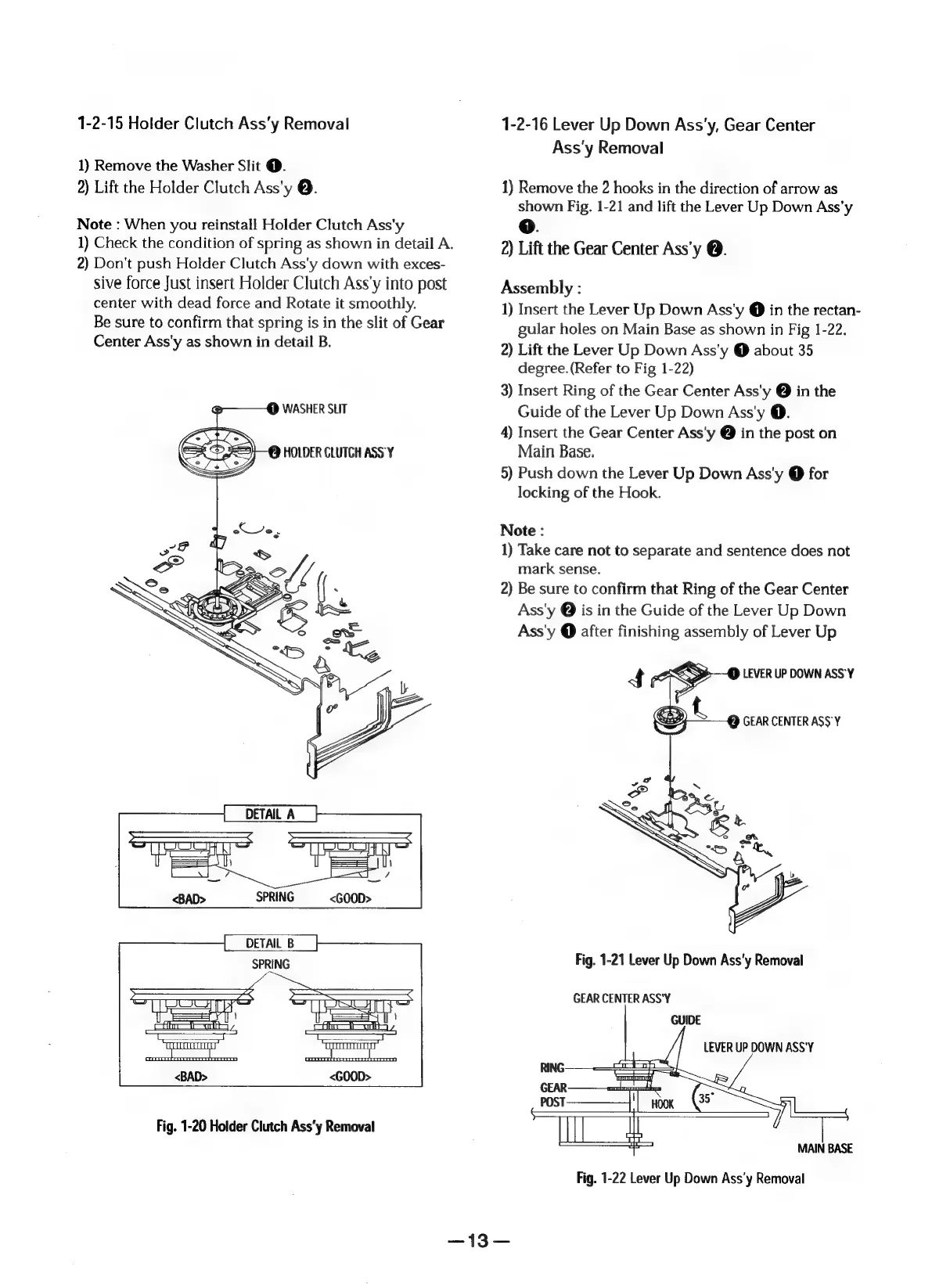
1-2-15
Holder
Clutch
Ass’‘y
Removal
1)
Remove
the
Washer
Slit
@.
2)
Lift
the
Holder
Clutch
Ass’y
.
Note
:
When
you
reinstall
Holder
Clutch
Ass'y
1)
Check
the
condition
of
spring
as
shown
in
detail
A.
2)
Don't
push
Holder
Clutch
Ass'y
down
with
exces-
sive
force
Just
insert
Holder
Clutch
Ass’y
into
post
center
with
dead
force
and
Rotate
it
smoothly.
Be
sure
to
confirm
that
spring
is
in
the
slit
of
Gear
Center
Ass'y
as
shown
in
detail
B.
@——@
WASHER
SLIT
O
HOLDER
CLUTCH
ASS
Y
SPRING
<GOOD>
Fig.
1-20
Holder
Clutch
Ass'y
Removal
1-2-16
Lever
Up
Down
Ass'y,
Gear
Center
Ass'y
Removal
1)
Remove
the
2
hooks
in
the
direction
of
arrow
as
shown
Fig.
1-21
and
lift
the
Lever
Up
Down
Ass’y
oO.
2)
Lift
the
Gear
Center
Ass’y
@.
Assembly
:
1)
Insert
the
Lever
Up
Down
Ass'y
@
in
the
rectan-
gular
holes
on
Main
Base
as
shown
in
Fig
1-22.
2)
Lift
the
Lever
Up
Down
Ass'y
@
about
35
degree.
(Refer
to
Fig
1-22)
3)
Insert
Ring
of
the
Gear
Center
Ass'y
@
in
the
Guide
of
the
Lever
Up
Down
Ass'y
@.
4)
Insert
the
Gear
Center
Ass'y
@
in
the
post
on
Main
Base.
5)
Push
down
the
Lever
Up
Down
Ass'y
@
for
locking
of
the
Hook.
Note
:
1)
Take
care
not
to
separate
and
sentence
does
not
mark
sense.
2)
Be
sure
to
confirm
that
Ring
of
the
Gear
Center
Ass'y
@
is
in
the
Guide
of
the
Lever
Up
Down
Ass'y
@
after
finishing
assembly
of
Lever
Up
4
4
lla
LEVER
UP
DOWN
ASS'Y
f,
P)
GEAR
CENTER
ASS'Y
7
Fig.
1-21
Lever
Up
Down
Ass’y
Removal
GEAR
CENTER
ASS'Y
GUIDE
LEVER
UP
DOWN
ASS'Y
MAIN
BASE
Fig.
1-22
Lever
Up
Down
Ass'y
Removal
=

Table of Contents

Related product manuals