EasyManua.ls Logo

Sony SLV-SE620 - NVRAM Option Setting

Sony SLV-SE620
96 pages
Print Icon
To Next Page IconTo Next Page
To Previous Page IconTo Previous Page
Loading...
5-3
Head
Switching
Point
Adjustment
1)
Playback
the
alignment
tape.
2)
Press
the
“TEST”
button
on
Main
PCB/Function
PCB
to
set
the
adjustment
mode.
(See
Fig.
5-2
and
5-3)
3)
Press
the
“SP/LP”
button
of
remote
control
then
adjustment
is
operated
automatically.
(See
Fig.
5-1)
4)
Turn
the
Power
off.
5-4
NVRAM
Option
Setting
1)
NVRAM
Option
is
adjusted
at
production
line
basically.
2)
In
case
Micom
(IC601)
and
NVRAM
(IC605
;
EEPROM)
is
replaced,
be
sure
to
set
the
corresponding
option
number
of
the
reqaired
model.
(If
the
option
is
not
set,
the
unit
is
not
operated.)
1)
Press
the
“TEST”
button
on
Main
PCB/Function
PCB
to
set
the
adjustment
mode.
(See
Fig.
5-2
and
5-3)
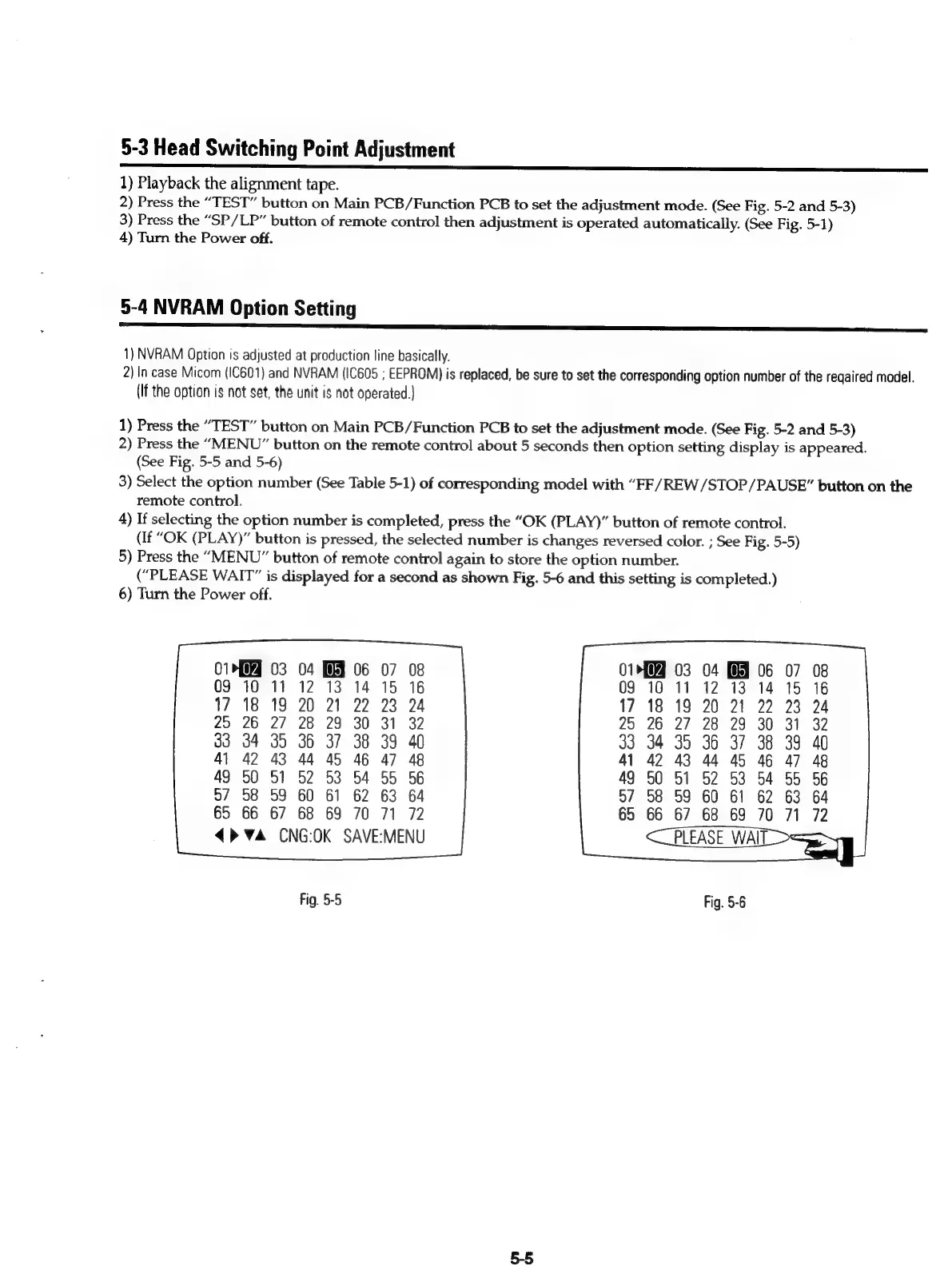
2)
Press
the
“MENU”
button
on
the
remote
control
about
5
seconds
then
option
setting
display
is
appeared.
(See
Fig.
5-5
and
5-6)
3)
Select
the
option
number
(See
Table
5-1)
of
corresponding
model
with
“FF/REW/STOP/PAUSE”
button
on
the
remote
control.
4)
If
selecting
the
option
number
is
completed,
press
the
“OK
(PLAY)”
button
of
remote
control.
(If
“OK
(PLAY)”
button
is
pressed,
the
selected
number
is
changes
reversed
color.
;
See
Fig.
5-5)
5)
Press
the
“MENU”
button
of
remote
control
again
to
store
the
option
number.
(“PLEASE
WAIT”
is
displayed
for
a
second
as
shown
Fig.
5-6
and
this
setting
is
completed.)
6)
Turn
the
Power
off.
04 06
12 13
14
20
21
22
28
29
30
36
37
38
04
06
13
14
21
22
29
30
dh
38
44
45
46
92 53
54
60
61
62
68
69
70
<>
Va
CNG:OK
SAVE:MENU
45
46
03
54
61
62
Fig.
5-5
Fig.
5-6
5-5

Table of Contents

Related product manuals