EasyManua.ls Logo

Sony SLV-SE620 - Adjusting the Picture Seeeccnnscesecrccscccscccccacceces; Reducing the Vcrs Power CONSUMPLION; Changing Menu Options Sd Eeeasveerecensasensesscnesenenccseccoccccsesssccoscossecs

Sony SLV-SE620
96 pages
Print Icon
To Next Page IconTo Next Page
To Previous Page IconTo Previous Page
Loading...
a
a
er
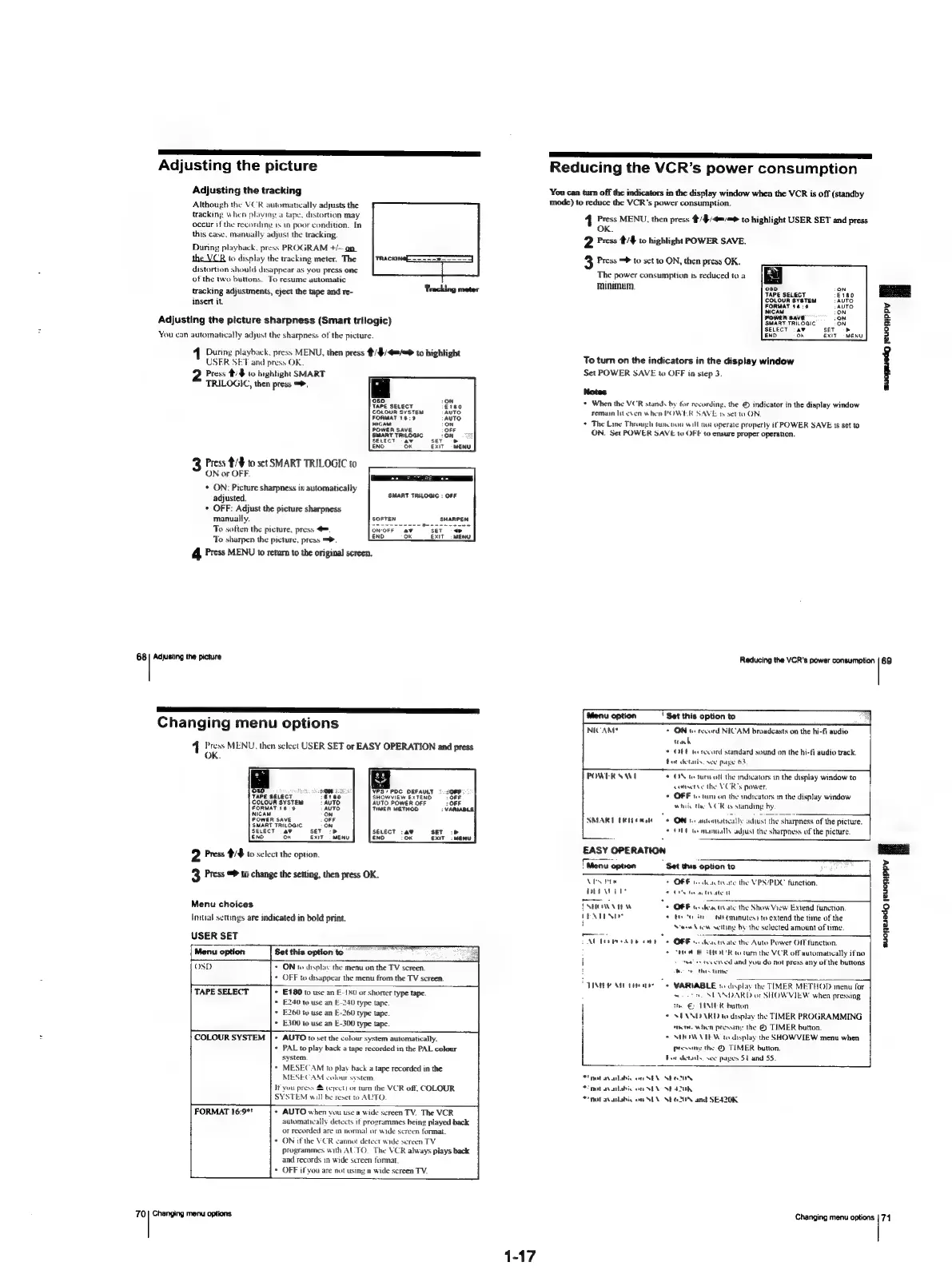
Adjusting
the
picture
Reducing
the
VCR’s
power
consumption
Adjusting
the
tracking
You
can
turn
off
the
indicators
in
the
display
window
when
the
VCR
is
off
(standby
Although
the
VCR
automatically
adjusts
the
mode)
to
reduce
the
VCR’s
power
consumption.
tracking
when
playing
a
tape.
distortion
may
1
Press
MENU,
then
press
4/¢/4=/=>
to
highlight
USER
SET
and
press
occur
if
the
recording
is
in
poor
condition.
In
OK.
this
case,
manually
adjust
the
tracking.
2
Press
¢/#
to
highlight
POWER
SAVE
During
playback,
press
PROGRAM
+/~
on
the
VCR
to
display
the
tracking
meter.
The
_
ee
eer
3
Press
=
to
set
to
ON,
then
press
OK.
distortion
should
disappear
as
you
press
one
The
power
consumption
is
reduced
to
a
a
of
the
two
buttons.
To
resume
automatic
minimum
as
- . e
se
O30
tracking
adjustments,
eject
the
tape
and
re-
Tracking
meter
TAPE
SELECT
:
3
COLOUR
SYSTEM
Insert
it.
FORMAT
18:0
MAM
Adjusting
the
picture
sharpness
(Smart
trilogic)
SMART
TRILOGIC
a
You
can
automatically
adjust
the
sharpness
of
the
picture.
ene
ok
adh
To
turn
on
the
indicators
in
the
display
window
Set
POWER
SAVE
to
OFF
in
step
3.
2
Press
4:%
to
highlight
SMART
suopesedg
jeuonippy
H
TRILOGIC,
then
press
=,
ee
acicee
:
*
When
the
VCR
stands
by
for
recording,
the
©
indicator
in
the
display
window
CoLoun
system
remain
lit
even
when
POWER
SAVE
ty
set
ta
ON
coe
:
*
The
Line
Through
tuncnon
will
noi
operate
properly
if
POWER
SAVE
1s
set
to
POWER
SAVE
ON.
Set
POWER
SAVE
to
OFF
to
ensure
proper
operation.
ExIT
MENU
Press
#/¥
to
set
SMART
TRILOGIC
to
ON
or
OFF.
¢
ON:
Picture
sharpness
is
automatically
adjusted.
*
OFF:
Adjust
the
picture
sharpness
manually.
To
sotten
the
picture,
press
To
sharpen
the
picture,
press
=.
4
Press
MENU
to
return
to
the
original
screen.
68
|
Adjusting
the
picture
Reducing
the
VCR's
power
consumption
\”
ny
a
a
EET
Changing
menu
options
1
Press
MENU,
then
select
USER
SET
or
EASY
OPERATION
and
press
OK.
Menu
option
NICAM®
'
Set
this
option
to
+
ON
te
record
NICAM
broadcasts
on
the
hi-fi
audio
track
*
OFF
te
sccord
standard
sound
on
the
hi-fi
audio
track.
fet
chetarls,
see
pape
63
©
OS
tetern
off
the
mdicators
in
the
display
window
to
conserve
The
VCR's
power,
*
OFF
1.
tum
on
the
indicators
in
the
display
window
winic
the
VCK
ty
standing
by,
POWER
SWE
08D
r
VPS/
PDC
DEFAULT
TAPE
SELECT
SHOWVIEW
EXTEND
COLOUR
SYSTEM
AUTO
POWER
OFF
TIMER
METHOD
FORMAT
16
°9
NICAM
POWER
SAVE
SMART
TRILOGIC
SELECT
a9
sev
:
SELECT
:a¥
sET
:
END
Ok
EXIT
END
oK
Exit
SMART
ERI
ema
©
ON
to
automatically
adiust
the
2
ONT
te
manually
adjust
the
sharpness
of
the
picture
EASY
OPERATION
2
Press
#/$
to
select
the
option.
Se
|
Menu
option
3
Press
@
to
change
the
setting,
then
press
OK.
"
Set
this
option
to
suonersdo
jeuonippy
fl
VES
ite
+
OFF
1.
doactivate
the
VPS/PDC
function.
DEI
Wad
SOUPS
te
cove
Menu
choices
{SHOWN
TE
Ww
©
OFF
us
desctivate
the
Show
View
Extend
function.
Initial
settings
are
indicated
in
bold
print.
PENTENG?
+
ty
to
a
of
(minutes?
to
extend
the
time
of
the
i
Steew
View
setting
by
the
selected
amount
of
time.
=
.
—
USER
SET
CAL
TOAD)
cath
6
OBB
so
dentate
the
Auto
Power
Off
function.
Menu
option
Set
this
option
to
ree
o
CHER
BR
SHOU'R
totum
the
VCR
off
automatically
if'no
=
tea’
es
teverved
and
you
do
not
press
any
of
the
buttons
OSD
ON
to
display
the
menu
on
the
TV
screen.
hoor
this
time:
OFF
to
disappear
the
menu
from
the
TV
screen.
STINE
R
AIL
Ttad
+
VARIABLE
16
display
the
TIMER
METHOD
menu
for
TAPE
SELECT
E180
to
use
an
E-150
or
shorter
type
tape.
E240
to
use
an
E-240
type
tape
E260
tu
use
an
E-260
type
tape.
E300
to
use
an
E-300)
type
tape.
COLOUR
SYSTEM
AUTO
to
set
the
colour
system
automatically.
PAL
to
play
back
a
tape
recorded
in
the
PAL
colour
system.
MESECAM
to
play
back
a
tape
recorded
in
the
MESECAM
colour
system
It
you
press
(erect)
or
tum
the
VCR
off.
COLOUR
SYSTEM
will
be
reset
to
AUTO.
FORMAT
16:97!
+
AUTO
when
vou
use
a
wide
screen
TV.
The
VCR
automatically
detects
it
programmes
being
played
back
or
recorded
are
in
normal
or
wide
screen
format.
+
ONifthe
¥CR
cannot
detect
wide
screen
TV
programmes
with
AUTO.
The
VCR
always
plays
back
and
records
in
wide
screen
format.
©
OFF
if
you
are
not
using
a
wide
screen
TV.
70|
Changing
menu
options
1-17
stn
SEANDARD
or
SHOW
VIEW
when
pressing
tthe
€
TIMER
button
SPANIARD
to
display
the
TIMER
PROGRAMMING
fnote
when
pressing
the
@
TIMER
button.
SHON
VTE
W
to
display
the
SHOWVIEW
menu
when
Prossiny
the
©
TIMER
button.
For
details.
see
pages
$1
and
55.
*
nat
avalabic
on
SEX
SEO
OUN
nol
aailebio
on
SEN
NE
42UK
not
avaitabis
on
SEN
SEO
20N
and
SE420K.
Changing
menu
options
|
74

Table of Contents