EasyManua.ls Logo

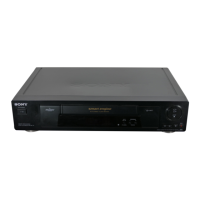
Sony SLV-SE620 - Additional Informatoin

Sony SLV-SE620
96 pages
Print Icon
To Next Page IconTo Next Page
To Previous Page IconTo Previous Page
Loading...
Additional
information
=
es
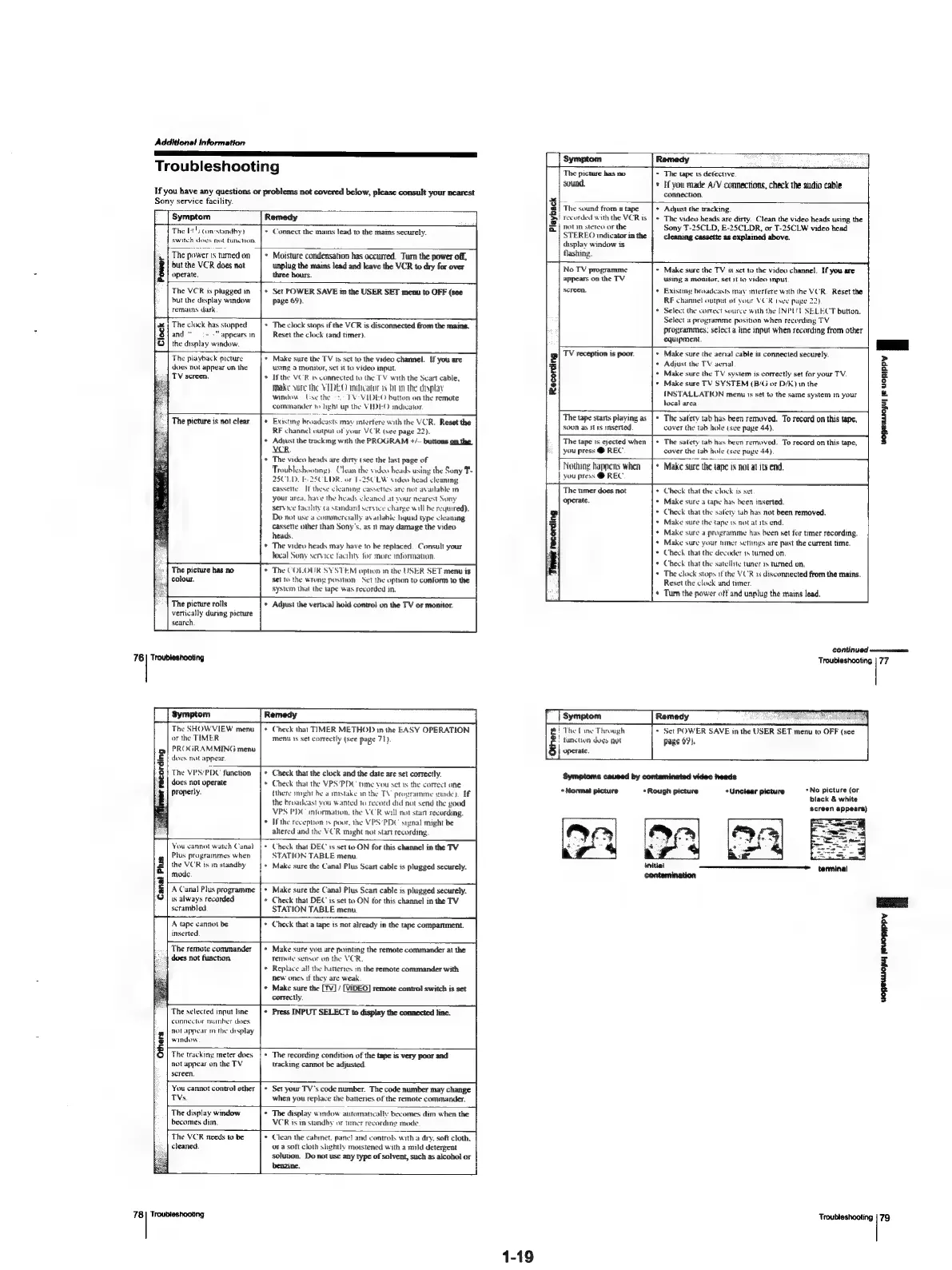
Troubleshooting
If
you
have
any
questions
or
problems
not
covered
below,
please
consult
your
nearest
Sony
service
facility.
Symptom
Remedy
The
1)
(onestandby)
switch
does
not
function.
+
Connect
the
mais
lead
to
the
mams
securely.
The
power
1s
tumed
on
but
the
VCR
does
not
operate.
+
Moisture
condensation
has
occurred.
Turn
the
power
off,
unplug
the
mains
lead
and
leave
the
VCR
to
dry
for
over
three
hours.
The
VCR
is
plugged
in
but
the
display
window
remains
dark
Set
POWER
SAVE
in
the
USER
SET
menu
to
OFF
(see
page
69).
The
clock
has
stopped
and“
:-
-"
appears
in
the
display
window.
The
clock
stops
if
the
VCR
is
disconnected
from
the
mains.
Reset
the
clock
(and
timer).
The
playback
picture
does
not
appear
on
the
TV
screen.
“|
Make
sure
the
TV
is
set
to
the
video
channel.
Ifyou
are
ustng
a
monitor,
set
it
to
video
input
If
the
VCR
ts
connected
to
the
TV
with
the
Scart
cable,
Make
sure
the
VIDEO
indicator
ws
hin
the
display
window
Use
the
=
TV
VIDEO
button
on
the
remote
commander
to
light
up
the
VIDEO
indicator.
The
picture
is
not
clear.
The
picture
has
no
|
colour.
The
picture
rolls
vertically
during
picture
search,
76
|
Troubleshooting
*
Existing
broadcasts
may
intertere
with
the
VCR.
Reset
the
RF
channel
output
of
your
VCR
(see
page
22).
+
Adjust
the
tacking
with
the
PROGRAM
+/-—
buttons
on
the
VCR.
*
The
video
heads
are
dirty
(see
the
last
page
of
Troubleshoonng).
Clean
the
video
heads
using
the
Sony
T-
25C1.D.
F-2SCLDR.
of
T-25CLW
video
head
cl
cassette.
[f
these
cleaning
cassettes
are
not
ay
your
area,
have
the
heads
cleaned
at
your
nearest
Sony
service
ticility
(a
standard
service
charge
woll
be
required).
Do
not
use
a
commercially
available
hquid
type
cleaning
cassette
other
than
Sony's,
as
11
may
damage
the
video
heads.
*
The
video
heads
may
have
to
be
replaced.
Consult
your
local
Sony
service
facility
for
more
information.
The
COLOUR
SYSTEM
option
in
the
USER
SET
menu
is
Set
to
the
wrong
position.
Set the
option
to
conform
to
the
system
that
the
tape
Was
recorded
in,
¢
Adjust
the
vertical
hold
contrei
on
the
TV
or
monitor.
The
SHOW
VIEW
menu
or
the
TIMER
PROGRAMMING
menu
does
not
appear,
*
Check
that
TIMER
METHOD
in
the
EASY
OPERATION
menu
1s
set
correctly
(see
page
71).
The
VPS/PDC
function
does
not
operate
Properly.
Check
that
the
clock
and
the
date
are
set
correctly.
©
Check
that
the
VPS‘PDC
time
you
set
is
the
correct
one
(there
might
be
a
mstake
in
the
TV
programme
inde).
If
the
broadcast
you
wanted
to
record
did
not
send
the
good
VPS
PDC
intormation,
the
VCR
will
not
start
recording.
©
If
the
reception
1s
pour,
the
VPS‘PDC
suznal
might
be
altered
and
the
VCR
might
not
start
recording.
You
cannot
watch
Canal
Plus
programmes
when
the
VCR
is
in
standby
mode
+
Check
that
DEC
is
set
to
ON
for
this
channel
in
the
TV
STATION
TABLE
menu.
*
Make
sure
the
Canal
Plus
Scart
cable
is
plugged
securely.
A
Canal
Plus
programme
ts
always
recorded
scrambled
Canal
Plus
A
tape
cannot
be
inserted
Make
sure
the
Canal
Plus
Scart
cable
is
plugged
securely.
*
Check
that
DEC
is
set
to
ON
for
this
channel
in
the
TV
STATION
TABLE
menu.
Check
that
a
tape
is
not
already
in
the
tape
compartment.
The
remote
commander
does
not
function.
Make
sure
vou
are
pointing
the
remote
commander
at
the
Temote
sensor
on
the
VCR.
Replace
all
the
batteries
in
the
remote
commander
with
new
ones
if
they
are
weak
Make
sure
the
[Tv]
/
[VIDEO
correctly.
remote
control
switch
is
set
The
selected
input
line
connector
number
does
Nor
appear
im
the
display
window
*
Press
INPUT
SELECT
to
display
the
connected
line.
Others
The
trackiny
meter
does
not
appear
on
the
TV
screen.
The
recording
condition
of
the
tape
is
very
poor
and
tacking
cannot
be
adjusted.
You
cannot
control
other
TVs.
Set
your
TV's
code
number.
The
code
number
may
change
when
you
replace
the
batteries
of
the
remote
commander.
The
display
window
becomes
dim.
°
The
display
window
automatically
becomes
dim
when
the
VCR
is
in
standby
of
tmer
recording
mode.
The
VCR
needs
to
be
cleaned.
Clean
the
cabinet.
pane]
and
controls
with
a
dry.
soft
cloth.
ora
soft
cloth
slightly
moistened
with
a
mild
detergent
solution.
Do
not
use
any
type
of
solvent,
such
as
alcohol
or
benzine.
78
|
Troubleshooting
1-19
Symptom
Remedy
inna
The
picture
has
no
sound.
*
The
tape
ts
detective.
*
If
you
made
A/V
connections,
check
the
audio
cable
connection.
The
sound
from
a
tape
P
recorded
with
the
VCR
is
notin
sterea
or
the
STEREO
indicator
in
the
display
window
is
flashing.
*
Adjust
the
tracking.
*
The
video
heads
are
dirty.
Clean
the
video
heads
using
the
Sony
T-2SCLD,
E-25CLDR,
or
T-25CLW
video
head
cleaning
cassette
as
explained
above.
No
TV
programme
appears
on
the
TV
screen.
+
Make
sure
the
TV
is
set
to
the
video
channel.
If
you
are
using
a
monitor,
set
it
to
video
mput.
Existing
broadcasts
may
interfere
with
the
VCR.
Reset
the
RF
channel
output
ef
your
VCR
(see
page
22)
*
Select
the
correct
source
with
the
INPUT
SELECT
button,
Select
a
programme
position
when
recording
TV
programmes;
select
a
line
input
when
recording
from
other
equipment.
TV
reception
is
poor.
*
Make
sure
the
aenal
cable
is
connected
securely.
*
Adjust
the
TV
aenal
+
Make
sure
the
TV
system
is
correctly
set
for
your
TV.
»
Make
sure
TV
SYSTEM
(B/Gi
or
D/K)
in
the
INSTALLATION
menu
ts
set
to
the
same
system
in
your
local
area
The
tape
starts
playing
as
|
SOON
as
11
is
inserted.
*
The
safety
tab
has
been
removed,
To
record
on
this
tape,
cover
the
tab
hole
(see
pave
44).
The
tape
1s
ejected
when
you
press
@
REC.
*
The
satety
tab
has
been
removed.
To
record
on
this
tape,
cover
the tab
hole
(see
page
44)
Nothing
happens
when
|
you
press
@
REC.
Make
sure
the
tape
is
not
at
its
end.
The
mer
does
not
operate.
P|
The
[ine
Through
:
function
dogs
not
operate
+
Check
that
the
clo
+
Make
sure
a
tape
has
been
inserted.
*
Check
that
the
safety
tab
has
not
been
removed.
+
Make
sure
the
tape
ts
not
atats
end.
+
Make
sure
a
programme
has
been
set
for
timer
recording.
+
Make
sure
your
nmer
settings
are
past
the
current
time.
Check
that
the
decoder
1s
tumed
on.
Check
that
the
satellite
tuner
3s
turned
on,
The
clock
stops
ifthe
VCR
as
disconnected
from
the
mains.
Reset
the
clock
and
timer.
is
Set
Turn
the
power
off
and
unplug
the
mains
lead.
wopeuUojul
je
UopIPpY
i
CORTINUOC
serrata
Troubleshooting
|
77
+
Set
POWER
SAVE
in
the
USER
page
07).
Symptoms
caused
by
contaminated
video
heads
«Normal
picture
initial
contamination
+
Rough
picture
*No
picture
(or
black
&
whi
screen
appears)
*Unctear
picture
terminal
Troubleshooting
|
79

Table of Contents

Related product manuals