EasyManua.ls Logo

Sony SLV-SE620 - NICAM System Features; Searching using the index function

Sony SLV-SE620
96 pages
Print Icon
To Next Page IconTo Next Page
To Previous Page IconTo Previous Page
Loading...
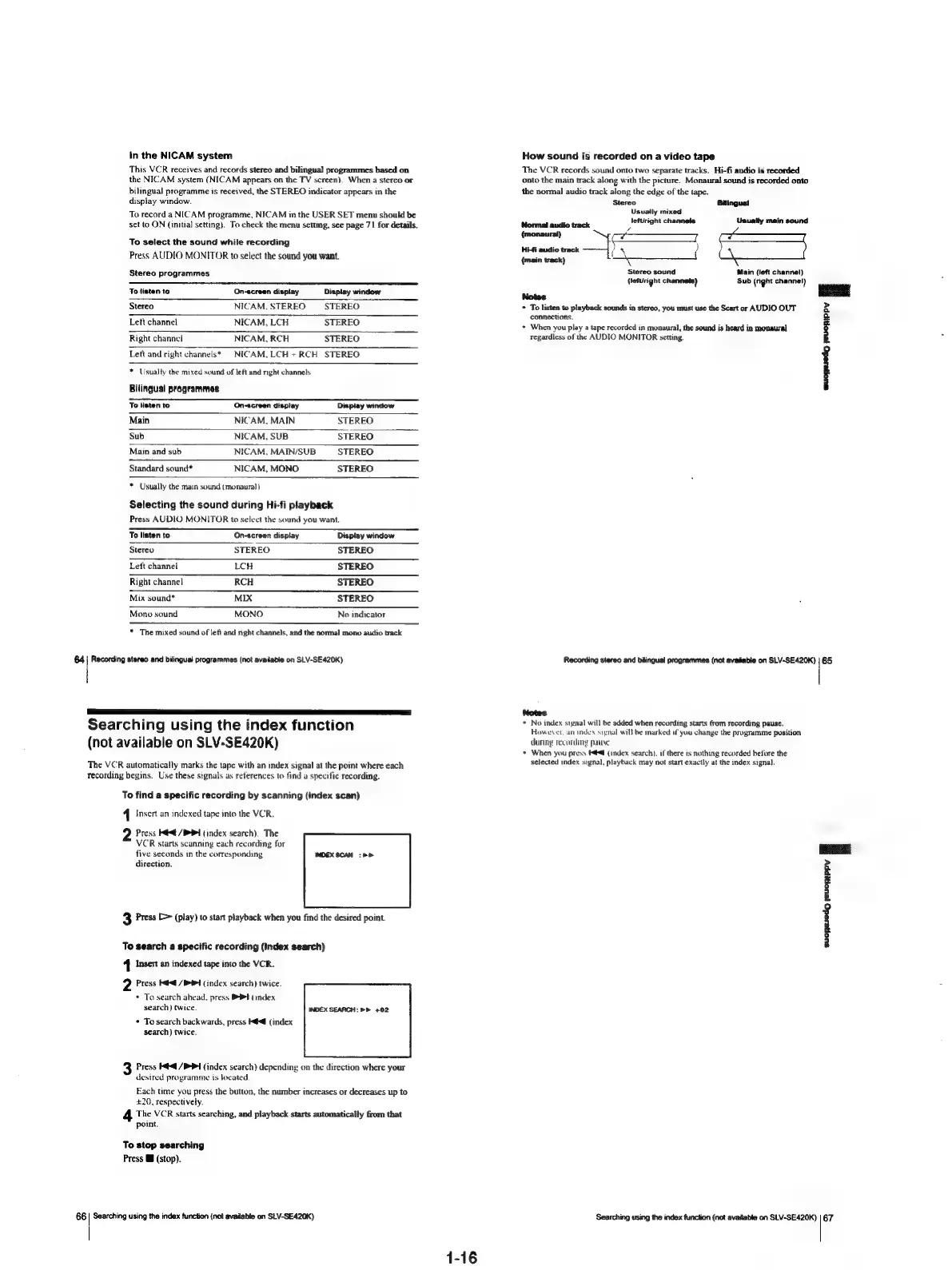
in
the
NICAM
system
This
VCR
receives
and
records
stereo
and
bilingual
programmes
based
on
the
NICAM
system
(NICAM
appears
on
the
TV
screen}.
When
a
stereo
or
bilingual
programme
is
received,
the
STEREO
indicator
appears
in
the
display
window.
To
record
a
NICAM
programme,
NICAM
in
the
USER
SET
menu
should
be
set
to
ON
{initial
setting).
To
check
the
menu
setting,
see
page
71
for
details.
To
select
the
sound
while
recording
Press
AUDIO
MONITOR
to
select
the
sound
you
want.
Stereo
programmes
To
listen
to
On-screen
display
Display
window
Stereo
NICAM,
STEREO STEREO
Left
channel
NICAM,
LCH
STEREO
Right
channel
NICAM,
RCH
STEREO
Left
and
right
channels*
NICAM,LCH
+
RCH
STEREO
*
Usually
the
mixed
sound
of
left
and
right
channels
Bilingual
programmes
To
listen
to
On-screen
display
Display
window
Main
NICAM,
MAIN
STEREO
Sub
NICAM,
SUB
STEREO
Main
and
sub
NICAM,
MAIN/SUB
STEREO
Standard
sound*
NICAM,
MONO
STEREO
*
Usually
the
main
sound
(monaural)
Selecting
the
sound
during
Hi-fi
playback
Press
AUDIO
MONITOR
to
select
the
sound
you
want.
To
listen
to
On-screen
display
Display
window
Stereo
STEREO
STEREO
Left
channel
LCH
STEREO
Right
channel
RCH
STEREO
Mix
sound*
MIX
STEREO
Mono
sound
MONO
No
indicator
*
The
mixed
sound
of
left
and
nght
channels,
and
the
normal
mono
audio
track
64
|
Recording
stereo
and
bilingual
programmes
(not
available
on
SLV-SE420K)
Searching
using
the
index
function
(not
available
on
SLV-SE420K)
The
VCR
automatically
marks
the
tape
with
an
index
signal
at
the
point
where
each
recording
begins.
Use
these
signals
as
references
to
tind
a
specific
recording.
To
find
a
specific
recording
by
scanning
(index
scan)
1
Insert
an
indexed
tape
into
the
VCR.
2
Press
K@
/B>P
1
(index
search).
The
VCR
starts
scanning
each
recording
for
five
seconds
in
the
corresponding
direction.
3
Press
[>
(play)
to
start
playback
when
you
find
the
desired
point.
To
search
a
specific
recording
(Index
search)
1
Insert
an
indexed
tape
into
the
VCR.
2
Press
Ke
/PO4
(index
search)
twice.
*
To
search
ahead,
press
PAPI
(index
search)
twice.
INDEX
SEARCH:
PP
+02
¢
To
search
backwards,
press
K@
(index
search)
twice.
Press
Ke
/P
Pl
(index
search)
depending
on
the
direction
where
your
desired
programme
is
located
Each
time
you
press
the
button,
the
number
increases
or
decreases
up
to
+20,
respectively.
The
VCR
starts
searching,
and
playback
starts
automatically
from
that
point.
To
stop
searching
Press
MB
(stop).
66
|
Searching
using
the
index
function
(not
available
on
SLV-SE420K)
1-16
How
sound
is
recorded
on
a
video
tape
The
VCR
records
sound
onto
two
separate
tracks.
Hi-fi
audio
is
recorded
onto
the
main
track
along
with
the
picture.
Monaural
sound
is
recorded
onto
the
normal
audio
track
along
the
edge
of
the
tape.
Stereo
Bilingual
Usuatly
mixed
Py
leftright
channels
Uaually
main
sound
(monaural)
oo
$=
ei
Of
(main
track)
y
Main
(left
channel)
Sub
(right
channel)
Stereo
sound
(lefuright
channets)
Notes
*
To
listen
to
playback
sounds
in
stereo,
you
must
use
the
Scart
or
AUDIO
OUT
connections.
+
When
you
play
a
tape
recorded
in
monaural,
the
sound
is
heard
in
monaural
regardless
of
the
AUDIO
MONITOR
setting.
suopeedg
euopippy
i
Recording
stereo
and
bilingual
programmes
(not
available
on
SLV-SE420K)
|
65
Notes
*
No
index
signal
will
be
added
when
recording
starts
from
recording
pause.
However,
an
index
signal
wil}
be
marked
if
you
change
the
programme
position
dunny
recording
pauye
+
When
you
press
Hé<@
(index
search).
if
there
ts
nothing
recorded
before
the
selected
index
signal,
playback
may
not
start
exactly
at
the
index
signal.
suopeedy
jeucyIppy
f
Searching
using
the
index
function
(not
available
on
SLV-SE420K)
|
67

Table of Contents

Related product manuals