EasyManua.ls Logo

Sony SLV-SE620 - Tape Transport System Adjustment; ACE Head Assembly Adjustment

Sony SLV-SE620
96 pages
Print Icon
To Next Page IconTo Next Page
To Previous Page IconTo Previous Page
Loading...
2-2
Tape
Transport
System
Adjustment
SSS
SSS
SS
SS
When
parts
are
replaced,
perform
the
required
adjustments
by
referring
to
procedures
for
the
tape
transport
system.
If
there
are
any
changes
to
the
tape
path,
first
run
a
T-120
tape
and
make
sure
excessive
tape
wrinkle
does
not
occur
at
the
tape
guides.
1)
If
tape
wrinkle
is
observed
at
the
guide
roller
§,
T,
turn
the
guide
roller
S,
T
until
wrinkle
disappears.
2)
If
the
tape
wrinkle
is
still
observed
at
the
tape
guide,
perform
the
tilt
adjustment
of
the
ACE
head.
(See
page
5-3
of
the
Service
Manual
for
Test
Point
Locations.)
2-2-1
ACE
Head
Assembly
Adjustment
2-2-1(a)
ACE
HEAD
HEIGHT
ADJUSTMENT
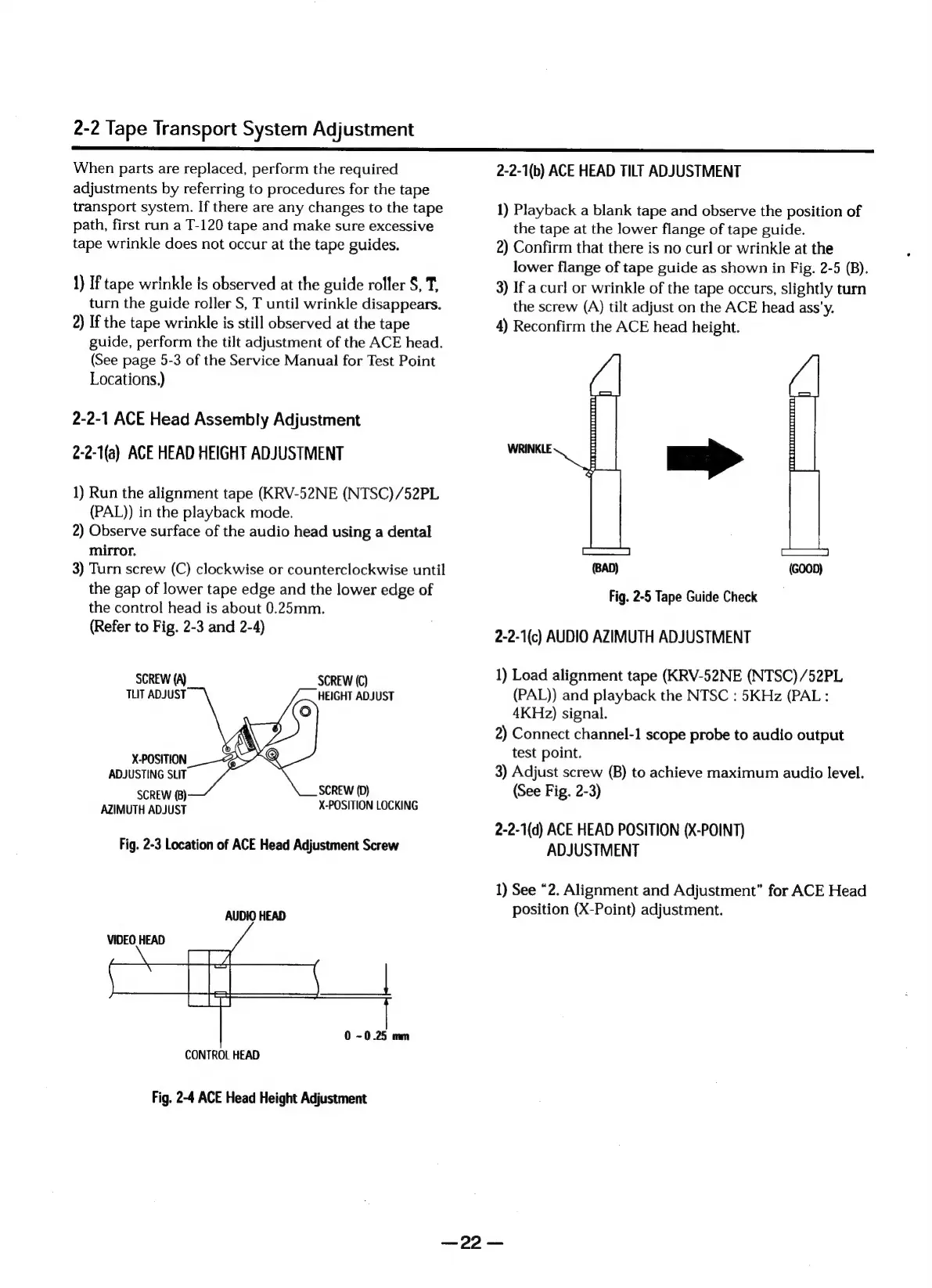
1)
Run
the
alignment
tape
(KRV-52NE
(NTSC)
/52PL
(PAL))
in
the
playback
mode.
2)
Observe
surface
of
the
audio
head
using
a
dental
mirror.
3)
Turn
screw
(C)
clockwise
or
counterclockwise
until
the
gap
of
lower
tape
edge
and
the
lower
edge
of
the
control
head
is
about
0.25mm.
(Refer
to
Fig.
2-3
and
2-4)
SCREW
(A)
SCREW
(C)
TUT
ADJUST
HEIGHT
ADJUST
X-POSITION
_-&
ADJUSTING
SLIT
SCREW
(0)
SCREW
(8)
AZIMUTH
ADJUST
X-POSITION
LOCKING
Fig.
2-3
Location
of
ACE
Head
Adjustment
Screw
AUDIO
HEAD
VIDEO
HEAD
|
0
~0.25
mm
CONTROL
HEAD
Fig.
2-4
ACE
Head
Height
Adjustment
2-2-1(b)
ACE
HEAD
TILT
ADJUSTMENT
1)
Playback
a
blank
tape
and
observe
the
position
of
the
tape
at
the
lower
flange
of
tape
guide.
2)
Confirm
that
there
is
no
curl
or
wrinkle
at
the
lower
flange
of
tape
guide
as
shown
in
Fig.
2-5
(B).
3)
If
a
curl
or
wrinkle
of
the
tape
occurs,
slightly
turn
the
screw
(A)
tilt
adjust
on
the
ACE
head
ass’y.
4)
Reconfirm
the
ACE
head
height.
(BAD)
(GOOD)
Fig.
2-5
Tape
Guide
Check
2-2-1(c)
AUDIO
AZIMUTH
ADJUSTMENT
1)
Load
alignment
tape
(KRV-52NE
(NTSC)
/52PL
(PAL))
and
playback
the
NTSC
:
5KHz
(PAL:
4KHz)
signal.
2)
Connect
channel-1
scope
probe
to
audio
output
test
point.
3)
Adjust
screw
(B)
to
achieve
maximum
audio
level.
(See
Fig.
2-3)
2-2-1(d)
ACE
HEAD
POSITION
(X-POINT)
ADJUSTMENT
1)
See
“2.
Alignment
and
Adjustment”
for
ACE
Head
position
(X-Point)
adjustment.
09:

Table of Contents

Related product manuals