EasyManua.ls Logo

Sony SLV-SE620 - 1. General

Sony SLV-SE620
96 pages
Print Icon
To Next Page IconTo Next Page
To Previous Page IconTo Previous Page
Loading...
1.
General
Getting
Started
SLV-SE220/SE420/SE620/SE720/SE727/SE820/SX720/SX727
SS
ie
Index
to
parts
and
controls
Refer
to
the
pages
indicated
in
parentheses
(_)
for
details.
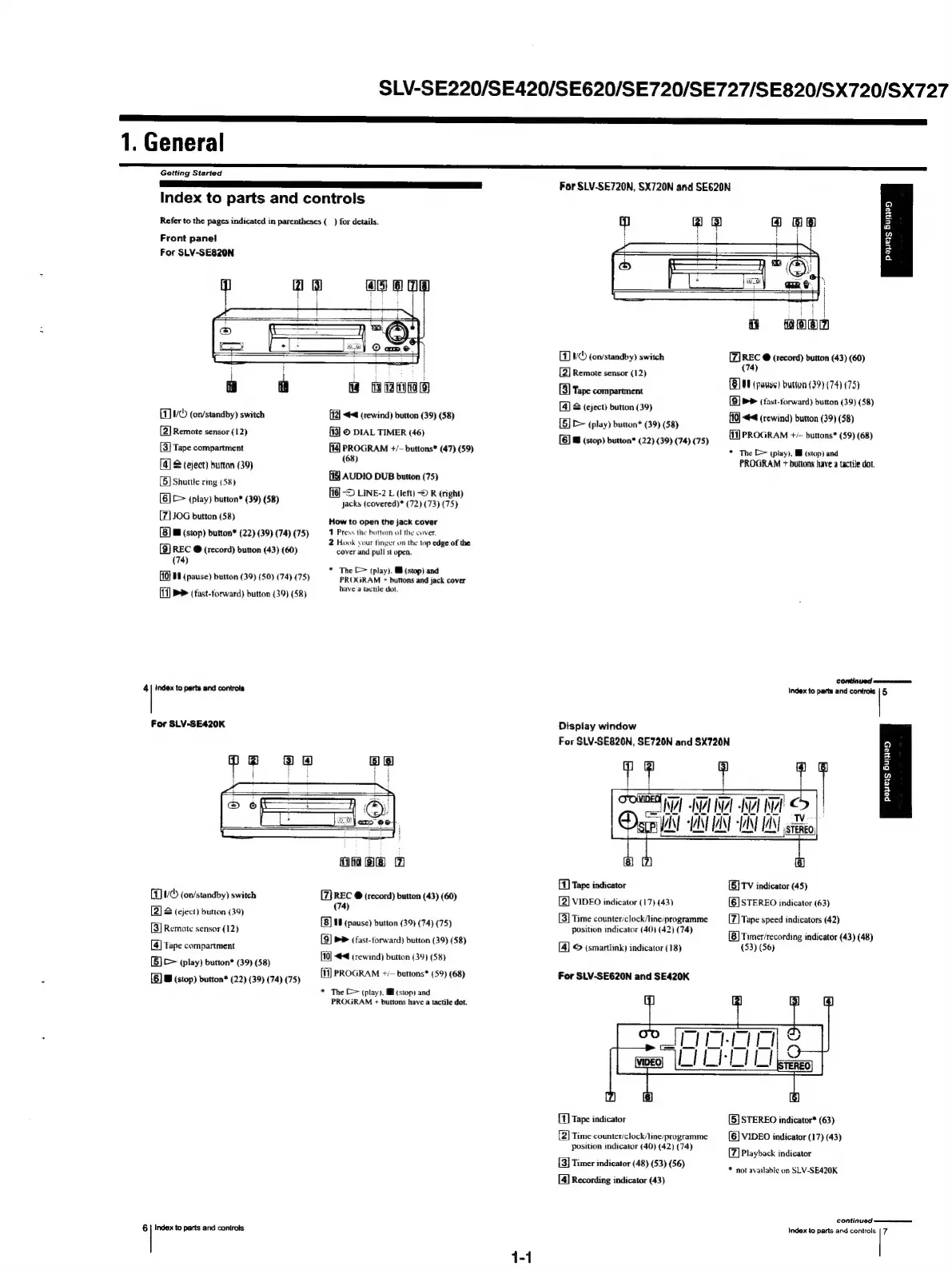
Front
panel
For
SLV-SE820N
(1
5
(on/standby)
switch
(2)
Remote
sensor
(12)
3]
Tape
compartment
[4]
S
(eject)
buttan
(39)
5]
Shuttle
ring
(58)
[6]
[>
(play)
button*
(39) (58)
[7]
JOG
button
(58)
[8)
&
(stop)
button*
(22)
(39) (74)
(75)
[9]
REC
@
(record)
button
(43)
(60)
(74)
[10}
88
(pause)
button
(39)
(50) (74)
(75)
[17]
>>
(tast-torward)
button
(39)
(58)
4
|
index
to
parts
and
controls
For
SLV-SE420K
a
ROMO
[12]
<4
(rewind)
button
(39)
(58)
{83]
©
DIAL
TIMER
(46)
[4
PROGRAM
+/-
buttons*
(47)
(59)
(68)
AUDIO
DUB
button
(75)
~D
LINE-2
L
(left)
©
R
(right)
jacks
(covered)*
(72)
(73)
(75)
How
to
open
the
jack
cover
1
Press
the
bottom
of
the
cover.
2
Hook
your
tinger
on
the
top
edge
of
the
cover
and
pull
it
open.
*
The
C>
(play).
Mf
(stop)
and
PROGRAM
+
buttons
and
jack
cover
have
a
tactile
dot,
five
(on/standby)
switch
&
(eject)
button
(39)
[2]
3]
Remote
sensor
(12)
4)
‘ape
compartment
[5]
>
(play)
button*
(39)
(58)
[6]
B
(stop)
button*
(22) (39) (74)
(75)
6
|
Index
to
parts
and
controls
Hoe
w
REC
@
(record)
button
(43)
(60)
(74)
[8]
18
(pause)
button
(39)
(74)
(75)
9)
PP
(fast-forward)
button
(39)
(58)
[10]
<4
(rewind)
button
(39)
(58)
11)
PROGRAM
+/—
buttons*
(59)
(68)
*
The
[>
(play).
MM
(stop)
and
PROGRAM
+
buttons
have
a
tactile
dot.
For
SLV-SE720N,
SX720N
and
SE620N
1)
VC
(on/standby)
switch
[2]
Remote
sensor
(12)
[3]
Tape
compartment
[4]
&
(eject)
button
(39)
[5]
D>
(play)
button*
(39)
(58)
Q
Oo
2
a
y
s
z
a
ft
noen
REC
@
(record)
button
(43) (60)
(74)
OF
(pause)
button
(39) (74)
(75)
PP
(fast-forward)
button
(39)
(58)
44
(rewind)
button
(39)
(58)
[6]
a
(stop)
button*
(22)
(39)
(74) (75)
[11]
PROGRAM
+/-
buttons*
(59) (68)
*
The
C=
(play),
HH
(stop)
and
PROGRAM
+
buttons
have
a
tactile
dot.
COFTEI
Od
ennneernarnansanaan
Display
window
For
SLV-SE820N,
SE720N
and
SX720N
ibm
Index
to
parts
and
controls
|
5
t
[41]
Tape
indicator
2|
VIDEO
indicator
(17)
(43)
3]
Time
counter/clock/line/programme
position
indicator
(40)
(42)
(74)
14]
©
(smartlink)
indicator
(18)
For
SLV-SE620N
and
SE420K
COMET]
NZ
Wel
-A
Rial
<>
|
D
scp
VAN VAN ANT
-1ANT
IANT
gst
papers
Buia
[5}
TV
indicator
(45)
STEREO
indicator
(63)
[6]
7|
Tape
speed
indicators
(42)
(8)
Timer/recording
indicator
(43)
(48)
(53)
(56)
{t]
Tape
indicator
2]
Time
counter/clock/line‘programme
position
indicator
(40) (42) (74)
[3]
Timer
indicator
(48)
(53) (56)
[4]
Recording
indicator
(43)
[5]
STEREO
indicator*
(63)
VIDEO
indicator
(17)
(43)
[6]
[7]
Playback
indicator
*
not
available
on
SLV-SE420K
CONTINUE?
=n
Index
to
parts
and
controls
|
7

Table of Contents

Related product manuals