EasyManua.ls Logo

Sony SLV-SE620 - Step 1: Unpacking

Sony SLV-SE620
96 pages
Print Icon
To Next Page IconTo Next Page
To Previous Page IconTo Previous Page
Loading...
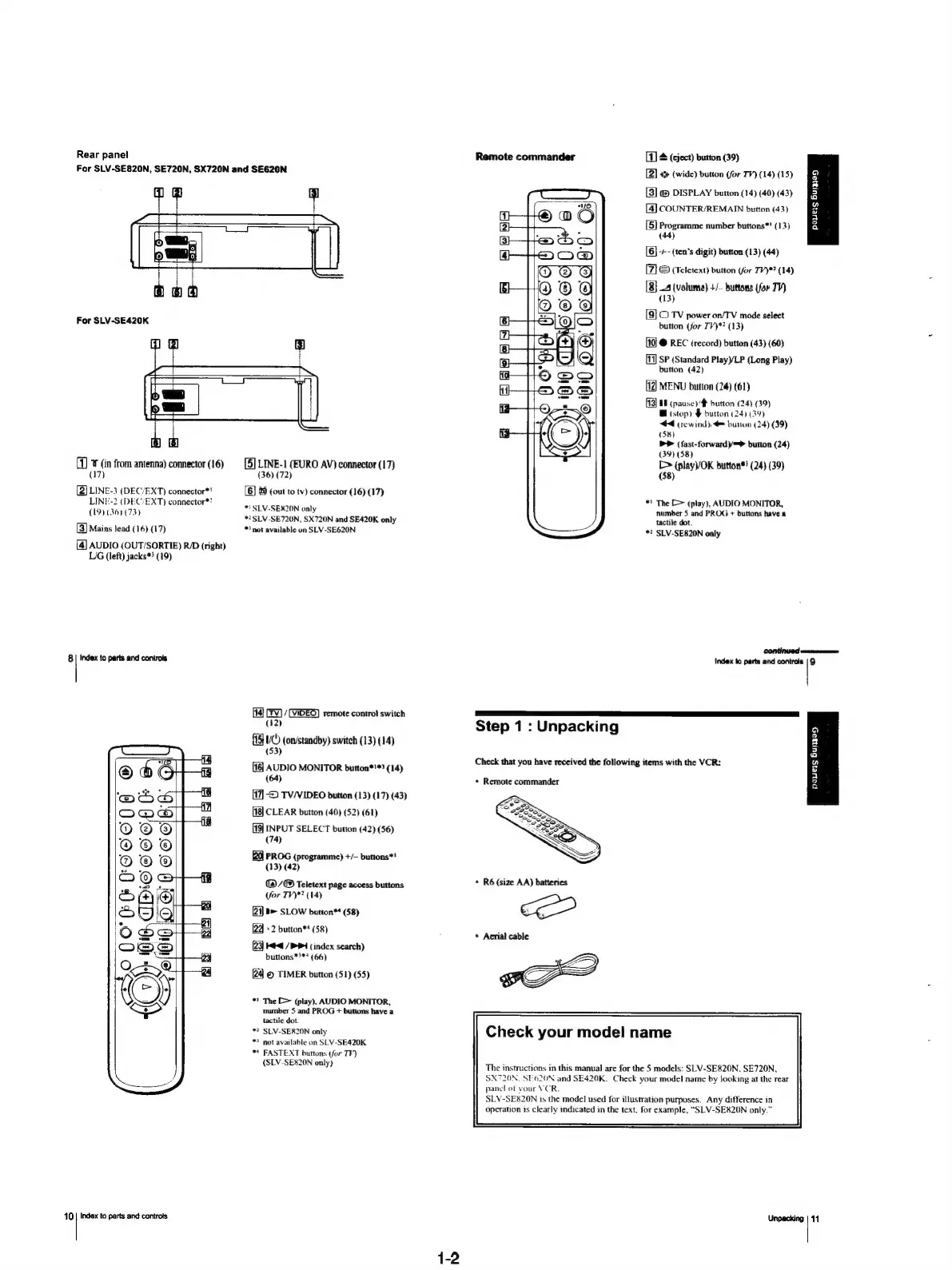
Rear
panel
For
SLV-SE820N,
SE720N,
SX720N
and
SE620N
For
SLV-SE420K
(1)
¥
(in
from
antenna)
connector
(16)
(17)
[2]
LINE-3
(DEC/EXT)
connector*!
LINE-2
(DEC’EXT)
connector*?
(19)
(36)
(73)
[3]
Mains
lead
(16)
(17)
[4]
AUDIO
(OUT/SORTIE)
R/D
(right)
L/G
(left)
jacks*>
(19)
8|
Index
to
parts
and
controls
[5]
LINE-1
(EURO
AV)
connector
(17)
(36)
(72)
[6]
&
(out
to
tv)
connector
(16)
(17)
*!
SLV-SER20N
only
"2
SLV-SE720N,
SX720N
and
SE420K
only
*
not
available
an
SLV-SE620N
(14)
CFV)
/
Temote
control
switch
(#2)
UC
(on/standby)
switch
(13)
(14)
(53)
{1
AUDIO
MONITOR
button*'*?
(14)
(64)
[17]
>
TV/VIDEO
button
(13)
(17)
(43)
10
|
Index
to
parts
and
controts
[18]
CLEAR
button
(40)
(52)
(61)
[19]
INPUT
SELECT
button
(42)
(56)
(74)
PROG
(programme)
+/—
buttons*!
(13)
(42)
G2)
/@
Teletext
page
access
buttons
(for
TV)*?
(14)
21]
B>
SLOW
button*
(58)
(23)
x2
button**
(58)
23)
Med
/P4
(index
search)
buttons*}**
(66)
[24]
©
TIMER
button
(51) (55)
™!
The
[>
(play),
AUDIO
MONITOR,
number
5
and
PROG
+
buttons
have
a
tactile
dot.
*?
SLV-SER20N
only
*
not
available
on
SLV-SE420K
**
FASTEXT
buttons
(for
TF)
(SLV-SE820N
only)
Remote
commander
[8]
&
(eject)
button
(39)
[2]
&
(wide)
button
(for
TV)
(14)
(15)
[3]
@
DISPLAY
button
(14)
(40) (43)
[4]
COUNTER/REMAIN
button
(43)
[5}
Programme
number
buttons*!
(13)
(44)
[6]
-/--
(ten’s
digit)
button
(13) (44)
[7}
©
(Teletext)
button
(for
TV)*?
(14)
[8}
4
(volume)
+/—
buttons
(for
TV)
(13)
[9]
CO
TV
power
on/TV
mode
select
button
(for
TV)*?
(13)
10}
@
REC
(record)
button
(43) (60)
[11]
SP
(Standard
Play)/LP
(Long
Play)
button
(42)
MENU
button
(24)
(61)
EN
(pausey#
button
(24)
(39)
B
(stop)
button
(24)
(39)
444
(rewind),
button
(24)
(39)
(58)
b>
(fast-forward)/=*
button
(24)
(39)
(58)
[>
(playV/OK
button®!
(24)
(39)
(58)
Al
S&S
*)
The
[>
(play),
AUDIO
MONITOR,
number
5
and
PROG
+
buttons
have
a
tactile
dot.
*?
SLV-SE820N
only
Q
6
s
5
a
2
Fy
a
2
a
Index
to
parts
and
controls
|
9
Step
1:
Unpacking
Check
that
you
have
received
the
following
items
with
the
VCR:
+
Remote
commander
*
R6
(size
AA)
batteries
jc
*
Aerial
cable
Check
your
model
name
The
instructions
in
this
manual
are
for
the
5
models:
SLV-SE820N,
SE720N,
SX720N.
SE-620N
and
SE420K.
Check
your
model
name
by
looking
at
the
rear
panel
of
vour
VCR.
SLV-SE820N
1s
the
model
used
for
illustration
purposes.
Any
difference
in
operation
is
clearly
indicated
in
the
text.
for
example,
“SLV-SE820N
only.”
Unpacking
payers
Buige5
11

Table of Contents

Related product manuals