EasyManua.ls Logo

Sony SLV-SE620 - Page 17

Sony SLV-SE620
96 pages
Print Icon
To Next Page IconTo Next Page
To Previous Page IconTo Previous Page
Loading...
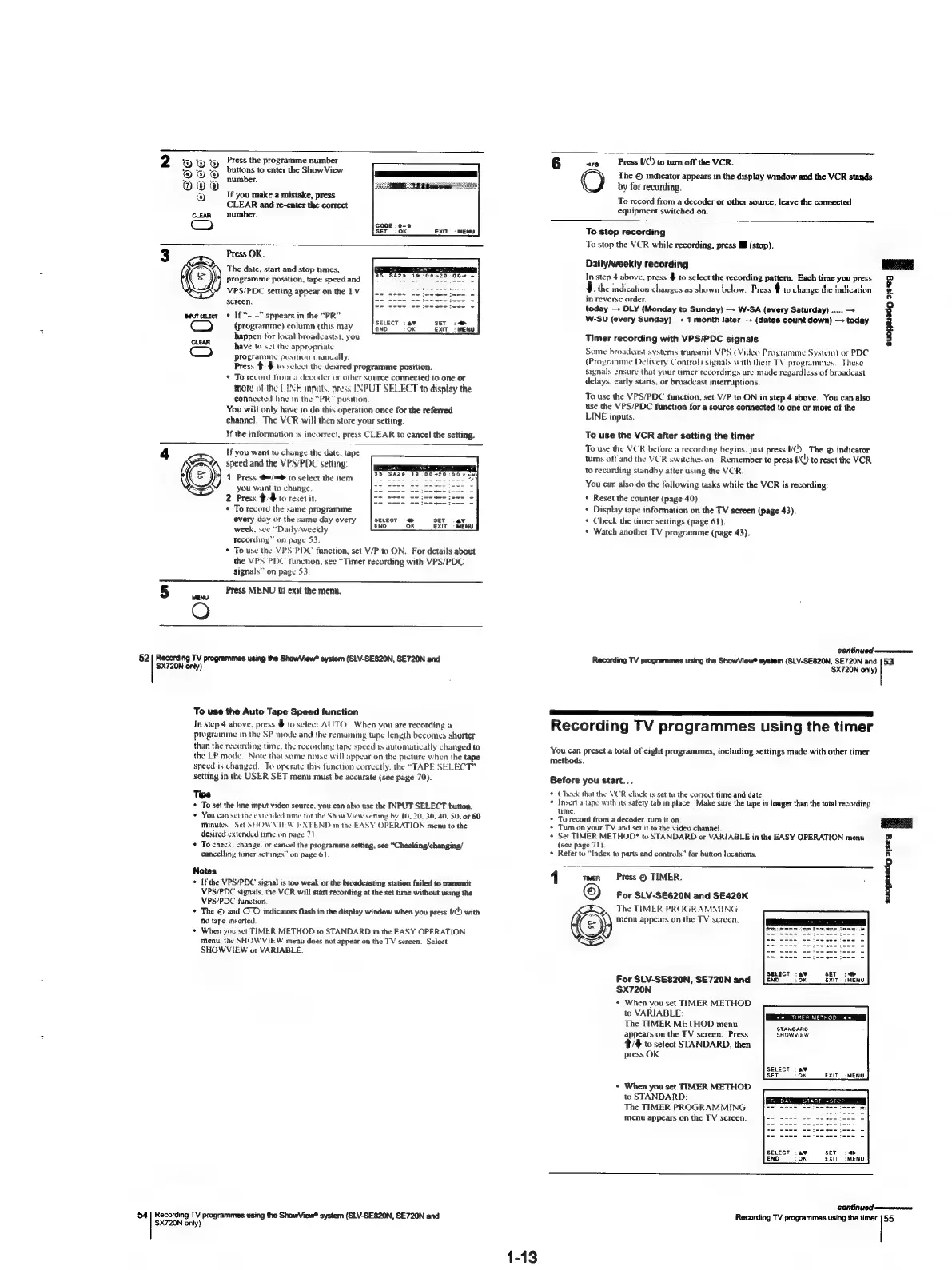
2
rOmOROY
Press
the
programme
number
6
“10
Press
I/()
to
turn
off
the
VCR.
OO
bbe
to
enter
the
ShowView
aS
The
©
indicator
appears
in
the
display
window
and
the
VCR
stands
009
:
ORE
Testes
it
by
for
recording.
rr
If
you
make
a
mistake,
@
¥
peas
To
record
from
a
decoder
or
other
source,
leave
the
connected
ae
and
re-enter
the
correct
equipment
switched
on.
To
stop
recording
To
stop
the
VCR
while
recording,
press
i
(stop).
Press
OK.
The
date,
start
and
stop
nmes,
programme
position,
tape
speed
and
VPS/PDC
setting
appear
on
the
TV
Daily/weekly
recording
In
step
4
above,
press
$
to
select
the
recording
pattern.
Each
time
you
press
~
the
mdication
changes
as
shown
below.
Bress
4
lo
change
the
indication
suojesede
2)seg
3
Screen.
=
in
reverse
order.
F
,
,
~-
ooo
today
DLY
(Monday
to
Sunday)
—+
W-SA
(every
Saturday)
.....
>
*
If*-
-”
appears
in
the
Koad
eicértae
W-SU
(every
Sunday)
—>
1
month
later
-+
(dates
count
down)
today
(programme)
column
{this
may
ENO
ox
happen
tor
local
broadcasts),
you
Timer
recording
with
VPS/PDC
signals
9g
ig
OF
OF
ED
|
OF
have
to
set
the
appropriate
programme
position
manually.
Press
#:$
to
select
the
desired
programme
position.
To
record
trom
a
decoder
or
other
source
connected
to
one
or
more
of
the
LINE
inputs.
press
[INPUT
SELECT
to
display
the
L
donwected
dine
ta
ere
eae
play
To
use
the
VPS/PDC
function,
set
V/P
to
ON
in
step
4
above.
You
can
also
You
will
only
have
to
do
this
operation
once
for
the
referred
tren
deli
function
for
a
source
connected
to
one
or
more
of
the
channel.
The
VCR
will
then
store
your
setting.
pus:
If
the
information
is
incorrect,
press
CLEAR
to
cancel
the
setting.
To
use
the
VCR
after
setting
the
timer
Some
broadcast
systems
transmit
VPS
(Video
Programme
System)
or
PDC
(Programme
Delivery
Control)
signals
with
their
TV
programmes.
These
stgnals
ensure
that
your
mer
recordings
are
made
regardless
of
broadcast
delays,
carly
starts,
or
broadcast
interruptions.
To
use
the
VCR
betore
a
recording
begins,
just
press
UV.
The
©
indicator
turns
offand
the
VCR
switches
on,
Remember
to
press
KO)
to
reset
the
VCR
to
recording
standby
after
using
the
VCR.
4
[f
you
want
to
change
the
date,
tape
speed
and
the
VPS/PDC
setting:
41
Press
@=/=>
to
select
the
item
you
want
to
change
2
Press
$/$
to
reset
it.
¢
To
record
the
same
programme
every
day
or
the
same
day
every
week,
sce
“Daily’weekly
Tecording”
on
page
53
To
usc
the
VPS’PDC
function,
set
V/P
to
ON.
For
details
about
the
VPS
PDC
function,
see
“Timer
recording
with
VPS/PDC
signals”
on
page
53.
5
Press
MENU
to
exit
the
menu.
wenu
O
©
You
can
also
do
the
following
tasks
while
the
VCR
is
recording:
*
Reset
the
counter
(page
40)
+
Display
tape
information
on
the
TV
screen
(page
43).
*
Check
the
timer
settings
(page
61).
*
Watch
another
TV
programme
(page
43).
CONKINUED
ceveemmeiieren,
52|
Recording
TV
programmes
using
the
ShowView*
system
(SLV-SE820N,
SE720N
and
Recording
TV
programmes
using
the
ShowView®
system
(SLV-SE820N,
SE720N
and
|53
SX720N
onty)
SX720N
only)
To
use
the
Auto
Tape
Speed
function
a
In
step
4
above,
press
$
to
select
AUTO.
When
you
are
recording
a
Recording
TV
programmes
using
the
timer
programme
in
the
SP
mode
and
the
remaming
tape
length
becomes
shorter
than
the
recording
time.
the
recording
tape
speed
ts
automatically
changed
to
You
can
preset
a
total
of
eight
programmes,
including
settings
made
with
other
timer
the
LP
mode.
Note
that
some
noise
will
appear
on
the
picture
when
the
tape
methods.
speed
is
changed.
To
operate
this
function
correctly,
the
“TAPE
SELECT”
setting
in
the
USER
SET
menu
must
be
accurate
(see
page
70).
Before
you
start...
Tips
*
Check
that
the
VCR
clock
is
set
to
the
correct
time
and
date.
+
To
set
the
line
input
video
source.
you
can
also
use
the
INPUT
SELECT
button.
.
Insert
a
tape
with
tts
safety
tab
in
place.
Make
sure
the
tape
is
longer
than
the
total
recording
*
You
can
set
the
extended
time
tor
the
Show
View
setting
by
10,
20.
30,
40,
50.
or
60
*
To
record
from
a
decoder.
tum
it
on.
eae
minutes.
Set
SHOWVIEW
EXTEND
in
the
EASY
OPERATION
menu
to
the
*
Tum
on
vour
TV
and
set
it
to
the
video
channel.
desired
extended
ume
on
page
71
*
Set
TIMER
METHOD*
to
STANDARD
or
VARIABLE
in
the
EASY
OPERATION
menu
ied
*
To
check,
change,
or
cancel
the
programme
setting,
see
“Checking/changing/
(see
page
71).
"
&
cancelling
timer
settings”
on
page
61.
+
Reter
to
“Index
to
parts
and
controls”
for
button
locations.
oi]
nome
eee
1
men
Press
©
TIMER.
;
+
Ifthe
VPS/PDC
signal
is
too
weak
or
the
broadcasting
station
failed
to
transmit
VPS/PDC
signals.
the
VCR
will
start
recording
at
the
set
time
without
using
the
For
SLV-SE620N
and
SE420K
VPS/PDC
function
4
u
7
*
The
©
and
OO
indicators
flash
in
the
display
window
when
you
press
U(!)
with
a
neTiMER
PROGR,
Sea
no
tape
inserted
(=)
menu
appears
on
the
TV
screen.
+
When
you
set
TIMER
METHOD
to
STANDARD
in
the
EASY
OPERATION
menu,
the
SHOWVIEW
menu
does
not
appear
on
the
TV
screen.
Select
SHOWVIEW
or
VARIABLE.
SELECT
av
SET
:@®
For
SLV-SE820N,
SE720N
and
[ENO
_:
0x
EXIT:
MENU
SX720N
+
When
vou
set
TIMER
METHOD
fo
VARIABLE:
The
TIMER
METHOD
menu
stinoAno
appears
on
the
TV
screen.
Press
SHOWVIEW
t/#
to
select
STANDARD,
then
press
OK.
ExiT
=
MENU
*
When
you
set
TIMER
METHOD
to
STANDARD:
The
TIMER
PROGRAMMING
menu
appears
on
the
TV
screen.
>
EXIT_:
MENU
CONTINOC
mmnanenonmvom
54
Reooreng
TV
programmes
using
the
ShowView®
system
(SLV-SE820N,
SE720N
and
Recording
TV
programmes
using
the
timer
|
55
720N
only)
1-13

Table of Contents

Related product manuals