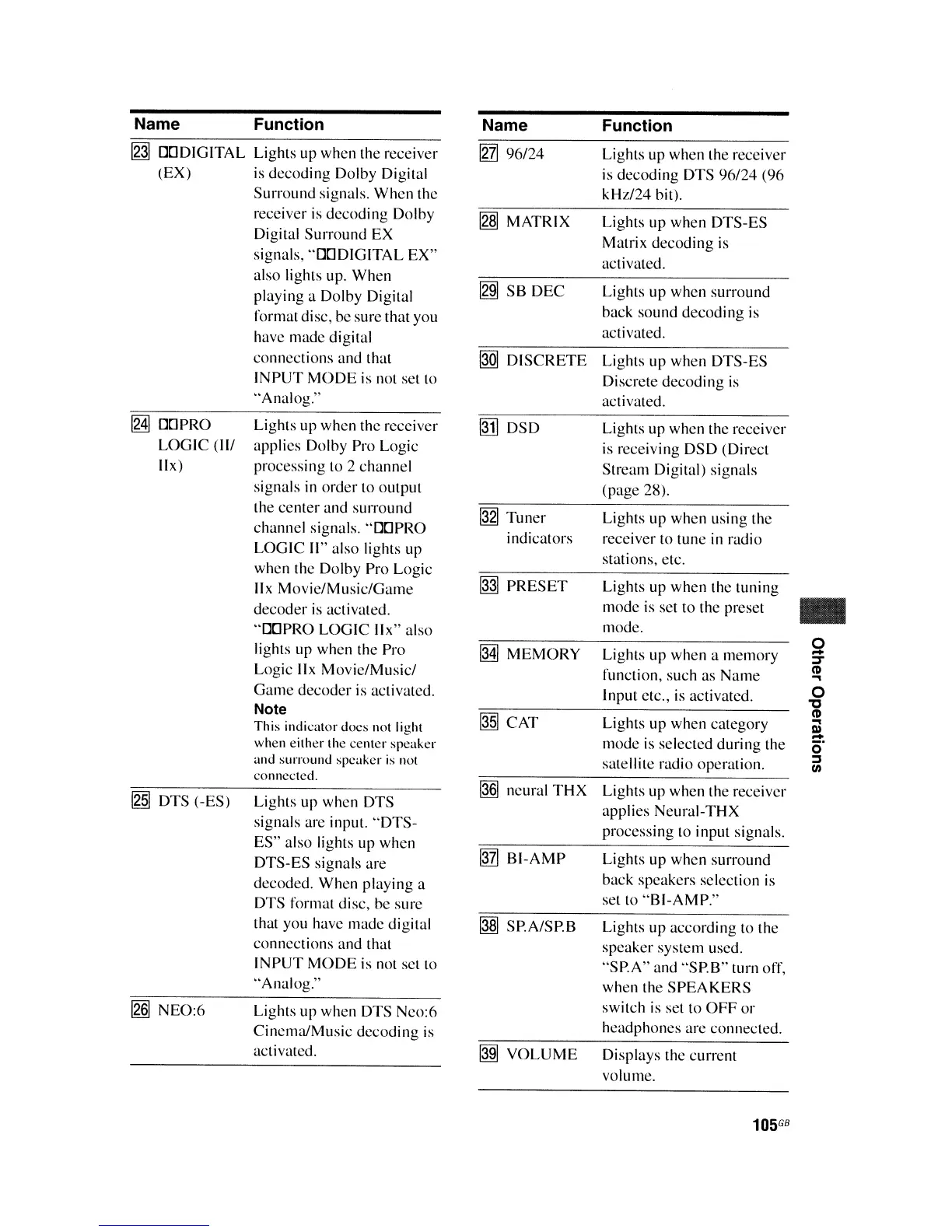
Name Function Name
Function
~
DODIGITAL Lights up when the receiver
~
96/24
Lights up when the receiver
(EX) is
decoding
Dolby Digital is decoding DTS
96/24
(96
Surround signals. When the kHz/24 bit).
receiver
is
decoding
Dolby
~
MATRIX
Lights
up
when DTS-ES
Digital
Surround
EX
Matrix
decoding
is
signals, "DODIGITAL
EX"
activated.
also lights up. When
~
SB
DEC
Lights up when surround
playing a Dolby Digital
format disc, be sure that you
back sound
decoding
is
have
made
digital
activated.
connections and that
@QI
DISCRETE
Lights up when DTS-ES
INPUT
MODE
is not set to
Discrete
decoding
is
"Analog."
activated.
~
DOPRO Lights up when the receiver
@1]
DSD
Lights up when the receiver
LOGIC
(II/ applies Dolby Pro Logic
is receiving
DSD
(Direct
IIx)
processing to 2 channel
Stream Digital) signals
signals in
order
to output
(page 28).
the center and sUITound
@gJ
Tuner
Lights
up
when using the
channel signals. "DOPRO
indicators receiver to tune in radio
LOGIC
II" also lights up
stations, etc.
when the Dolby Pro Logic
lIx Movie/Music!Game
~
PRESET
Lights up
when
the tuning
decoder
is
activated.
mode
is set to the preset
..
"DOPRO
LOGIC
lIx" also
mode.
lights up when the Pro
M
MEMORY
0
Lights up when a memory
-
J
Logic lIx Movie/Music!
function, such as
Name
CD
..,
Game
decoder
is activated.
Input etc., is activated.
0
'C
Note
@§]
CAT
CD
This indicator does not light
Lights up when category
..,
III
-
when either the
center
speaker
mode is selected during the
<:;-
and surround speaker
is
not
satellite radio operation.
:::J
III
connected.
@§]
neural
THX
~
DTS (-ES)
Lights up when DTS
Lights up when the receiver
applies Neural-THX
signals are input.
"DTS-
processing to input signals.
ES" also lights up when
~
BI-AMP
Lights
up
when surround
DTS-ES signals are
decoded. When playing a
back speakers selection
is
DTS format disc, be sure
set to
"BI-AMP."
that you have made digital
~
SP.A/SP.B Lights
up
according to the
connections and that
speaker system used.
INPUT
MODE
is not set to
"SPA"
and "SP.B" turn off,
"Analog."
when the
SPEAKERS
Ig§J
NEO:6
Lights up when DTS Neo:6
switch
is
set to
OFF
or
Cinema/Music
decoding
is
headphones are connected.
activated.
~
VOLUME
Displays the current
volume.
105
GB















 To Next Page