2:
Connecting
speakers
Before connecting cords, make sure to
disconnect the
AC
power cord (mains lead).
.1
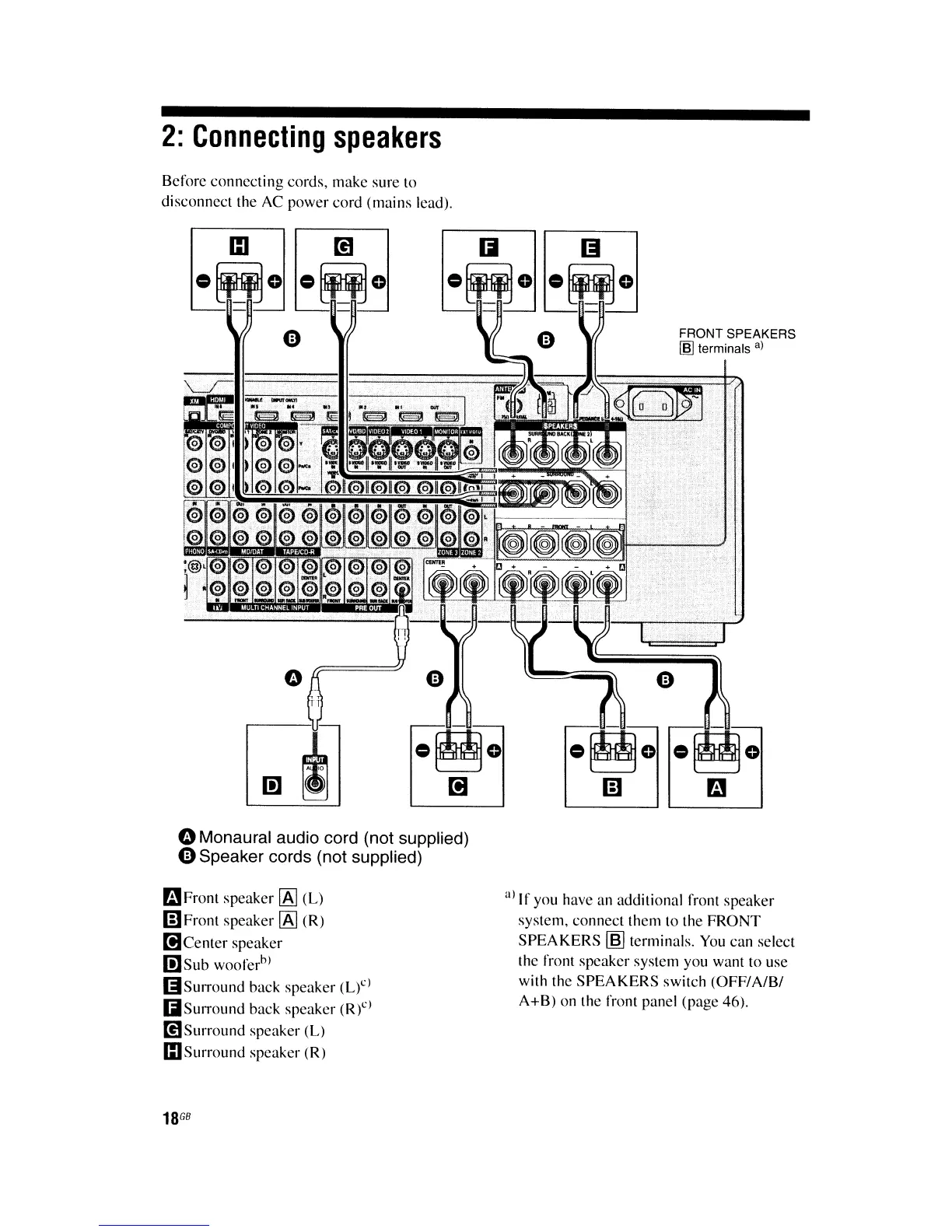
oMonaural audio cord (not supplied)
4)
Speaker cords (not supplied)
aFront speaker
[A]
(L)
mFront
speaker
[A]
(R)
[!)Center
speaker
I!]Sub
woofer
b
)
(iSurround
back speaker (L)")
IiIISurround back speaker (R)")
mSurround
speaker
(L)
G)Surround
speaker (R)
18
GB
FRONT SPEAKERS
[§]
terminals
a)
a)
If
you have an additional front speaker
system, connect them to the
FRONT
SPEAKERS
~
terminals.
You
can select
the front speaker system you want to use
with the
SPEAKERS
switch (OFF/A/B/
A+B) on the front panel (page 46).















 To Next Page