Using
a
bi-amplifier
connection
I
I'
you are not usi ng surround back speakers,
you can use the
SURROUND
BACK
SPEAKERS
terminals for the front speakers
for usc with a bi-amplifier connection.
To
connect speakers
Notes
•
You
cannot
use the
FRONT
SPEAKERS
B
jacks
for a bi-ampliller connection.
• When you usc the
auto
calibration function. make
the bi-amplilier settings before you perform auto
cal ibration.
'11'
you make the bi-amplitler settings, the speaker
level, balance, and
equalizer
settings
of
the
surround back speakers become invalid, and those
of
the front speakers are used.
• Signals output from the
PRE
OUT
jacks
are used
with the
same
settings as those
of
the
SPEAKERS
terminals.
Front speaker
(R)
Frontspeaker
(L)
~~)(~)
0
00
La
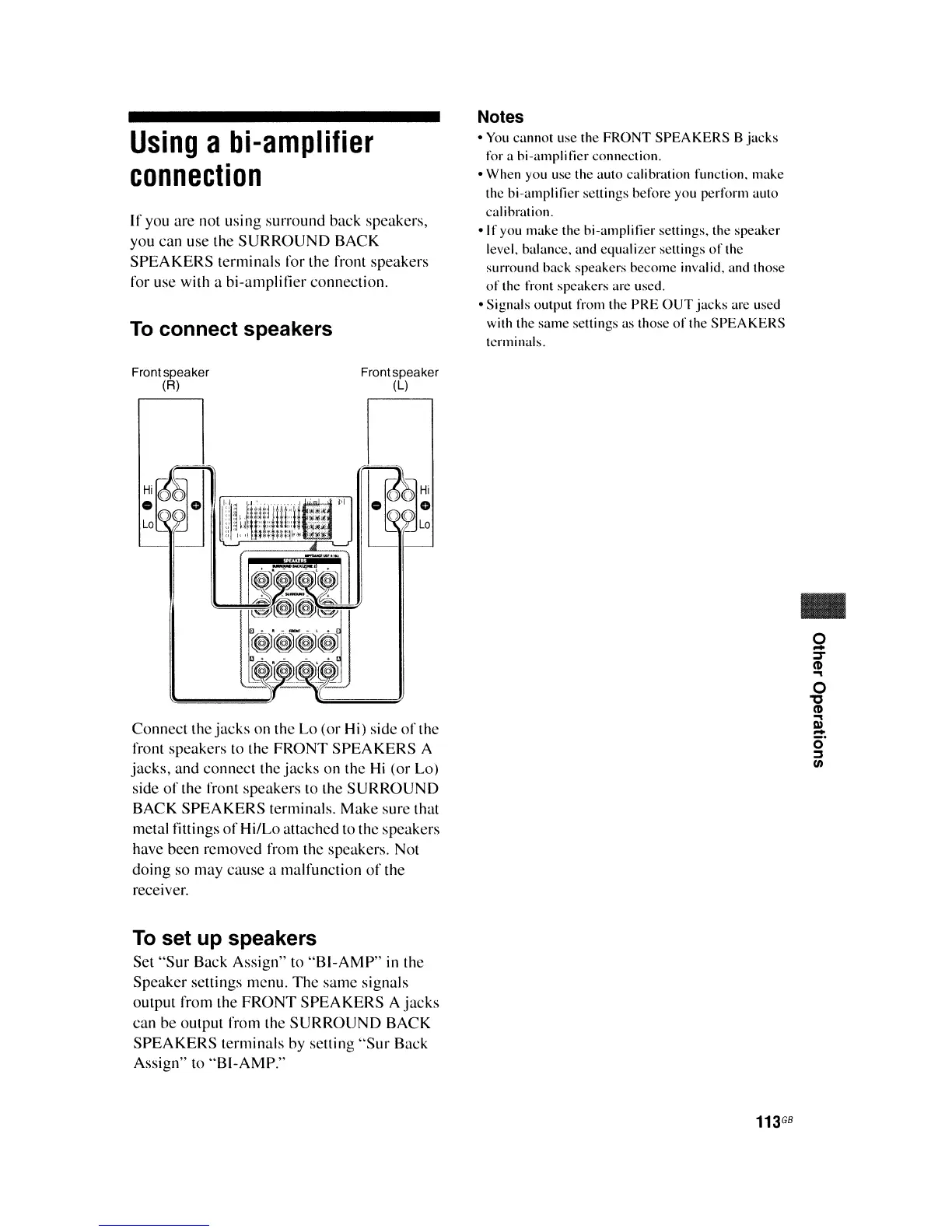
Connect
the
jacks
on the Lo (or Hi) side
of
the
front speakers to the
FRONT
SPEAKERS
A
jacks,
and connect the
jacks
on the
Hi
(or Lo)
side
of
the front speakers to the
SURROUND
BACK
SPEAKERS
terminals.
Make
sure that
metal fittings
of
Hi/Lo attached to the speakers
have been removed from the speakers. Not
doing so may
cause
a malfunction
of
the
receiver.
To
set up speakers
Set
"Sur
Back Assign" to
"BI-AMP"
in the
Speaker settings menu.
The
same
signals
output from the
FRONT
SPEAKERS
A
jacks
can be output from the
SURROUND
BACK
SPEAKERS
terminals by setting
"Sur
Back
Assign" to
"BI-AMP."
..
o
-
J
(1)
~
o
"
(1)
~
III
-
O·
::s
UI
113
GB















 To Next Page