CQnnttcting
component~
with
digitCiI
«JudiQ
input/output
jacks
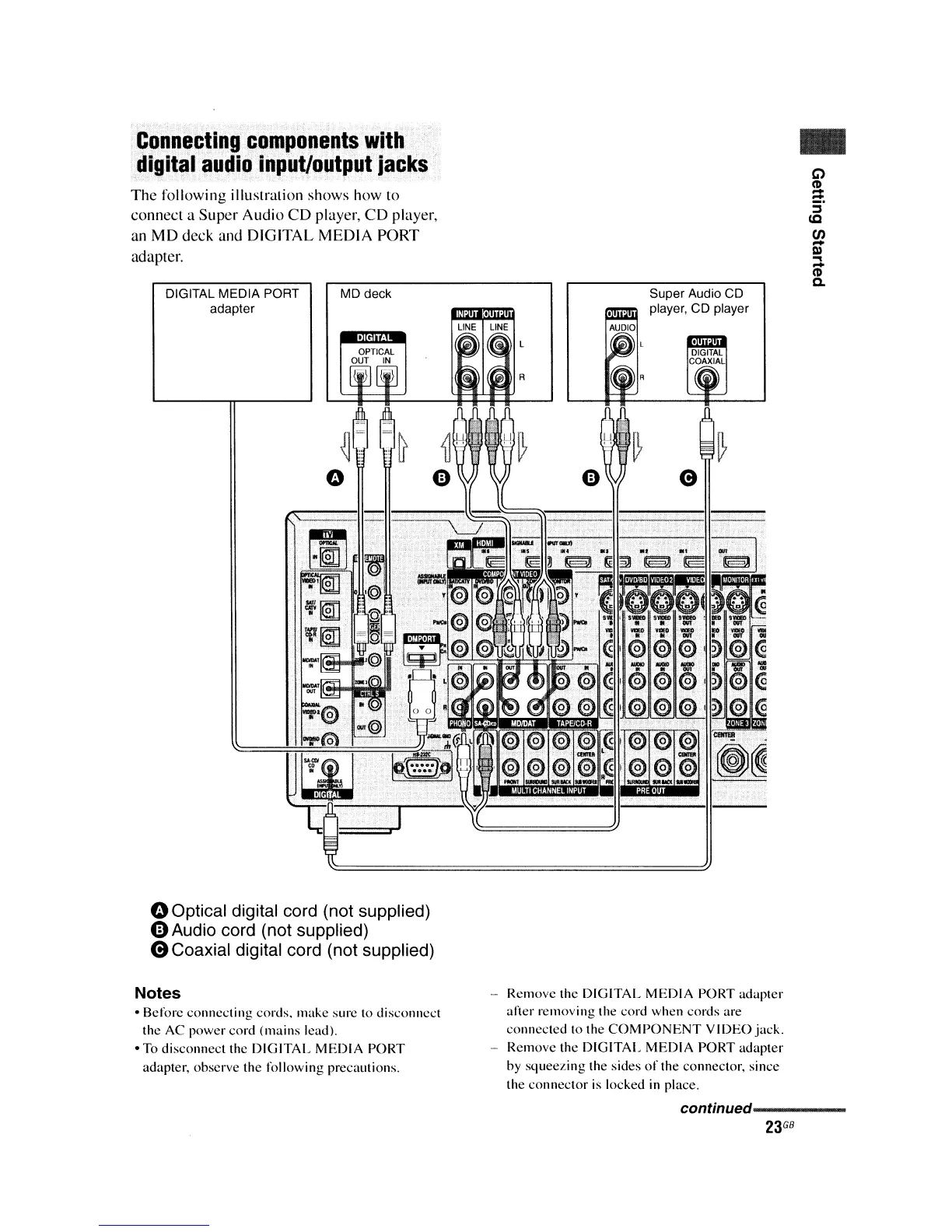
The
following illustration shows how to
connect a Super Audio
CD
player,
CD
player,
an
MD
deck and DIGITAL MEDIA PORT
adapter.
DIGITAL MEDIA PORT
adapter
MD deck
..
C>
~
S'
(Q
CJ)
-
III
...
lD
Q.
Super Audio CD
player, CD player
oOptical digital cord (not supplied)
oAudio cord (not supplied)
8Coaxial
digital cord (not supplied)
Notes
• Before connecting cords. make sure to disconnect
the
AC
power cord (mains leadl.
• To disconnect the
DIGITAL
MEDIA
PORT
adapter, observe the
following
precautions.
- Remove the
DIGITAL
MEDIA
PORT adapter
alier
removing the cord when cords are
connected to the
COMPONENT
VIDEO
jack.
- Remove the
DIGITAL
MEDIA
PORT adapter
by squeezing the sides
of
the connector, since
the connector is locked in place.
continued----------
23
GB















 To Next Page