Inserting
batteries
into
the
remote
e
-r'"1l'"
T
~OO
~
!~~~i2
When the command mode
is
set
to
"AY2,"
"COMMAND
MODE
lAY2j"
appears
on
the
display.
When the command mode is
set
to
"AY
I,"
"COMMAND
MODE
fAY
I)"
appears
on
the
display.
Turn on the receiver while pressing
2CH/A.DIRECT.
To switch the command mode
of the receiver
2CH/A.DIRECT
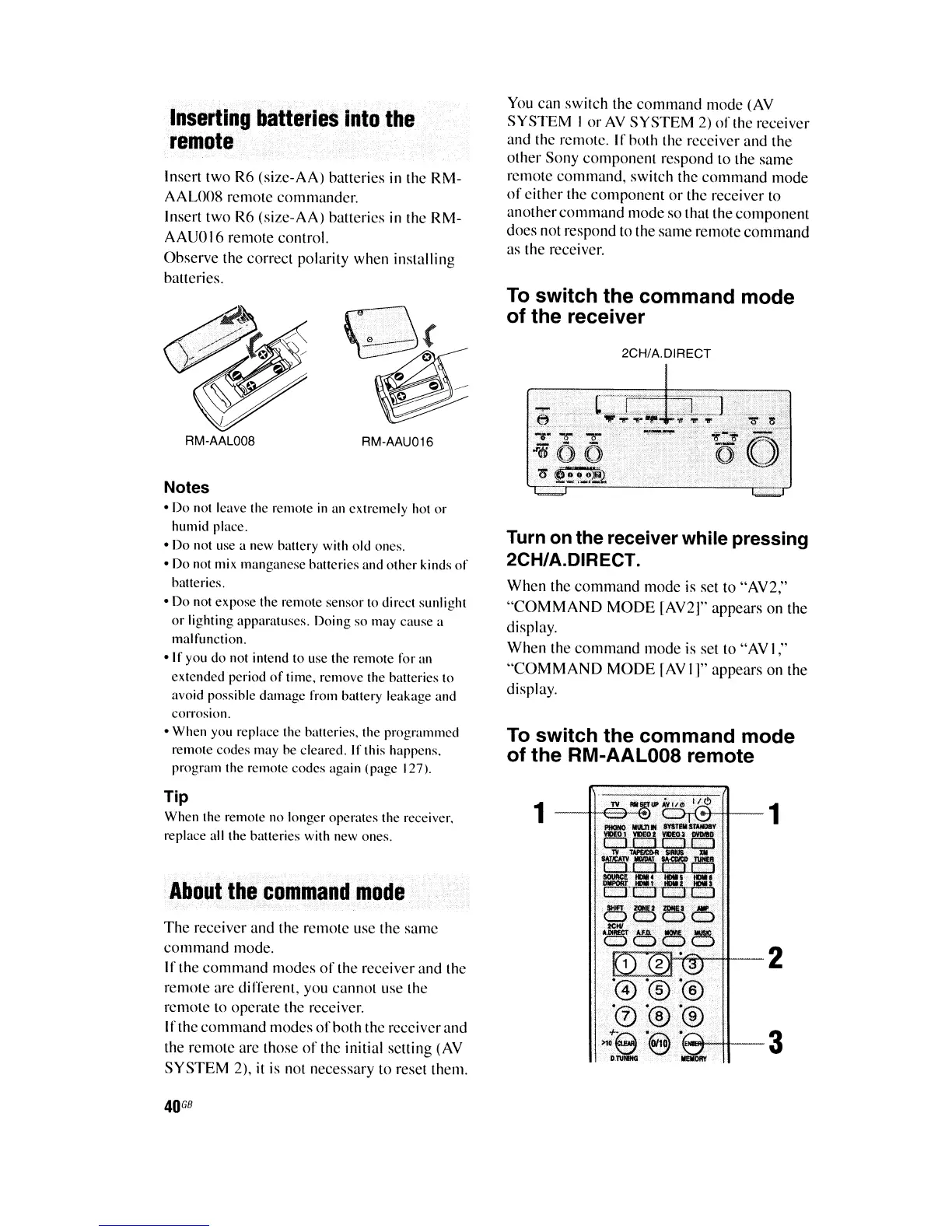
To switch the command mode
of the RM-AAL008 remote
You
can
switch the command mode
(AY
SYSTEM
I or AY
SYSTEM
2)
of
the
receiver
and
the
rcmote.
If
hoth
the
receiver
and
the
other Sony component respond to the
same
remote command, switch the command mode
of
either
the
component
or
the receiver to
another command mode
so
that the component
does
not respond to the
same
remote command
as
the receiver.
RM-AAU016
RM-AAL008
Notes
• Do not leave the remole
in
an extremely hot or
humid place.
• Do not use a new battery with old ones.
• Do not mix manganese batteries and other kinds
of
batteries.
• Do not expose the remote sensor to direct sunlight
or
lighting apparatuses. Doing so may cause a
malfunction.
·If
you do not intend to use the remote for an
extended period
of
time. remove the batteries to
avoid possible damage from battery leakage and
corrosion.
• When you replace the batteries. the programmed
remote codes may be cleared. If this happens.
program the remote codes again (page 127).
Insert two
R6
(size-AA)
hatteries in the
RM-
AAL008
remote commander.
Insert two R6
(size-AA)
hatteries in
the
RM-
AAUO
16
remote control.
Ohserve
the
correct polarity when installing
balleries.
Tip
When the remote no longer operates the receiver.
replace all the batteries with new ones.
About
the
command
mode
The recciver
and
the remote
use
the
same
command mode.
If
the command modes
of
the
receiver
and
the
remote
are
different. you cannot
use
the
remote to operate the receiver.
Irthe
command modes
ofhoth
the
receiver
and
the
remotc
are
those
of
thc
initial
selling
(AY
SYSTEM
2),
it
is not necessary to
reset
them.
1
2
-3
40
GB















 To Next Page