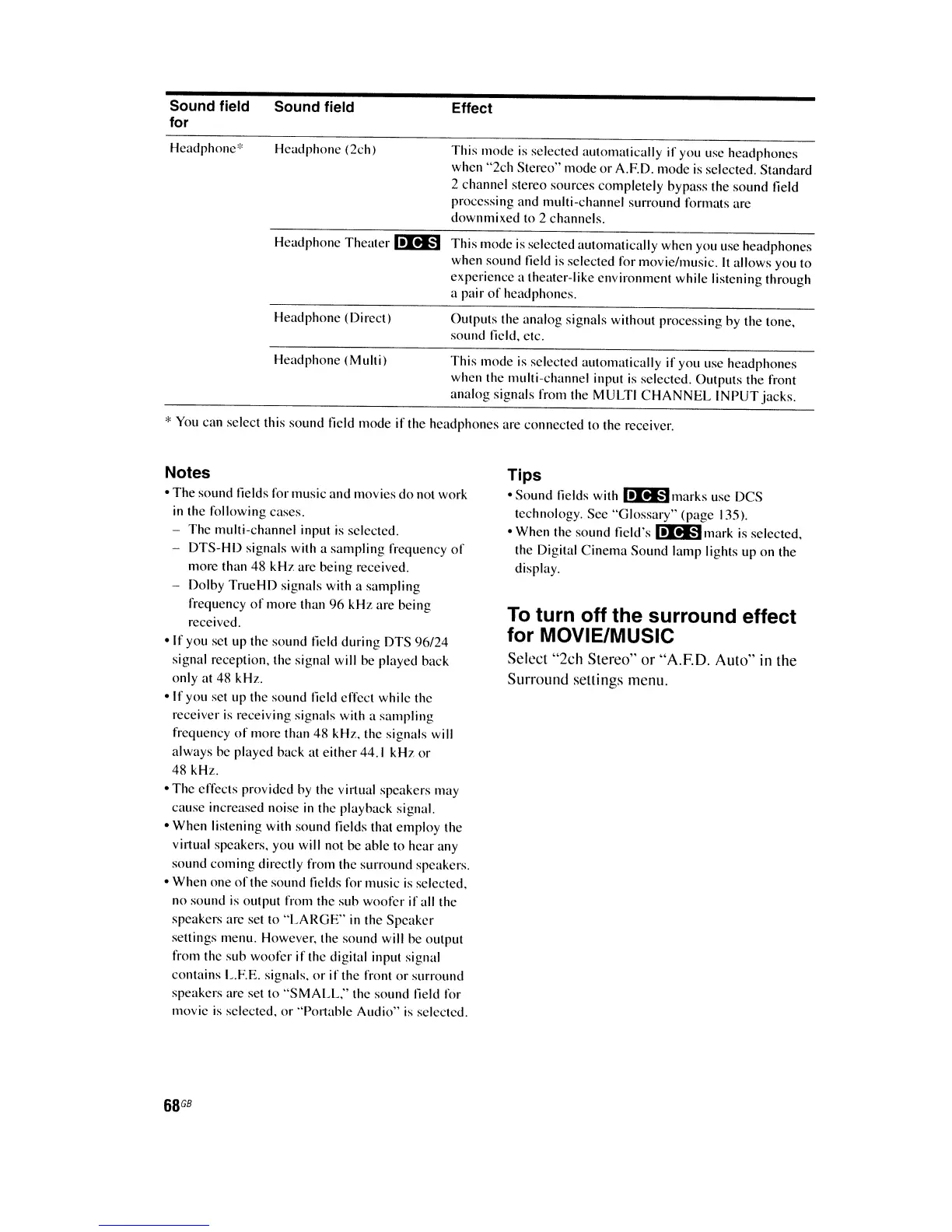
Sound field
for
Headphone'"
Sound field
Headphone (2ch)
Effect
This
mode
is selected automatically if you use headphones
when
"2ch
Stereo"
mode
or
A.F.D. mode
is
selected. Standard
2 channel stereo sources completely bypass the
sound
field
processing and multi-channel surround formats are
downmixed to 2 channels.
Headphone
Theater
I!I!I§J
This
mode
is
selected automatically when you use headphones
when sound
l1eld
is selected for movie/music. It allows you to
experience a theater-like environment while listening through
a pair
of
headphones.
Headphone (Direct) Outputs the analog signals without processing by the tone,
sound
l1e1d,
etc.
Headphone (Mulli) This mode is selected automatically if you use headphones
when the mulli-channel input
is
selected. Outputs the front
analog signals from the MULTI
CHANNEL
INPUT
jacks.
* You can select this
sound
field
mode
if the headphones are connected to the receiver.
Notes
oThe sound l1elds for music
and
movies
do
not work
in
the following cases.
- The mulli-channel input is selected.
-
DTS-HD
signals with a
sampling
frequency
of
more than 48
kHz
are being received.
- Dolby
TrueHD
signals with a sampling
frequency
of
more than
96
kHz
are being
received.
olf
you set up the
sound
field during DTS 96/24
signal reception, the signal will be played back
only at 48 kHz.
olf
you set up the sound field effect while the
receiver
is
receiving signals with a
sampling
frequency
of
more than 48 kHz, the signals will
always
be played back at either 44.1
kHz
or
48 kHz.
oThe effects provided by the virtual speakers may
cause increased noise
in
the playback signal.
oWhen listening with
sound
fields that
employ
the
virtual speakers. you will not
be
able to hear any
sound
coming
directly from the surround speakers.
oWhen one
of
the sound l1elds for music
is
selected.
no sound
is
output from the
sub
woofer if all the
speakers arc set to
"LARGE"
in
the
Speaker
settings menu. However. the sound will he output
from the
sub
woofer
if
the digital input signal
contains L.F.E. signals,
or
if
the front
or
surround
speakers are set
to
"SMALL."
the sound Iield for
movie
is
selected.
or
·'Po.1ahle
Audio"
is
selected.
68
GB
Tips
oSound l1elds with
I!I!I§Jmarks
use DCS
technology. See
"Glossary"
(page 135).
oWhen the sound field's
I!I!I§Jmark
is
selected.
the Digital
Cinema
Sound lamp lights up
on
the
display.
To
turn off the surround effect
for MOVIE/MUSIC
Select "2ch Stereo" or "A.F.D.
Auto"
in
the
Surround settings menu.















 To Next Page