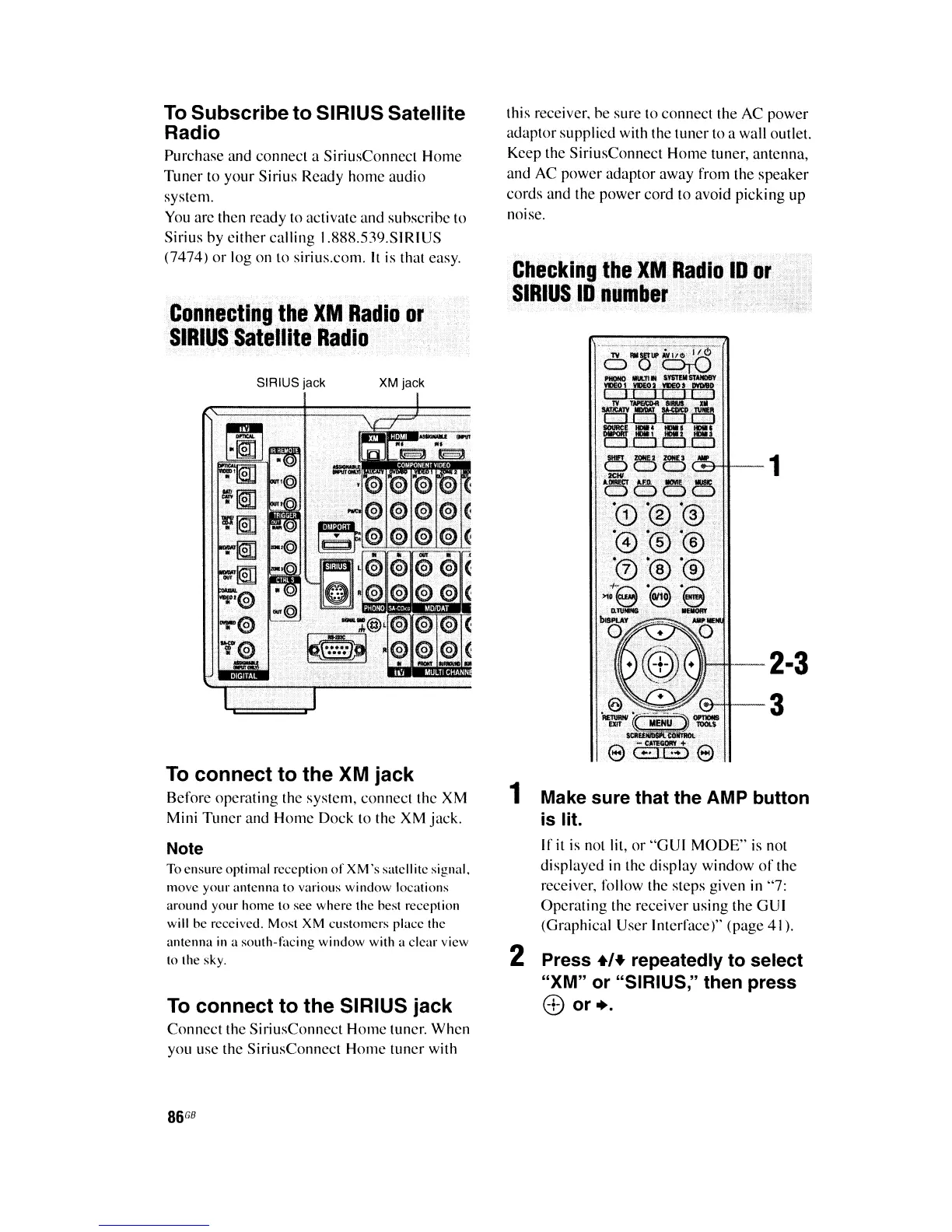
Connecting
the
XM
Radio
or
SIRIUS
Satellite
Radio
To
connect to the SIRIUS jack
Connect
the SiriusConnect Home tuner. When
you use the SiriusConnect Home tuner with
Checking
the
XM
Radio
ID
or
SIRIUS
ID
number
1 Make sure that the
AMP
button
is lit.
If it is not lit, or
"GUI
MODE" is not
displayed
in
the display window
of
the
receiver, follow the steps given in "7:
Operating the receiver using the GUI
(Graphical User Interface)" (page 41).
2 Press +'+ repeatedly to select
"XM" or "SIRIUS," then press
c±>
or
•.
this receiver. be sure to connect the AC power
adaptor supplied with the tuner to a wall outlet.
Keep the SiriusConneet Home tuner, antenna,
and AC power adaptor away from the speaker
cords and the
power
cord to avoid picking up
noise.
XM jackSIRIUS jack
To
connect to the XM jack
Before operating the system, connect the XM
Mini
Tuner
and Home Dock to the XM jack.
Note
To ensure optimal reception
of
XM',
satellite signal.
Inove
your
antenna to various
window
locations
arollnd your
home
to see where the hest reception
will he received. Most XM ellstomers place the
antenna
in
a
south-being
window with a clear view
to the sky.
To
Subscribe to SIRIUS Satellite
Radio
Purchase and connect a SiriusConnect
Home
Tuner
to
your
Sirius Ready
home
audio
system.
You
arc then ready to activate and subscribe to
Sirius by
either
calling 1.888.539.SIRIUS
(7474)
or
log on to sirius.com.
It
is that easy.
86
GB















 To Next Page