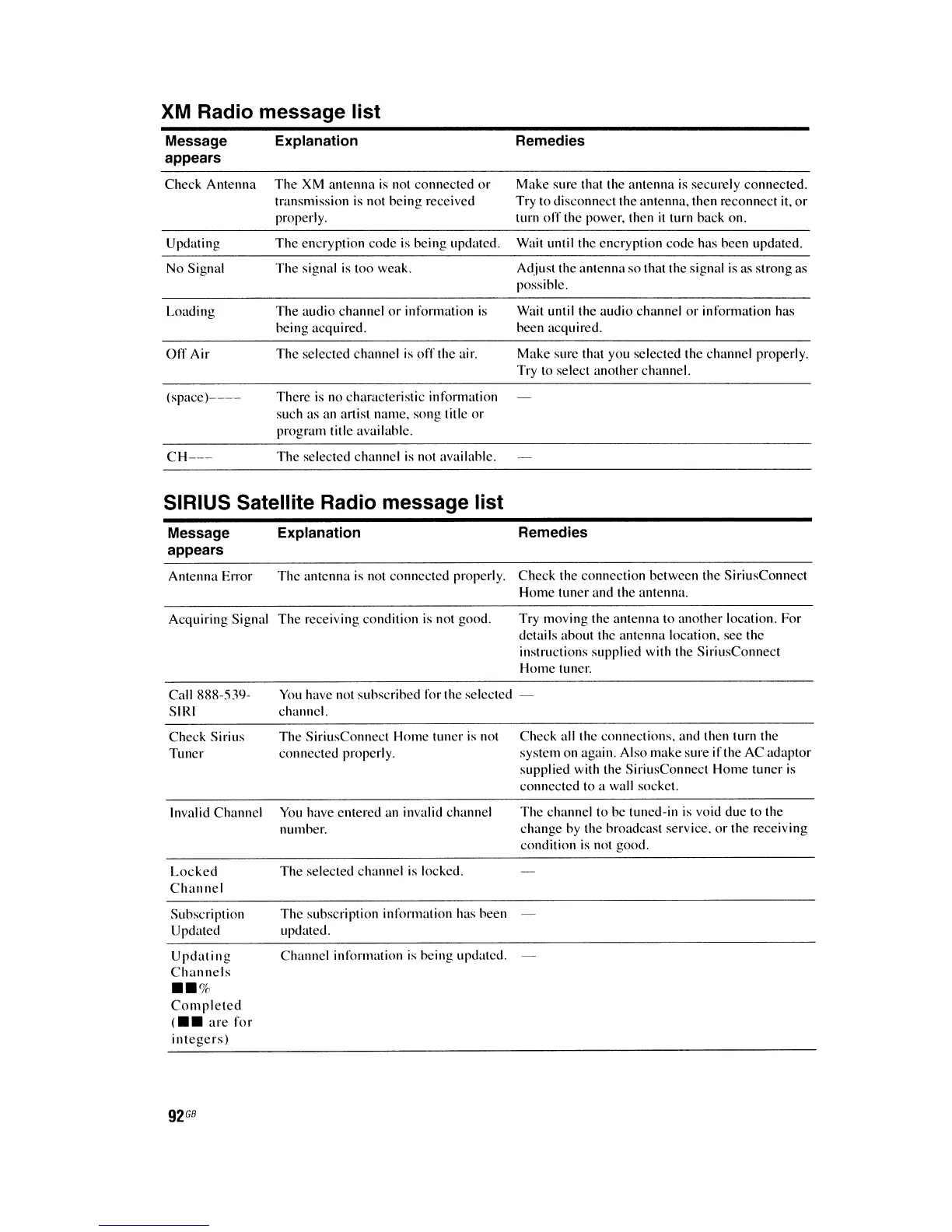
XM
Radio message list
Message
appears
Check Antenna
Updating
No Signal
Loading
Off
Air
(space)----
CH---
Explanation
The XM antenna
is
not connected
or
transmission is not being received
properly.
The
encryption code
is
being updated.
The
signal is too weak.
The
audio channel
or
information
is
being acquired.
The selected channel
is
off
the air.
There is no characteristic information
such as an artist name, song title
or
program title available.
The selected channel is not available.
Remedies
Make sure that the antenna is securely connected.
Try to disconnect the antenna, then reconnect it,
or
turn
off
the power. then
it
turn back on.
Wait until the encryption code has been updated.
Adjust the antenna
so
that the signal is as strong as
possible.
Wait until the audio channel or information has
been acquired.
Make sure that you selected the channel properly.
Try to select another channel.
SIRIUS Satellite Radio message list
Message
appears
Explanation
Remedies
Antenna Error
The
antenna
is
not connected properly. Check the connection between the SiriusConnect
Home tuner and the antenna.
Acquiring Signal
The
receiving condition is not good.
Try moving the antenna to another location. For
details about the antenna location, see the
instructions supplied with the SiriusConnect
Home tuner.
Call 888-.'\39-
SIRI
Check Sirius
Tuner
Invalid Channel
Locked
Channel
Subscription
Updated
Updating
Channels
••
%
Completed
(
••
are
for
integers)
92
GB
You
have not subscribed for the selected
channel.
The SiriusConnect Home tuner
is
not
connected properly.
You
have entered an invalid channel
number.
The selected channel
is
locked.
The subscription information has been
updated.
Channel information is being updated.
Check all the connections, and then turn the
system on again. Also make sure ifthe AC adaptor
supplied with the SiriusConnect Home tuner
is
connected to a wall socket.
The channel to be tuned-in is void due to the
change
by
the broadcast service,
or
the receiving
condition
is
not good.















 To Next Page