46 1115 -10 9 - 0 01 R EV D www.stryker.com
Return To Table of Contents
Operation Guide
OPERATING THE CHAPERONE (STRETCHER EXIT) OPTION - OPTIONAL SETUP (NOT AVAILABLE
WITH PRIME X OPTION)
You can change the pattern and volume of the alert.
To change the alert pattern:
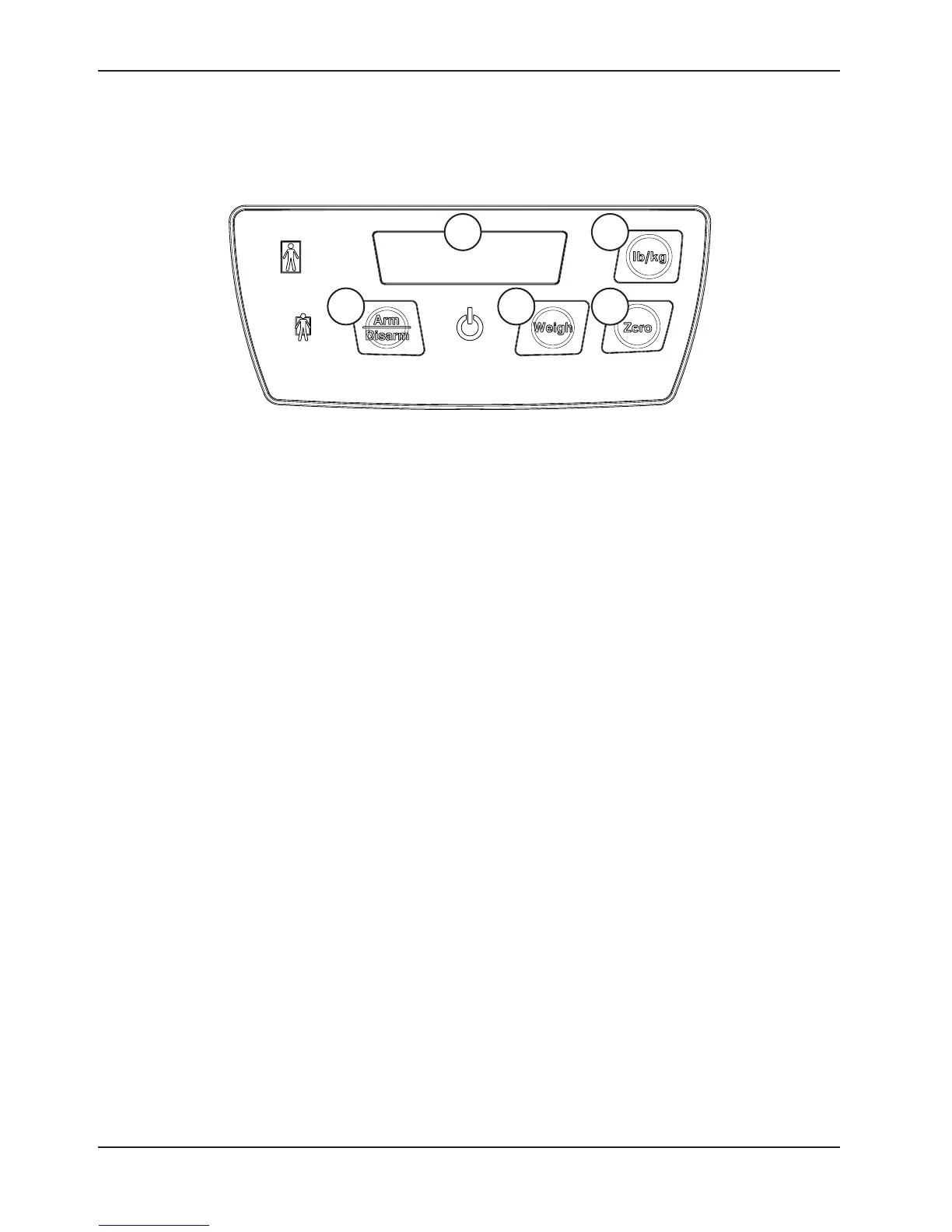
1. Press and hold the Arm/Disarm (1) button and the Weigh (2) button together for 6 seconds. Ignore all display
messages until “Ptrn” appears on the display (5).
2. Release both buttons. The display (5) shows the current setting “P (1-10)”.
3. Press the Arm/Disarm (1) or Weigh (2) button to change the setting. As you press each button to select your
setting, a brief sample is played.
4. Press and hold the Arm/Disarm (1) button and the Weigh (2) button together for 6 seconds until “Set” appears on
the display (5) to save your selected setting.
5. Release both buttons. The display (5) shows “P (1-10)”. A brief sample of your selected pattern will confirm your
sound setting.
To change the alert volume:
1. Press and hold the Zero (3) button and the lb/kg (4) button together for 6 seconds. Ignore all display messages
until “UOL” appears on the display (5).
2. Release both buttons. The display (5) shows the current setting “L (1-4)”.
3. Press the Zero (3) button or lb/kg (4) button to change the setting. As you press each button to select your setting,
a brief sample is played.
4. Press and hold the Zero (3) button and the lb/kg (4) button together for 6 seconds until “Set” appears on the
display (5) to save your selected setting.
5. Release both buttons. The display (5) shows “L (1-4)”. A brief sample of your selected volume will confirm your
sound setting.
4
1 2
3
5
Figure 34: Chaperone Panel






 To Next Page