Micro Series
Micro Series 1-47
Document generated:29.06.17
SW V1.1
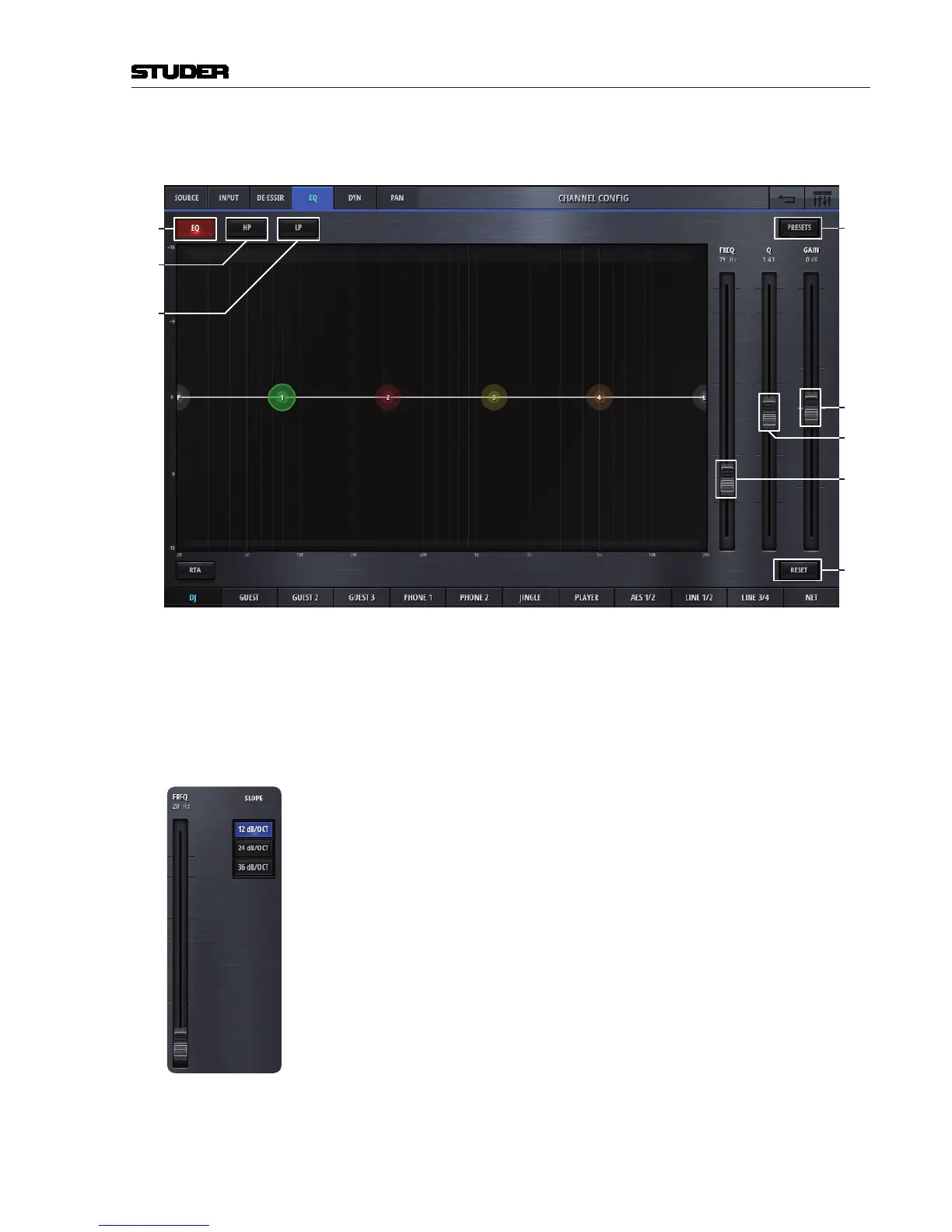
The config page of the channels eq section holds control elements necesarry
to set the channels eq and high- and lowpassfilter :
[1]
[8]
[9]
[7]
[6]
[5]
[2]
[3]
[1] EQ On/Off Activates the EQ when illumnated.
[2] Highpass filter On/Off Activates and deactivates the highpass filter.
[3] Lowpass filter On/Off Activates and deactivates the lowpass filter.
[5] Freq Controls the frequency parameter of the selected EQ band. One of the four
EQ bands can easily be selected by clicking or touching onto the numbered
(1-4), coloured circles on the frequency axis.
[6] Q Sets the width of the EQ band.
[7] Gain Sets the gain (+/- 18dB) of the EQ band.
[8] Reset This button sets all values of this processing block to the default values.
[9] Presets Opens the presets window for EQ presets.
The EQ can also completely be operated on the spectrum field - either by
using mouse or touchscreen.
If either highpass- or lowpass circles are selected, the filter parameters are
displayed instead of the EQ band parameters.



 To Next Page