Micro Series
1-46 Micro Series
Document generated: 29.06.17
SW V1.1
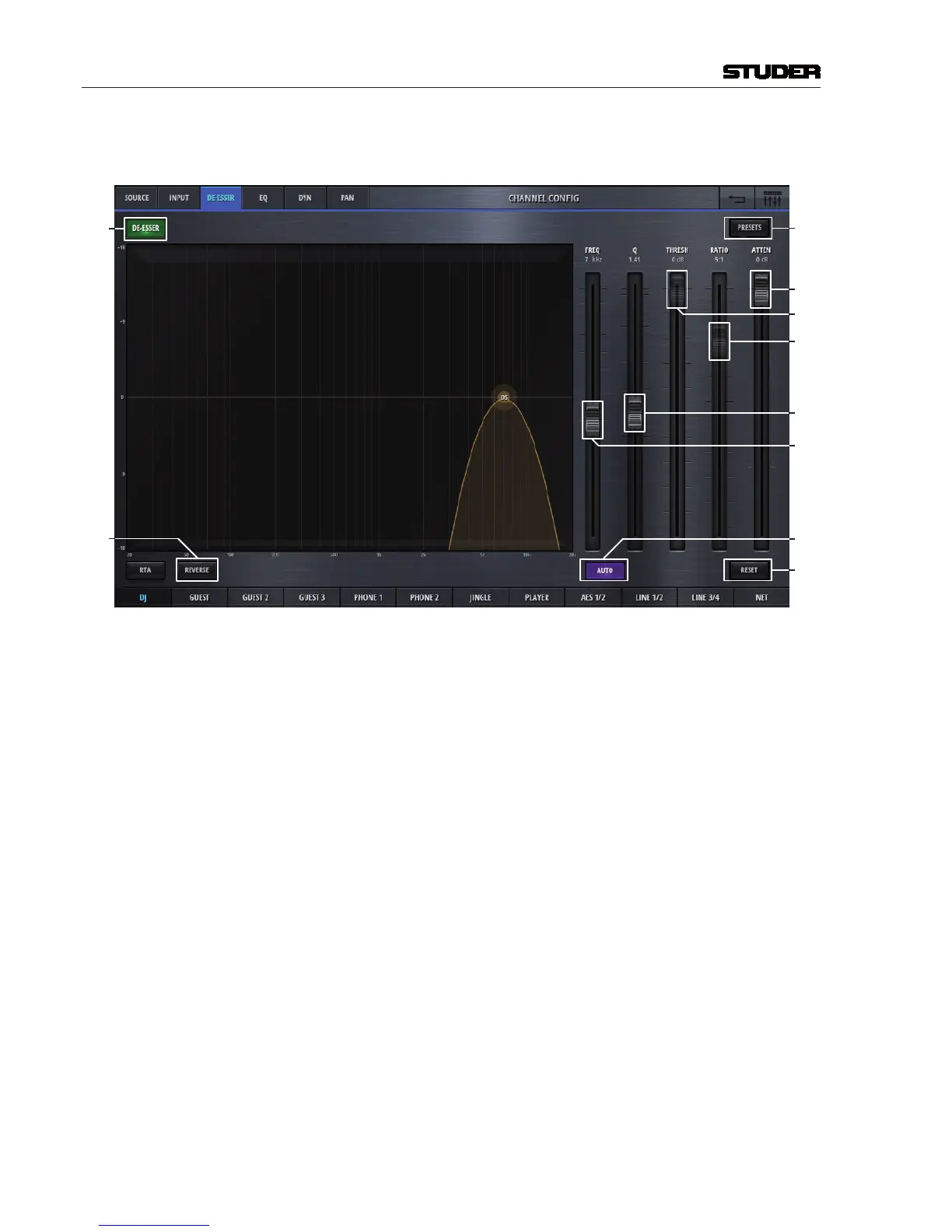
The config page of the channels de-esser section holds control elements
necesarry to set the channels De-esser parameters :
[1]
[10]
[3]
[11]
[8]
[6]
[7]
[5]
[4]
[9]
[1] DeEsser On/Off Activates the De-Esser when illuminated.
[3] Reverse The reverse function allows listening to the part of the signal which is going
to be removed by the De-Esser.
[4] Freq Sets the operation frequency of the De-Esser.
[5] Q Sets the width of the bandpass filter.
[6] Threshold Sets the threshold of the bandpass compressor.
[7] Ratio Sets the ratio of the bandpass compressor.
[8] Attenuation Controls the amount of gain reduction. Attenuation is only available when
Auto is active.
[9] Auto Enables automatic threshold, which dynamically adjusts the De-Esser thresh-
old according to the incomming audio. When Auto is active, Ratio and
Threshold controls are disabled in place of Attenuation.
[10] Reset This button sets all values of this processing block to the default values.
[11] Presets Opens the preset window for the De-Esser presets.



 To Next Page