SWE90UF-2PB Operation & Maintenance Manual
3.4 CONTROL PANEL
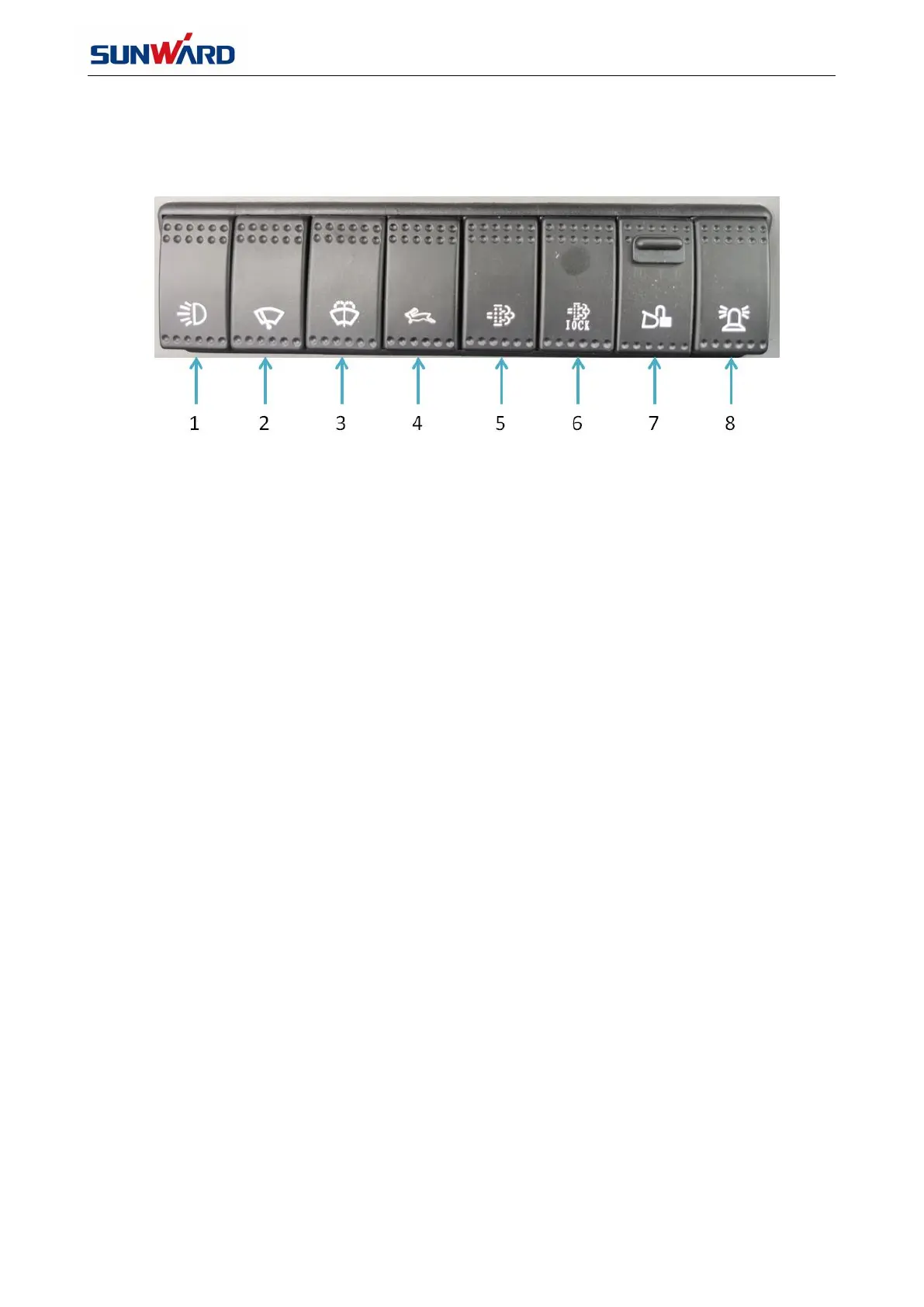
As shown in FIG. 3.4.1.
1. Work light switch
2. Wiper switch
3. Washer switch
4. High travel speed switch
5. Regeneration request switch
6. Regeneration interlock switch
7. Quick-change lock switch(optional)
8. Warning light switch
1 —Work light switch
This switch turns the work light on and off. When pressing down the switch, the work light will be on and
the icon is green; when pressing the switch again, the work light will be off and the green icon will be
extinguished.
2 — Wiper switch
This switch controls the wiper. When pressing down this switch, wiper begins to work, the icon will be on for
green; press it again, green light goes out and the wiper stops.
3 — Washer switch
This switch controls the washer. When pressing down this switch, washing water will be sprayed out and the
icon will be on for green; press it again, the green light goes out and washing water stops.
4 — High travel speed switch
When pressing down this switch, the green icon will be on and the travel speed will be changed to high;
after pressing it again, the green icon will be off and the travel speed will back to low.



 To Next Page