OPERATION OF THE MJB4
MJB4 - Operation Rev07 05-10 27
3
3.4.4. Saving and Loading Pro-
grams
This function allows for saving of selected settings to
a specific program space or selecting a previously
saved program.
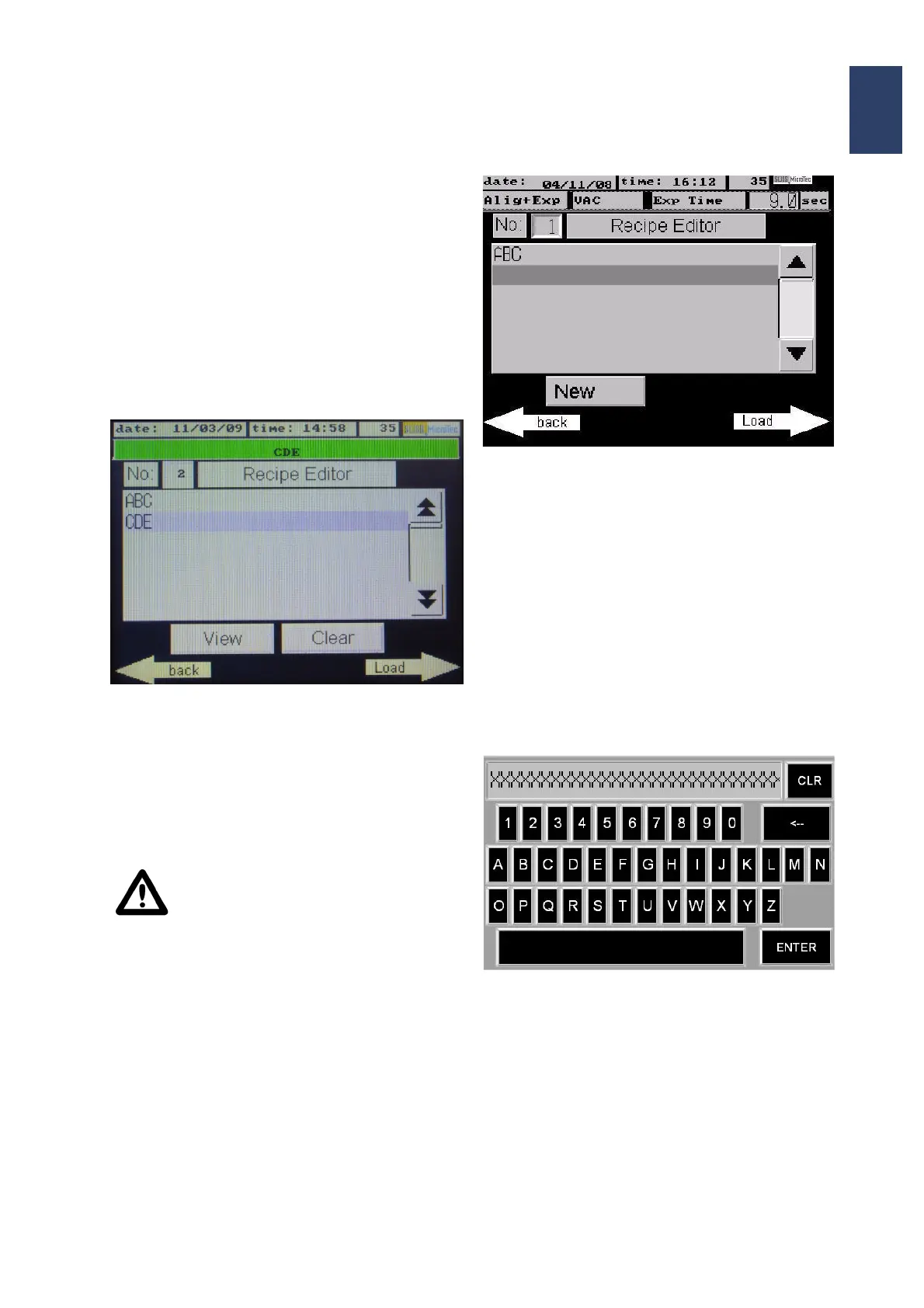
Pushing the button Recipes in the main menu the
Recipe Editor appears. Here all already stored pro
-
grams are listed and new programs can be stored.
With the black arrow keys you can scroll through the
list.
Screen: Recipe Editor
• An already stored recipe in the menu is selected
with the Show button. All included parameters
are displayed. Pushing the button Load will acti
-
vate the selected parameters and the display
switches back to the Main menu. The recipe
name is shown on top of the display.
Attention!
If you press the CLEAR button, all se-
lected parameters are deleted and the
program space is available again.
Recipe Editor: New Recipe
• If a new recipe is created with new parameters or
if an existing recipe has been changed you can
store the recipe as a new one within the recipe
editor.
You have to select the next free program space
with the cursor (with the black arrow keys).
Pushing the button New opens an alphanumeri-
cal key board. The program name for the new
program can be typed in and stored via the Enter
button.
The display returns to the main menu and the
process can be started.
Alphanumerical keyboard



 To Next Page