67
3 D104 4-CHANNEL RS232 SWITCHING UNIT
3.1 GENERAL DESCRIPTION
The D104 switching unit is designed to link up to four OptoRS simplex or duplex instruments to be connected to unit
D100S , or, by connecting several D104 units in parallel, up to 16 instruments. The D100S unit automatically reads
the values measured by the Sylvac RS 232 instrument and processes them in the same way as a value measured
by a probe.
The D104 unit may be fixed to the D100Sby inserting four plastic legs. It may also be installed separately, close to
OptoRS instruments (maximum RS232 connection distance is 15 meters).
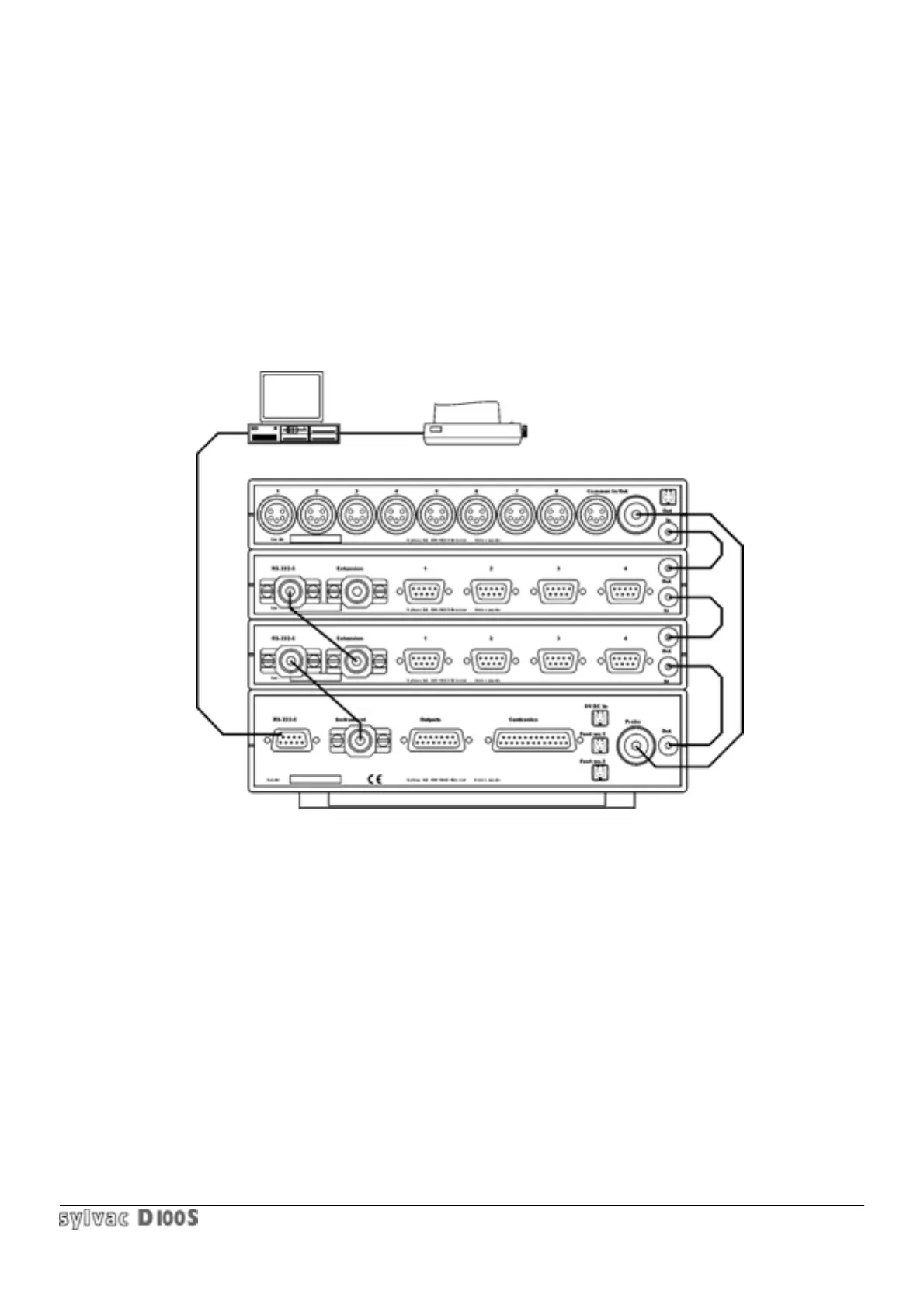
3.2 CONNECTION OF 2 D104 UNITS AND 1 D108 UNIT ON D100S UNIT
3.3 OPERATION
The OptoRS simplex or duplex instruments are connected to inputs 1 to 4 of the D104 unit and correspond to
channels 1 to 4 on the display.
If a second D104 unit is used, the inputs marked 1 to 4 on this unit correspond to channels 5 to 8 on the display.
This second unit will be connected in the same way as above : the ‘Extension’ input/ouput of the first D104 unit is
connected to the ‘RS232’ input/ouput of the second D104 by means of the 9p. male cable supplied. It is also
necessary to connect the output of the first D104 to the ‘In’ input od the second D104.
Configure the OptoRS channels by pressing Setup then channel, then type in the OptoRS channel number followed
by Enter, then Enter if the channel is allocated to the OptoRS instrument connected to this channel number, then 2
for OptoRS simplex instruments or 3 for duplex.
It is now possible on the D100S display unit to enter presets, tolerances, choose the direction of measurement and
the radius/diameter mode for each channel. Once this has been done, it is possible to select manually the channel to
be displayed, and to change channels by means of the external contact (foot pedal) if this has been configured to do
so. These functions are explained in detail in Section 1.6.



 To Next Page