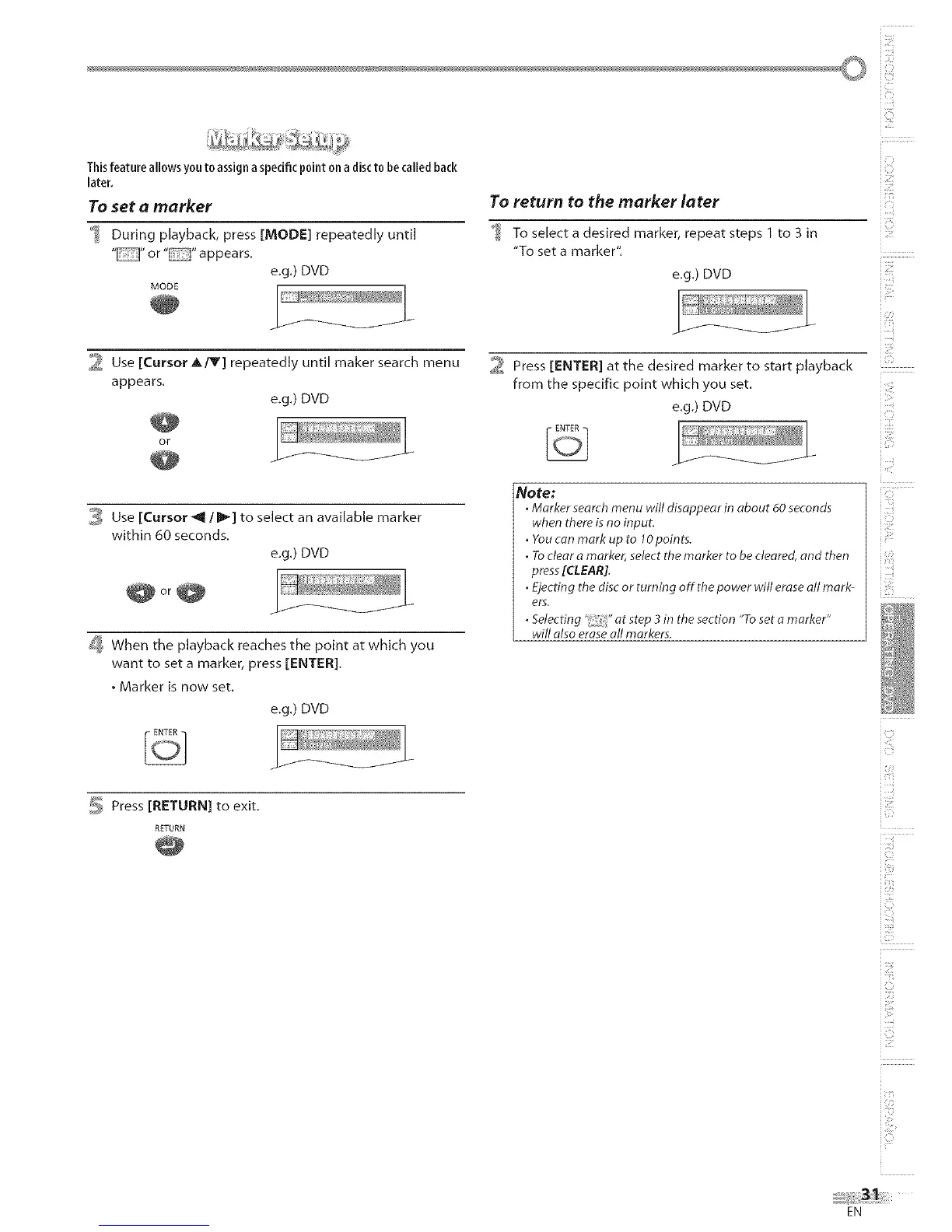
Thisfeatureallowsyoutoassignaspecificpointonadisctobecalledback
later.
To set a marker
During playback, press [MODE] repeatedly until
" "or" "appears.
e.g.) DVD
_ Use [Cursor A/Y] repeatedly until maker search menu
appears.
e.g,) DVD
OY
_ Use [Cursor _ IF] to select an available marker
within 60 seconds.
e.g.) DVD
@or@
_ When the playback reaches the point at which you
want to set a marker, press [ENTER].
• Marker is now set.
e.g.) DVD
5 Press [RETURN] to exit.
RETURN
To return to the marker later
To select a desired marker, repeat steps 1 to 3 in
"To set a marker".
e,g,) DVD
2 Press [ENTER] at the desired marker to start playback
from the specific point which you set.
e.g.) DVD
Note:
• Marker search menu will disappear in about 60 seconds
when there isno input.
• You can mark up to lOpoints.
• Toclear a marker, select themarker to be cleared, and then
press[CLEAR].
• Ejecting the disc or turning off the power will eraseall mark-
ers,
• Selecting '_;" at step 3 in the section "To set a marker"
will also eraseall markers.
i_!::iiii!
iZ!_"
i!:!i'i
i <i
i e i¸
i (i,__i
iii i"!
i _ii_iii!;
T
i Ci
i!iiiiii:i
i i i"i
EN




 To Next Page