As Required Maintenance – Quick Guide: Maintenance
Sysmex House, Garamonde Drive, Wymbush, Milton Keynes, MK8 8DF, United Kingdom · Phone +44 333 320 3460 · Fax +44 1908 267 901
academy.training@sysmex.co.uk· www.sysmex.co.uk
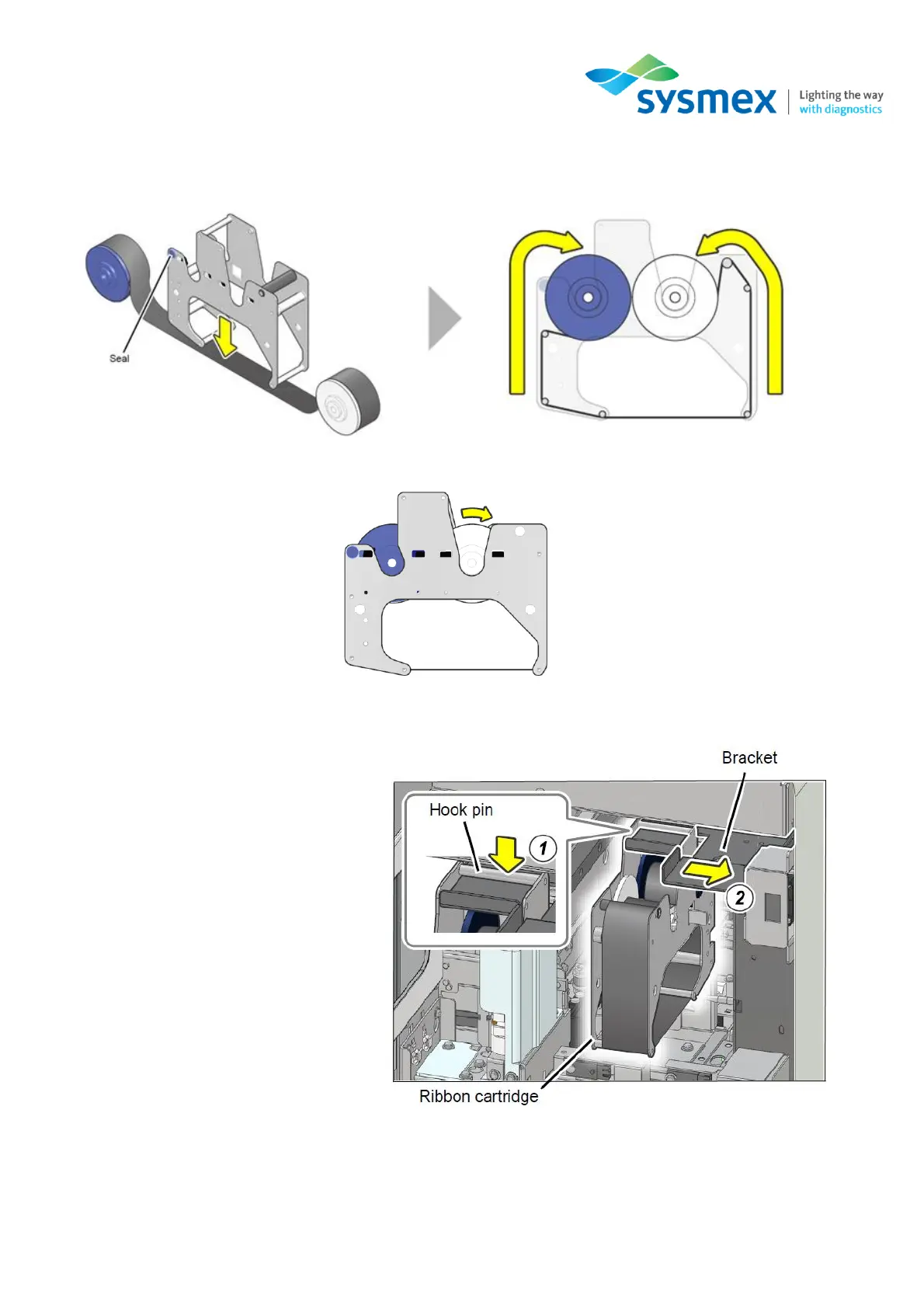
5. Replace the ink ribbon making sure the ink side of the ribbon faces down. Place the blue roller
on the side with the seal with the white roller on the opposite side.
6. Before loading, wind the white roller in the direction shown to remove in slack in the ribbon.
7. Install the ink ribbon cartridge as shown in the diagram below:
(1) Attach the ribbon to the hook pin
on the bracket.
(2) Slide the bracket back to the
right to load the ink ribbon
cartridge.
8. Once the ink ribbon has been replaced, restore all affected components back to their original
position.



 To Next Page