Manual Mode – Quick Guide: Running Samples
Sysmex House, Garamonde Drive, Wymbush, Milton Keynes, MK8 8DF, United Kingdom · Phone +44 333 320 3460 · Fax +44 1908 267 901
academy.training@sysmex.co.uk· www.sysmex.co.uk
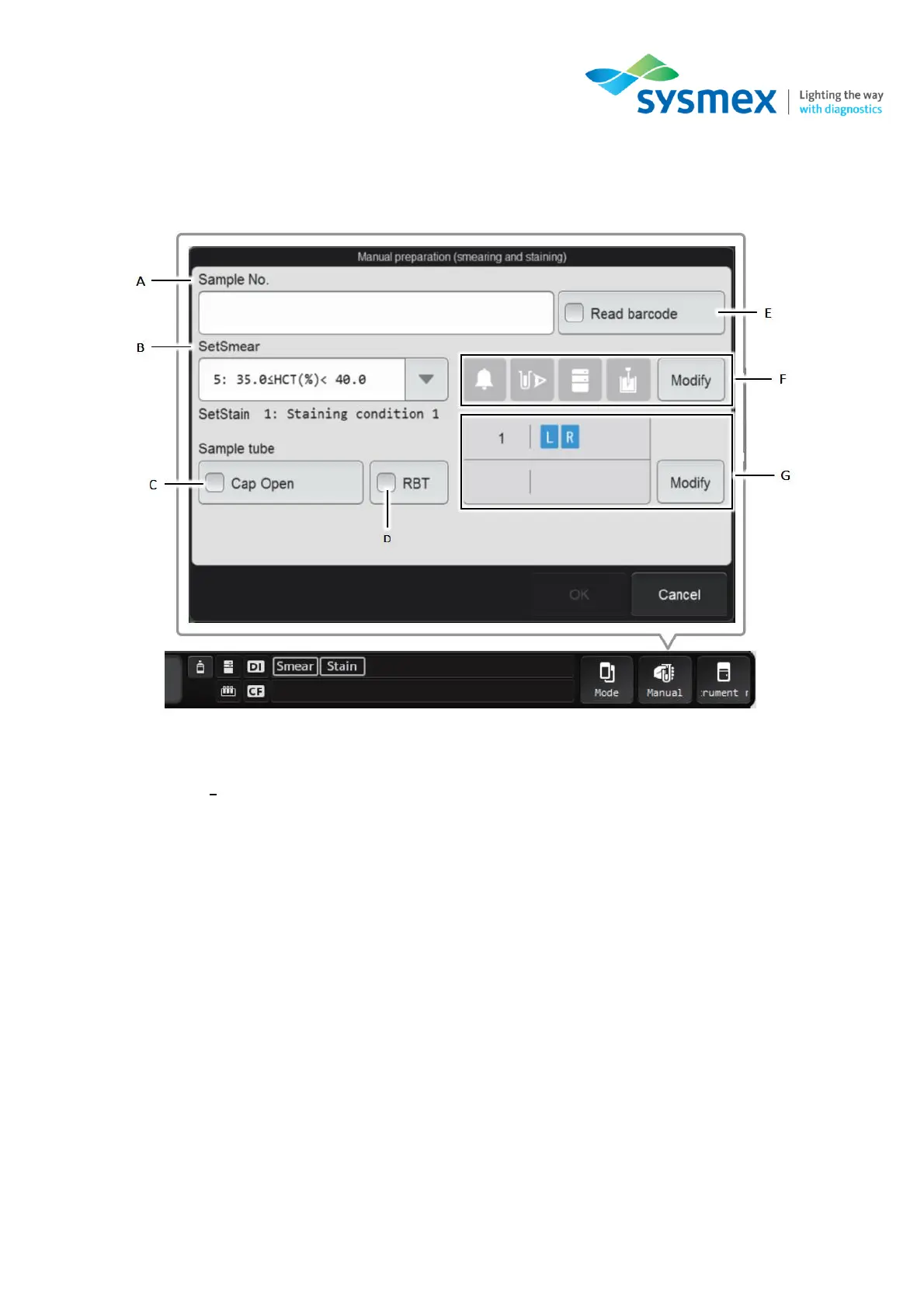
3. Select [Manual] from the status area, the [Manual Preparation] dialog box will open. Configure
the menu for your sample type.
A) Sample N
o
- Sample number, if required, can be manually entered here. Sample numbers can
be entered either via a hand-held barcode reader or inputted using the onboard keyboard.
B) Set smear – Can be used, if required, to run samples using alternative smearing conditions.
C) Cap open – Select this box to aspirate samples with the cap open loaded into the regular sample
tube holder.
D) RBT – Select this box if using a Raised Bottom Tube (RBT)
E) Read barcode – Select this box if you wish the analyser to read the sample barcode. This
function can only be performed for samples loaded into the regular sample tube holder.



 To Next Page