Performance
Check-2445A/2455A
Service
I.
Set pulse generator # 1 to produce a positive 0.5-µs
pulse every 1
µs.
m.
Set
pulse generator # 2 to produce a positive
400-ns pulse
when
it receives
an
external trigger.
NOTE
The
lowest point
of
the HI must
not
be lower than
2.0V.
n.
Set both pulse generators to produce pulses
of
+ 0.6 V
LO
and
+ 2.0 V
HI.
o.
Push
the A/8
MENU
button.
p.
Use
the
~
REF
OR
DL
Y
POS
control to underline
LOGIC-TRIG.
q.
Push
the upper
TRIGGER
MODE button.
r.
Turn
either~
control to underline B:WR.
s.
Push
the upper TRIGGER MODE button.
t. Turn the
~
REF
OR
DL Y POSITION control to under-
line
RADIX.
u.
Turn
the~
control to underline HEX.
v.
Push
the upper TRIGGER MODE button.
w.
Connect the clock
(C)
input
of
the Word Recognizer
to the wire
on
the
reel
binding post of the
CH
1 input.
x.
Connect the a and W0-W15 inputs
of
the Word
Recognizer to the wire
on
the
reel
binding post
of
the
CH
2
input.
y.
Set the A
and
B SEC/DIV switch to 20
ns.
4-40
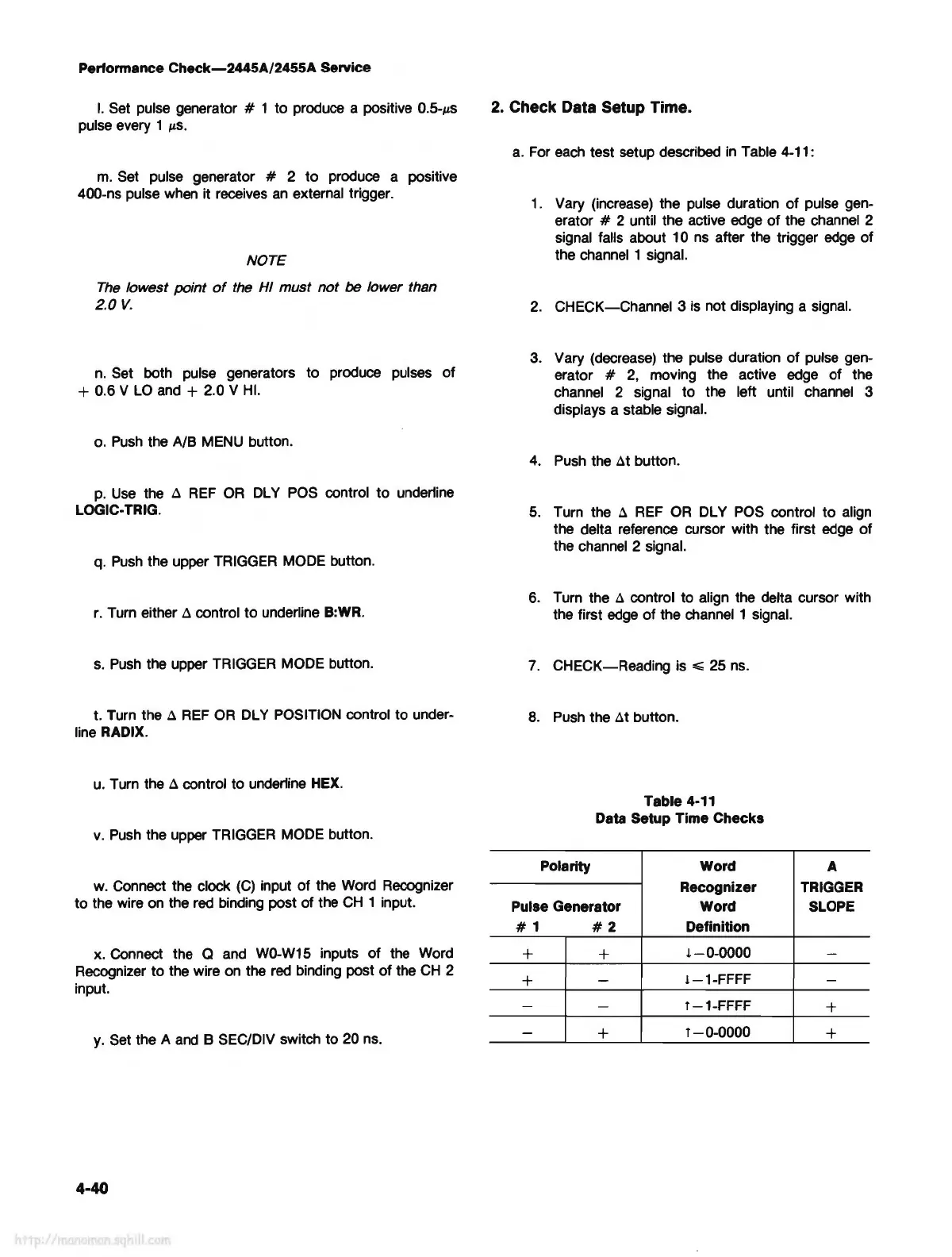
2. Check Data Setup Time.
a.
For
each
test setup described
in
Table 4-11:
1.
Vary (increase) the pulse duration
of
pulse gen-
erator
# 2 until the active edge
of
the channel 2
signal falls about 10
ns
after the trigger
edge
of
the channel 1 signal.
2.
CHECK-Channel 3
is
not displaying a signal.
3.
Vary (decrease) the pulse duration
of
pulse gen-
erator
#
2,
moving the active edge of the
channel 2 signal to the left until channel 3
displays a stable signal.
4.
Push
the
~t
button.
5.
Turn the
~
REF
OR
DL Y
POS
control to align
the delta reference cursor with the first edge
of
the channel 2 signal.
6.
Turn the
~
control to align the delta cursor with
the first
edge
of
the channel 1 signal.
7.
CHECK-Reading is
,,;;;
25
ns.
8.
Push
the
~t
button.
Table 4-11
Data Setup Time Checks
Polarity Word
A
Recognizer TRIGGER
Pulse Generator
Word
SLOPE
#1
#2
Definition
+
+
l-0-0000
-
+
-
!-1-FFFF
-
-
-
f-1-FFFF
+
-
+
f-0-0000
+



 To Next Page