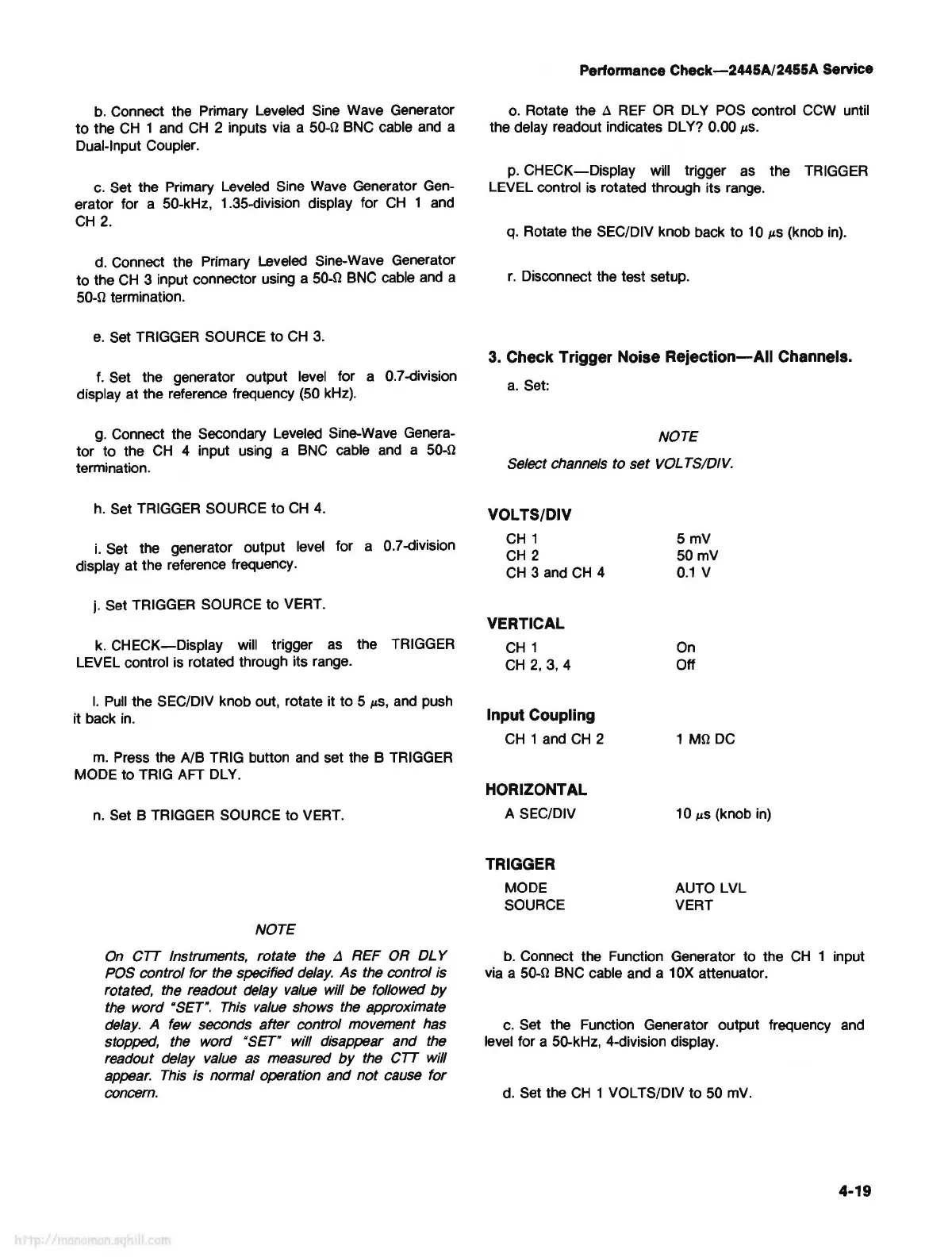
b. Connect the Primary Leveled Sine Wave Generator
to
the CH 1 and
CH
2 inputs via a 50-n BNC cable and a
Dual-Input Coupler.
c.
Set the Primary Leveled Sine Wave Generator Gen-
erator for a 50-kHz, 1.35-division display for
CH
1 and
CH
2.
d. Connect the Primary Leveled Sine-Wave Generator
to
the CH 3 input connector using a 50-n BNC cable and a
50-n termination.
e.
Set TRIGGER SOURCE
to
CH 3.
f.
Set the generator output level for a 0.7-division
display
at
the reference frequency (50 kHz).
g. Connect the Secondary Leveled Sine-Wave Genera-
tor
to
the CH 4 input using a BNC cable and a 50-n
termination.
h.
Set TRIGGER SOURCE
to
CH
4.
i.
Set the generator output level for a 0.7-division
display
at
the reference frequency.
j. Set TRIGGER SOURCE
to
VERT.
k.
CHECK-Display
will trigger as the TRIGGER
LEVEL control is rotated through its range.
I.
Pull the SEC/DIV knob out, rotate it
to
5
µ.s,
and push
it back in.
m. Press the
A/8
TRIG button and set the B TRIGGER
MODE
to
TRIG AFT DLY.
n.
Set B TRIGGER SOURCE
to
VERT.
NOTE
On
CTT Instruments, rotate the
.:l
REF OR
DL
Y
POS
control for the specified
delay.
As the control is
rotated, the readout delay
value
will be followed
by
the word "SET".
This
value
shows the approximate
delay.
A few seconds after control movement has
stopped, the word
"SET" will disappear and the
readout delay value as measured
by
the CTT will
appear.
This
is normal operation and
not
cause for
concern.
Performance
Check-2445A/2455A
Service
o. Rotate the A REF OR DL Y POS control CCW until
the delay readout indicates DL Y? 0.00
µ.s.
p.
CHECK-Display
will trigger as the TRIGGER
LEVEL control is rotated through its range.
q. Rotate the SEC/DIV knob back
to
10
µ.s
(knob in).
r.
Disconnect the test setup.
3. Check Trigger Noise
Rejection-All
Channels.
a.
Set:
NOTE
Select channels to set
VOL
TS/DIV.
VOLTS/DIV
CH
1
CH
2
CH 3 and
CH
4
VERTICAL
CH
1
CH
2,
3, 4
Input Coupling
CH 1 and
CH
2
HORIZONTAL
A SEC/DIV
TRIGGER
MODE
SOURCE
5mV
50mV
0.1
V
On
Off
1
Mn
DC
10
µ.S
(knob in)
AUTO LVL
VERT
b. Connect the Function Generator to the
CH
1 input
via a
50-n BNC cable and a 10X attenuator.
c.
Set the Function Generator output frequency and
level for a 50-kHz, 4-division display.
d. Set the
CH
1 VOL TS/DIV
to
50 mV.
4-19



 To Next Page