39 MPH200 series video encoders WebUI user manual
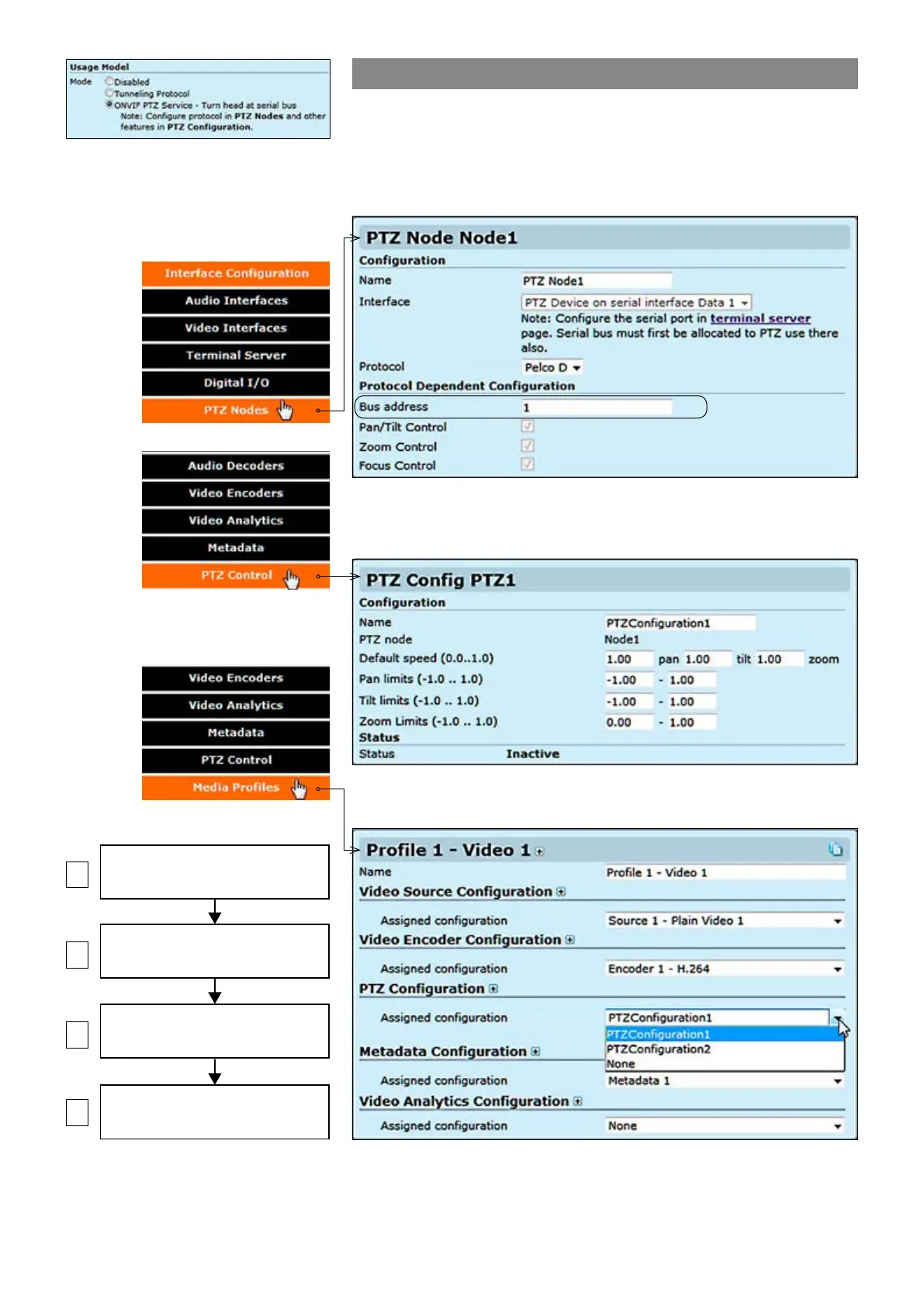
ONVIF PTZ service
ONVIF PTZ service lets you control the camera from ONVIF client
application. ONVIF PTZ service is available from data channel 1. It
means that MPH converts ONVIF PTZ commands to Pelco D
commands and transmits that to the camera via Data channel 1.
Step-by-step owchart how to
congure ONVIF PTZ data 1 channel
in the MPH encoder.
TERMINAL SERVICE
(enable ONVIF PTZ on DATA 1)
PTZ NODE
(set a bus address for camera)
PTZ CONFIGURATIONS
(set limitations for PTZ operations)
MEDIA PROFILE
(PTZ configurations assignment)
1
3
4
2
In order to activate the ONVIF PTZ
protocol, data port mode must be rst
set to the ONVIF PTZ service usage
from the Terminal Server page.
3. Then on the PTZ congurations page you can set limitations for PTZ
operations. For each PTZ node you can limit speed, pan, tilt and zoom.
4. Finally on the Media proles page you need to assign the PTZ
conguration to the media prole where the camera is connected to.
2. Next on the PTZ Nodes page you need to set a Bus address for the
camera, you can have two cameras using the same Data port with different
bus addresses.



 To Next Page